Choosing the right Customer Relationship Management (CRM) system isn’t just another software decision—it can make or break your sales pipeline management and overall performance. For sales managers and small business owners leading teams of 5–50 people, the decision often comes down to two compelling options: Pipedrive and Copper CRM. Both CRM software platforms promise visual sales CRM features with streamlined deal closing rates, but they take fundamentally different approaches to achieving these goals.
The stakes are high. Research shows that companies using customer relationship management tools effectively see sales jump by 29% and sales productivity climb by 34%. Pick the wrong CRM comparison winner, though, and you risk low adoption, wasted resources, and missed opportunities. This comprehensive guide will help you determine which visual sales CRM aligns better with your team’s workflow, technical infrastructure, and growth objectives.
At its core, the question isn’t just “Which has better features?” or “Which is cheaper?” It’s this: Which CRM software will your team actually use to close more deals? Pipedrive positions itself as the sales-focused platform “designed by salespeople, for salespeople,” emphasizing activity-based selling and reliable pipeline visualization. Copper CRM takes a different angle, billing itself as the relationship-first platform “Recommended for Google Workspace,” promising smooth integration with the tools your team already uses daily.
In this CRM comparison, we’ll put both platforms to the test across six critical areas: visual pipeline management, feature capabilities, Google Workspace integration, pricing structures, ease of use, and reporting capabilities. Along the way, we’ll address the trade-offs between simplicity and power that define each platform’s approach to customer relationship management.
Visual Pipeline Comparison
The visual pipeline is the heartbeat of any modern CRM software, and both Pipedrive and Copper CRM recognize this truth. Yet their designs reveal two very different philosophies about how sales teams should manage pipelines and customer relationships.
Pipeline Comparison
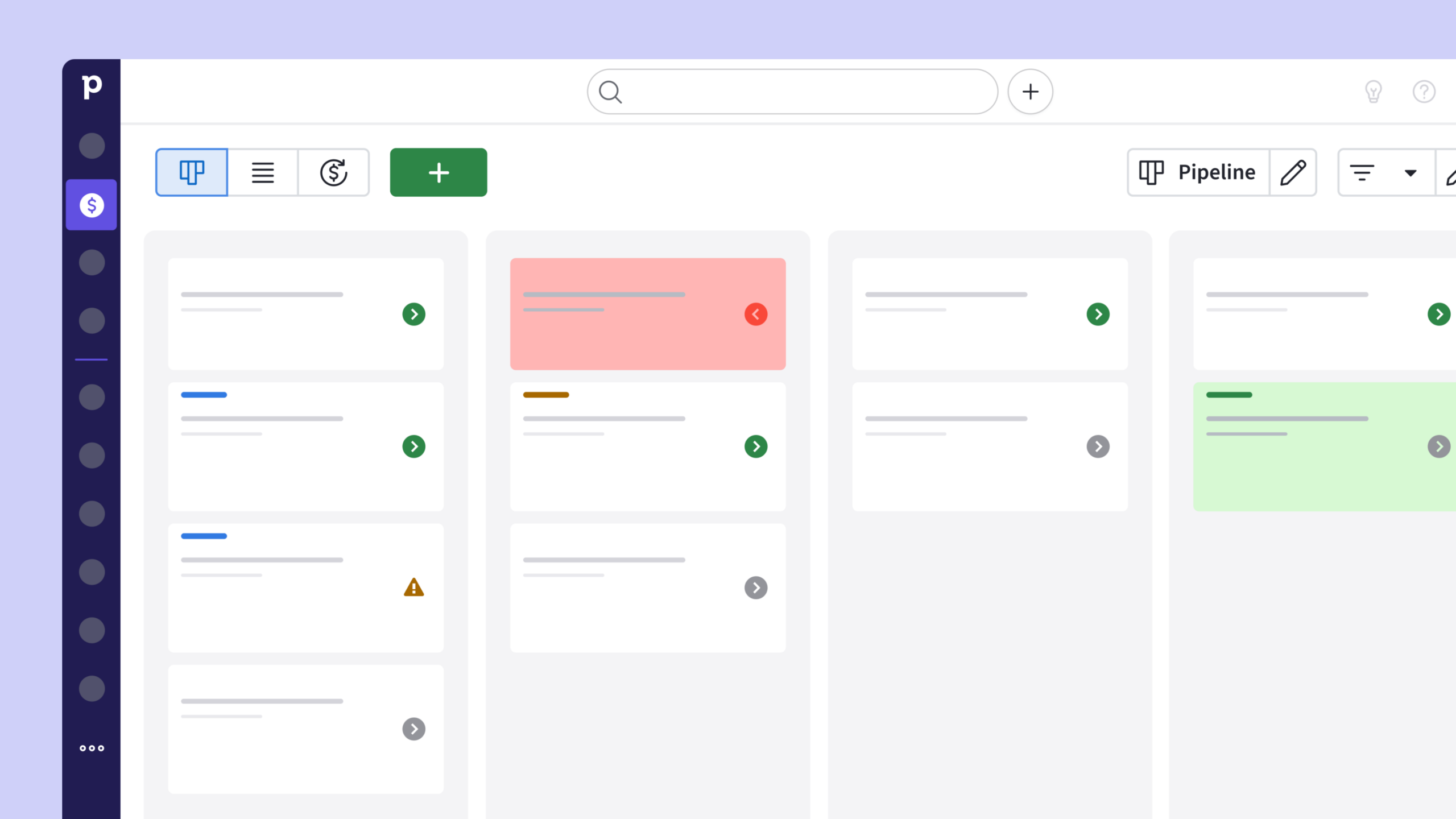
Pipedrive’s signature pipeline view emphasizes deal progression through clearly defined stages
Pipedrive’s pipeline management is its signature strength and biggest differentiator. Deals appear as cards that move through customizable stages, creating an intuitive, drag-and-drop visual sales CRM experience. Each card highlights the essentials at a glance—contact name, deal value, expected close date, and stage—so reps spend less time digging and more time selling. The frictionless updates make pipeline tracking fast, responsive, and momentum-driven.
Pipedrive emphasizes linear pipeline progression: clear stages, predictable paths, and weighted probabilities for accurate forecasting. This setup is perfect for transactional sales where velocity and deal closing rates matter most. Sales managers can instantly spot bottlenecks, reallocate resources, and keep teams laser-focused on moving deals forward.
Customization also plays a big role. Teams can create multiple pipelines for different product lines, tweak stage names and probabilities, and trigger automated actions when deals advance. Add in advanced filters—by rep, date, deal size, or custom fields—and Pipedrive becomes a CRM comparison winner for businesses seeking clarity and control.
Copper Pipeline View
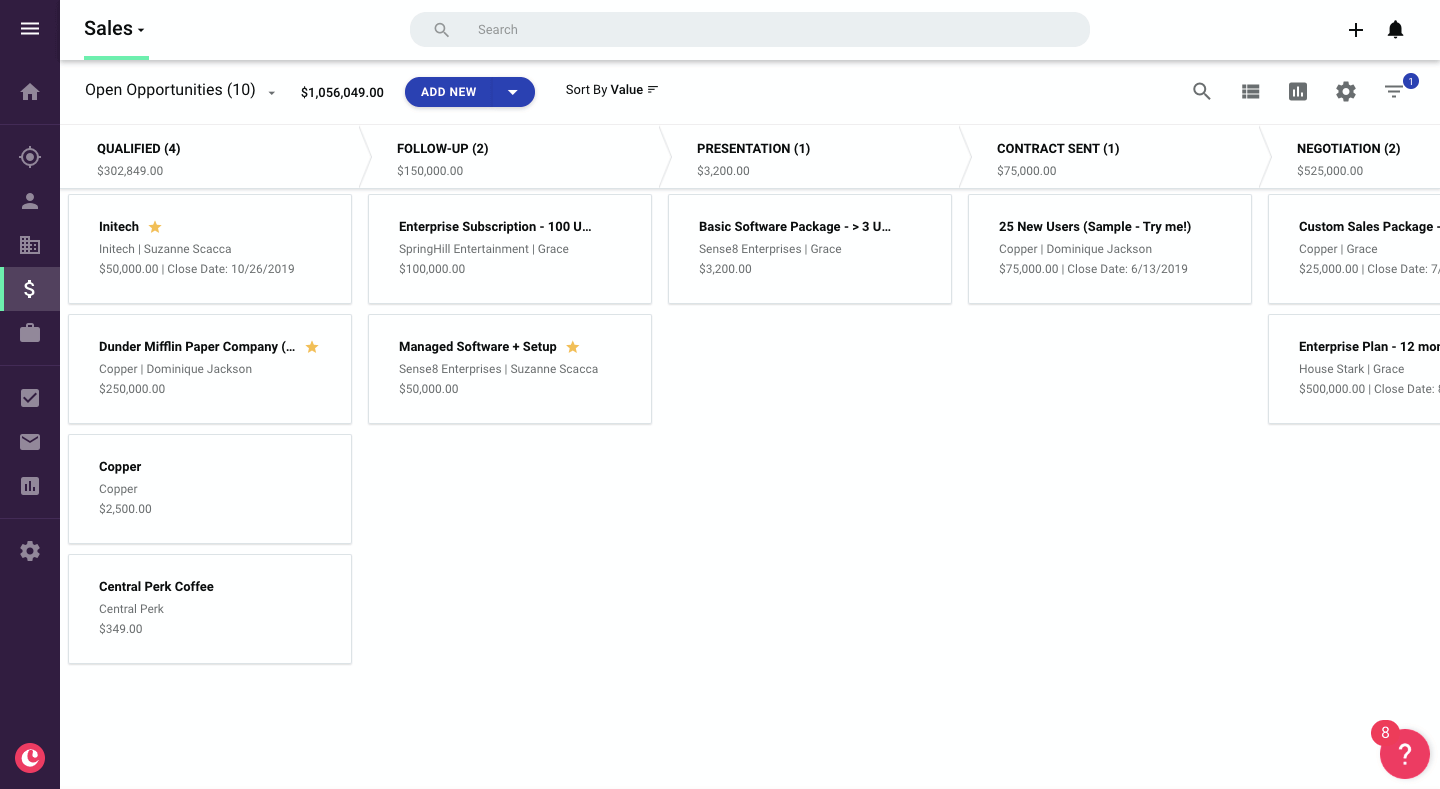
Copper’s pipeline interface integrates smoothly with Google Workspace tools
Copper CRM, on the other hand, takes a more relationship-centric approach. Its pipeline view still offers drag-and-drop convenience but integrates contact history, emails, and calendar events for a holistic customer relationship management perspective. Instead of focusing solely on deal stages, Copper highlights the full context of interactions, giving sales teams richer insights into their accounts.
This approach shines for consultancies, agencies, and service-based businesses where sales pipeline management is less linear. Multiple stakeholders, long decision cycles, and back-and-forth communication become easier to track without forcing everything into rigid stages.
Here’s the key difference:
- Pipedrive excels when you need speed, structure, and predictable deal cycles.
- Copper CRM thrives when relationships are complex, ongoing, and tied deeply into communication.
Thanks to its Google Workspace integration, Copper naturally updates pipelines as your team communicates, reducing the need for manual data entry.
If your team prioritizes sales productivity and pure deal velocity, Pipedrive delivers sharper results. But if your business revolves around building lasting client relationships, Copper’s contextual approach offers stronger long-term customer relationship management tools.
Understanding the feature landscape between Pipedrive and Copper CRM requires looking beyond simple checklists. It’s not only about what each platform offers, but also how those capabilities translate into tangible sales productivity gains for small and medium-sized teams.
Comprehensive feature comparison across key CRM capabilities
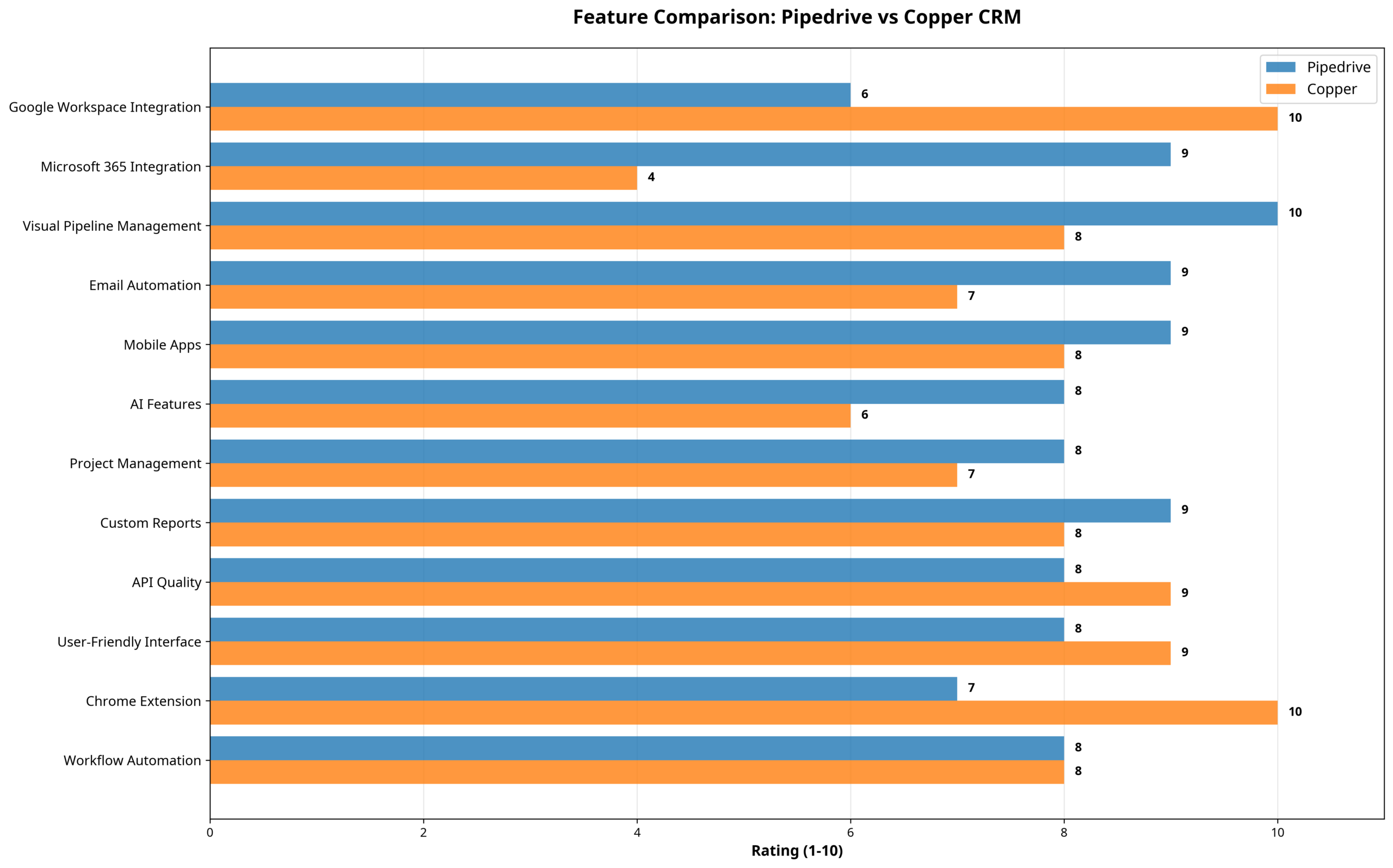
Pipeline Management and Deal Tracking
Pipedrive’s pipeline management sits at the center of its platform and represents its defining strength. The system allows unlimited custom pipelines, each with fully customizable stages, probability weightings, and automated actions. Teams can build separate pipelines for different product lines, regions, or customer segments, giving them granular control over diverse sales processes.
Workload balancing is supported through deal rotation and assignment features, ensuring opportunities are distributed fairly. Managers benefit from advanced filtering and search tools that surface deals needing attention, while the forecast view generates revenue projections based on weighted probabilities and expected close dates. Pipedrive’s activity-based selling model also encourages consistent follow-up through automated reminders and next-step prompts.
Copper CRM approaches pipeline management from a different angle. While it also offers stage customization and probability adjustments, its real distinction lies in tying pipeline activity directly to broader customer relationship management tools. The system automatically captures email interactions, calendar events, and document-sharing activities, building a continuous timeline of customer engagement.
This relationship-focused approach resonates in complex B2B sales cycles where multiple stakeholders, longer evaluations, and back-and-forth communication are common. Instead of isolating each deal, Copper’s pipeline keeps the full history visible, helping sales representatives understand customer preferences, decision-making styles, and communication patterns.
Email Integration and Communication
Email integration marks another point of divergence between the two platforms.
Pipedrive provides reliable synchronization with Gmail, Outlook, and Exchange. Its email features cover template management, mail merges, open and click tracking, and automated sequences. Emails can be sent directly from deal records, with all correspondence automatically logged to the relevant contact or opportunity. The platform also enables advanced drip campaigns and conditional workflows triggered by stage changes or customer behaviors, ensuring consistent communication even in long-cycle sales.
Copper CRM leans heavily on its Google Workspace integration. Through its Chrome extension, CRM functions appear natively inside Gmail, allowing users to manage customer interactions without leaving their inbox. Sales representatives can access templates, track opens and clicks, and use merge fields directly within Gmail’s familiar interface. Integration extends to Google Calendar, automatically creating contact records for meeting attendees and logging scheduled events as CRM activities.
Mobile Applications and Remote Access
Both platforms recognize the importance of mobile access for modern selling, but their approaches reflect their larger philosophies.
Pipedrive’s mobile apps for iOS and Android deliver comprehensive CRM functionality on the go. The visual pipeline view is fully accessible, enabling users to update deal stages, log notes, and schedule follow-ups from any location. Offline mode ensures uninterrupted productivity, with updates syncing once a connection is restored. Additional device integrations, such as automatic call logging, GPS-based check-ins, and photo attachments, reduce administrative friction and help keep CRM data complete.
Copper CRM’s mobile applications extend its Google-centric design. The apps maintain the familiar Google interface language, supporting continuity across devices. Deep integration with Gmail, Google Calendar, and Google Drive ensures that email, scheduling, and document access work smoothly in mobile environments, making it particularly well-suited for teams already embedded in the Google ecosystem.
Automation and Workflow Capabilities
Automation is often the difference between a CRM that saves time and one that creates more work.
Pipedrive’s automation builder offers a visual, drag-and-drop interface for creating workflows. Automations can be triggered by deal stage changes, field updates, or time-based criteria. They can update deal properties, assign tasks, send emails, generate calendar events, or initiate third-party integrations. AI-powered features such as probability scoring, step recommendations, and response suggestions help reps prioritize tasks and improve communication without extensive setup.
Copper CRM emphasizes automation through intelligent data capture. It creates contact records directly from emails, logs calendar events as activities, and suggests relationship links based on communication patterns. Workflow rules allow follow-ups, assignments, and notifications to be triggered within the context of the complete customer relationship, not just an isolated deal. This reduces manual entry while still supporting meaningful automation for relationship-driven teams.
Google Workspace Integration
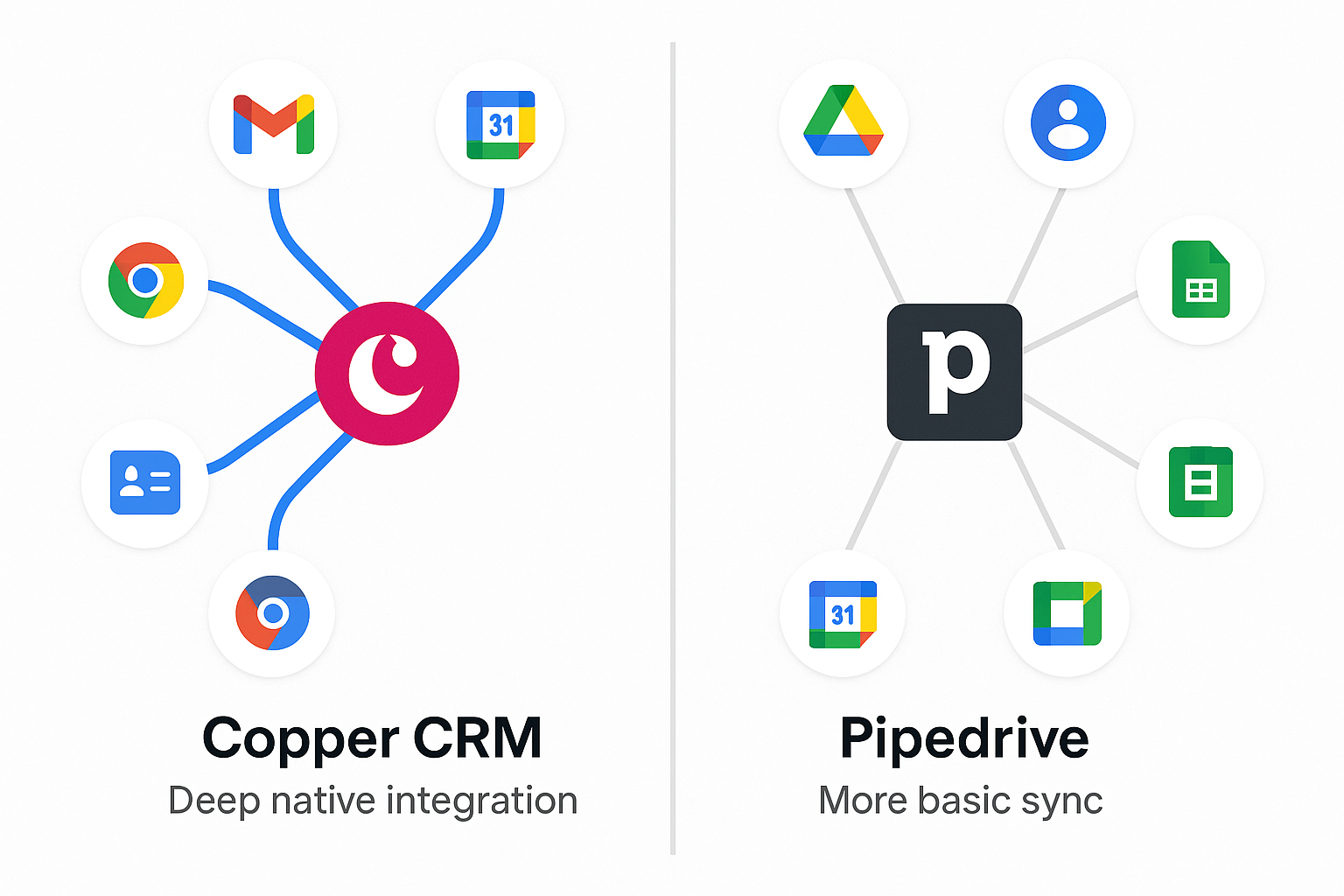
Integration with Google Workspace is one of the clearest differentiators between Pipedrive and Copper CRM, shaping how each platform supports daily workflows and impacts sales productivity.
Google Workspace Integration Comparison
Visual comparison of Google Workspace integration approaches
Copper’s Native Google Workspace Integration
Copper CRM’s integration with Google Workspace is more than simple synchronization—it’s a core architectural choice. As the only CRM officially designated “Recommended for Google Workspace” by Google, Copper positions itself as a near-native extension of the Google ecosystem.
Through its Chrome extension, Copper brings full customer relationship management tools directly into Gmail, Google Calendar, and Drive. Sales reps can update deals, log activities, schedule follow-ups, and view histories without leaving their inbox. This reduces context switching, one of the most common barriers to CRM adoption.
In everyday use, the depth of the integration stands out. New email contacts are auto-captured, with details pre-populated from signatures or domains. Calendar events become CRM activities automatically, with attendees linked to existing contact records. Documents in Google Drive can be attached directly to deals, with permissions and version control inherited from Workspace security policies.
Data synchronization extends across Gmail, Calendar, and Contacts, ensuring updates flow bidirectionally. Copper also connects with Google Sheets and Looker Studio for analytics, allowing teams to build dashboards and combine CRM data with other business intelligence sources inside the Google ecosystem.
This deep integration creates a smooth, almost invisible CRM experience. Sales representatives often find their visual sales CRM activity happening in the background, while they continue to work naturally inside Gmail and Calendar. The trade-off, however, is dependency: teams locked into Copper’s Google-first model may find it difficult to migrate to other providers later.
Pipedrive’s Multi-platform Approach
Pipedrive takes a different route with a platform-agnostic design. Instead of being tightly bound to one ecosystem, it supports Google Workspace, Microsoft 365, Exchange, and other major providers. This makes Pipedrive attractive for organizations with mixed tech stacks or those that may switch platforms in the future.
Its Google Workspace integration covers the essentials: bidirectional email sync, calendar scheduling, and contact management. The Gmail add-on lets users view contacts, deals, and notes without leaving their inbox, though the experience requires active use rather than Copper’s passive data capture.
Where Pipedrive truly distinguishes itself is through its broader integration ecosystem. With over 400 native connectors and Zapier compatibility, the platform ties into marketing automation, accounting systems, customer support tools, and BI applications. This gives teams the freedom to design CRM workflows that extend beyond email and calendar, supporting complex, multi-system environments.
This flexibility allows Pipedrive to serve as a central hub for sales operations. However, it demands more deliberate effort from sales reps, who need to actively log activities and maintain data consistency across systems. For some teams, this discipline is worth the payoff in control and customization.
Integration Impact on Team Productivity
The differences in these integration philosophies become clear in daily workflows.
Teams using Copper CRM experience minimal friction because CRM activities happen directly within the Google Workspace environment. Sending an email, scheduling a meeting, or sharing a document automatically generates CRM records. Contact information stays updated across Gmail, Calendar, and Copper without manual entry. This smooth automation often results in higher adoption rates, more accurate data, and ultimately stronger sales pipeline management.
The automatic data capture also means that relationship histories build organically over time. Sales representatives don’t need to dedicate time to administrative updates—instead, their interactions naturally populate the CRM. This leads to greater job satisfaction, less time spent on manual tasks, and more time focused on customer-facing activities. For many teams, this ease of use becomes the decisive factor in CRM adoption.
However, this same tight integration creates dependency. Businesses that rely heavily on Copper’s Google-first model may find it difficult to switch providers or migrate data if they later decide to move away from Google Workspace.
Pipedrive’s approach requires more deliberate engagement. Sales reps must actively log activities, update records, and ensure consistency across multiple systems. While this demands greater effort, it also gives teams flexibility to shape their CRM usage around a diverse technology stack. For organizations that use multiple business tools outside Google, this approach provides a broader foundation for building customized workflows.
The trade-off is clear: Copper reduces friction but narrows flexibility; Pipedrive offers flexibility but requires more intentional user engagement.
Decision Factors for Google Workspace Teams
For teams fully committed to Google Workspace, Copper CRM provides a near-frictionless CRM experience. Automatic data capture, smooth Gmail integration, and embedded Calendar and Drive workflows remove much of the administrative burden that typically slows adoption. For these organizations, Copper often feels less like a separate tool and more like an extension of their existing Google applications.
By contrast, organizations that need extensive customization, advanced automation, or integration with non-Google applications may find Pipedrive better suited to their long-term needs. Its reliable API and third-party ecosystem allow businesses to connect CRM with marketing, finance, customer support, and BI systems, building end-to-end workflows across multiple platforms.
Ultimately, the decision depends on priorities. Copper is the stronger choice for teams prioritizing smooth integration and simplicity inside Google Workspace. Pipedrive excels when flexibility, customization, and a broad integration landscape matter more. Both solutions enhance customer relationship management, but each reflects a fundamentally different vision of how CRM should fit into the sales workflow.
Understanding the true cost of CRM ownership goes beyond monthly subscription fees. Teams must also weigh implementation time, training requirements, and the hidden costs of missing features that may require costly upgrades or third-party solutions.
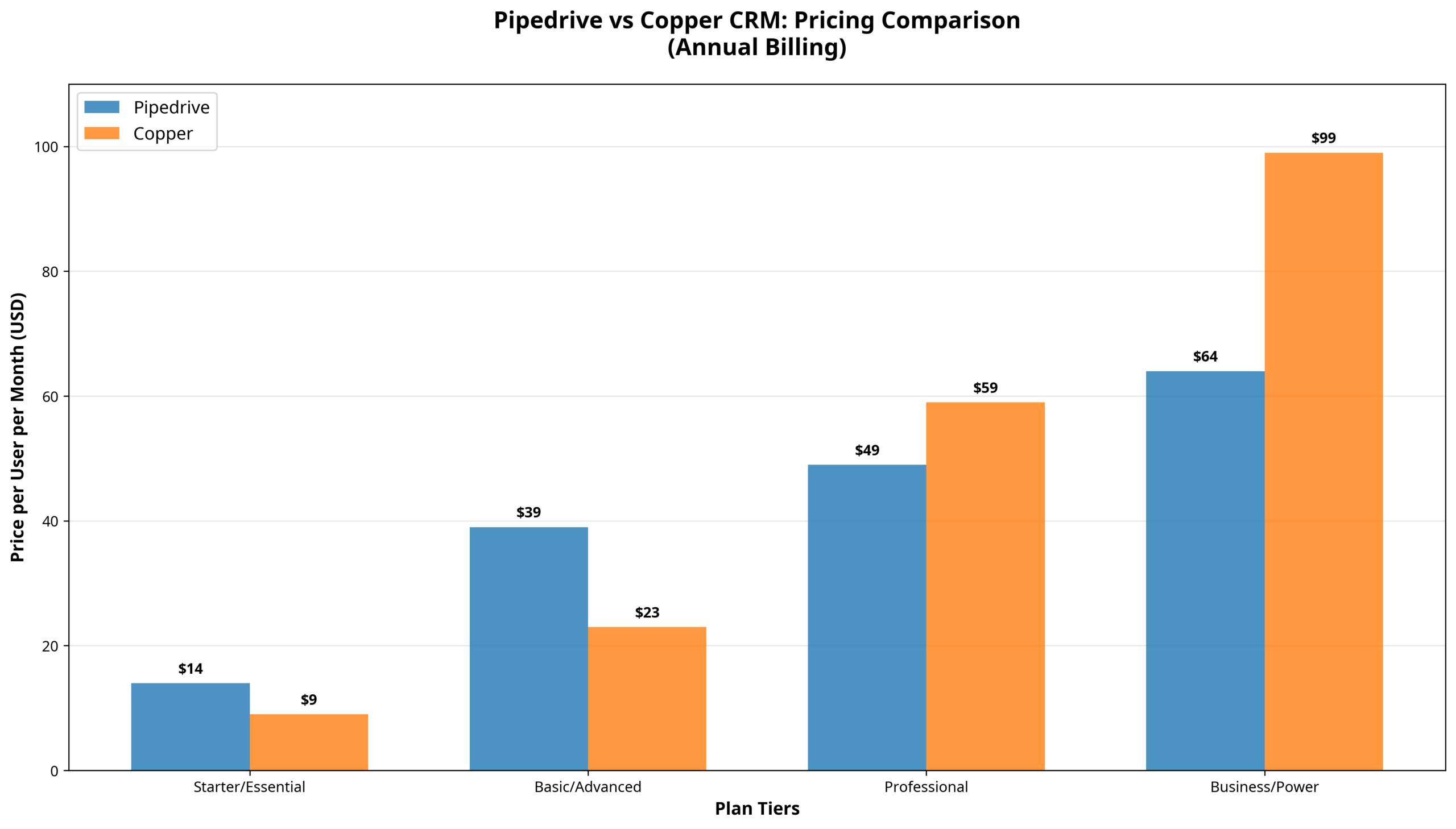
Annual pricing comparison across plan tiers for both platforms
Pipedrive Pricing Structure
Pipedrive’s pricing strategy emphasizes predictable scaling through five distinct plan tiers.
- Essential Plan ($14/user/month): Core pipeline management, contact organization, and basic reporting for small teams beginning their CRM journey. The low entry cost makes it appealing for startups with limited budgets.
- Advanced Plan ($39/user/month): Adds email automation, scheduling tools, and stronger integration capabilities. For many small businesses, this represents the sweet spot—reliable automation without enterprise complexity.
- Professional Plan ($49/user/month): Introduces AI-powered sales assistance, contract management, advanced reporting, and e-signature functionality. This tier is popular with B2B organizations that need forecasting and proposal management.
- Power Plan ($64/user/month): Expands into project management, territory management, and advanced permissions, fitting larger teams.
- Enterprise Plan ($99/user/month): Offers unlimited customization, enhanced security, and priority support—built for organizations with complex CRM requirements.
Pipedrive rewards annual commitments with discounts of up to 42%, making long-term subscriptions especially cost-effective for stable businesses. This structure, however, favors established companies with predictable revenue streams over startups that need monthly flexibility.
In essence, Pipedrive’s pricing reflects its identity as a visual sales CRM that scales in both features and cost. Its mid-tier plans offer substantial value for teams that want advanced tools without committing to enterprise-level complexity.
Copper CRM Pricing Analysis
Copper’s pricing strategy aligns with its positioning as a Google Workspace-native platform, structured to mirror typical Workspace adoption patterns.
- Starter Plan ($9/user/month): Basic CRM functionality with Google Workspace integration. This entry tier makes Copper one of the most affordable CRMs for teams already in the Google ecosystem.
- Basic Plan ($23/user/month): Adds pipeline management, project tracking, and task automation. For small teams, it provides comprehensive functionality while keeping the smooth Google integration that defines Copper’s value.
- Professional Plan ($59/user/month): Introduces workflow automation, bulk email, and advanced reporting. It is also the most popular choice, with 63% of customers selecting it as the balance of features and price. The premium cost compared to Pipedrive’s Professional plan reflects the deep Google-native integration.
- Business Plan ($99/user/month): Offers unlimited contacts, email series automation, and custom reporting—targeted at larger organizations with more complex needs.
Unlike Pipedrive, many of Copper’s Google-focused features—such as Chrome extension functionality, Workspace integration, and automatic contact enrichment—are included by default. However, the higher per-user costs scale quickly with team size, making Copper less attractive for organizations prioritizing cost efficiency.
Ultimately, Copper’s pricing reflects its promise: pay a premium for customer relationship management tools that save time through tight Google Workspace integration.
Total Cost of Ownership Analysis
True CRM cost extends into training, implementation, and ongoing administrative overhead.
Pipedrive usually requires 2–4 weeks for setup and training, with additional time needed for advanced automations and integrations. Its flexibility provides long-term scalability but requires administrative oversight to maintain optimized workflows. Teams experienced with CRMs adapt quickly, while those new to structured sales systems may face a steeper learning curve.
Copper CRM benefits from Google Workspace familiarity, reducing training time dramatically. Teams already using Gmail and Calendar can often achieve productive use within days. However, its simpler interface may feel restrictive to organizations requiring deep customization or complex automation.
Ongoing overhead also differs. Pipedrive’s flexibility requires active management to keep data clean and workflows effective. Copper’s automatic data capture reduces admin burden but sacrifices some customization and control.
Here the trade-off is clear: Pipedrive demands more upfront effort for long-term adaptability, while Copper reduces setup time at the cost of limited configurability.
Value Proposition Comparison
When it comes to overall value, Pipedrive appeals to teams seeking cost efficiency and broad functionality. The Professional tier delivers strong automation, reporting, and forecasting at a competitive price point, making it a compelling choice for small to medium-sized businesses that need scalability.
Copper CRM positions its value around productivity gains. The smooth Google Workspace integration reduces training costs, accelerates adoption, and minimizes context switching. For teams embedded in Google’s ecosystem, this efficiency often justifies the higher per-user cost.
The economics shift depending on team size. For larger organizations (15+ users), Pipedrive’s lower pricing scales more effectively. For smaller teams (5–10 users), Copper’s integration benefits often outweigh its cost premium.
Hidden Costs and Considerations
Both platforms introduce hidden costs worth considering.
Pipedrive may require consultant support for advanced customizations, and its reliance on integrations can lead to added expenses for third-party software. Training costs are higher initially, but the depth of its feature set pays off over time.
Copper’s Google dependency creates potential switching costs if teams migrate to another provider. Its simpler feature set may also require add-on tools for advanced marketing automation or more complex reporting. While training costs are lower, limited functionality may restrict long-term scalability for feature-hungry organizations.
The broader decision reflects organizational priorities. Businesses that value comprehensive CRM functionality at a competitive price point often lean toward Pipedrive. Teams that prioritize ease of use, faster adoption, and deep Google Workspace integration are better served by Copper, even at a higher recurring cost.
Ease of Use
The usability of a CRM system often determines its success or failure inside an organization. Even the most feature-rich platform loses value if team members avoid it because of complexity or workflow friction.
User Journey Comparison
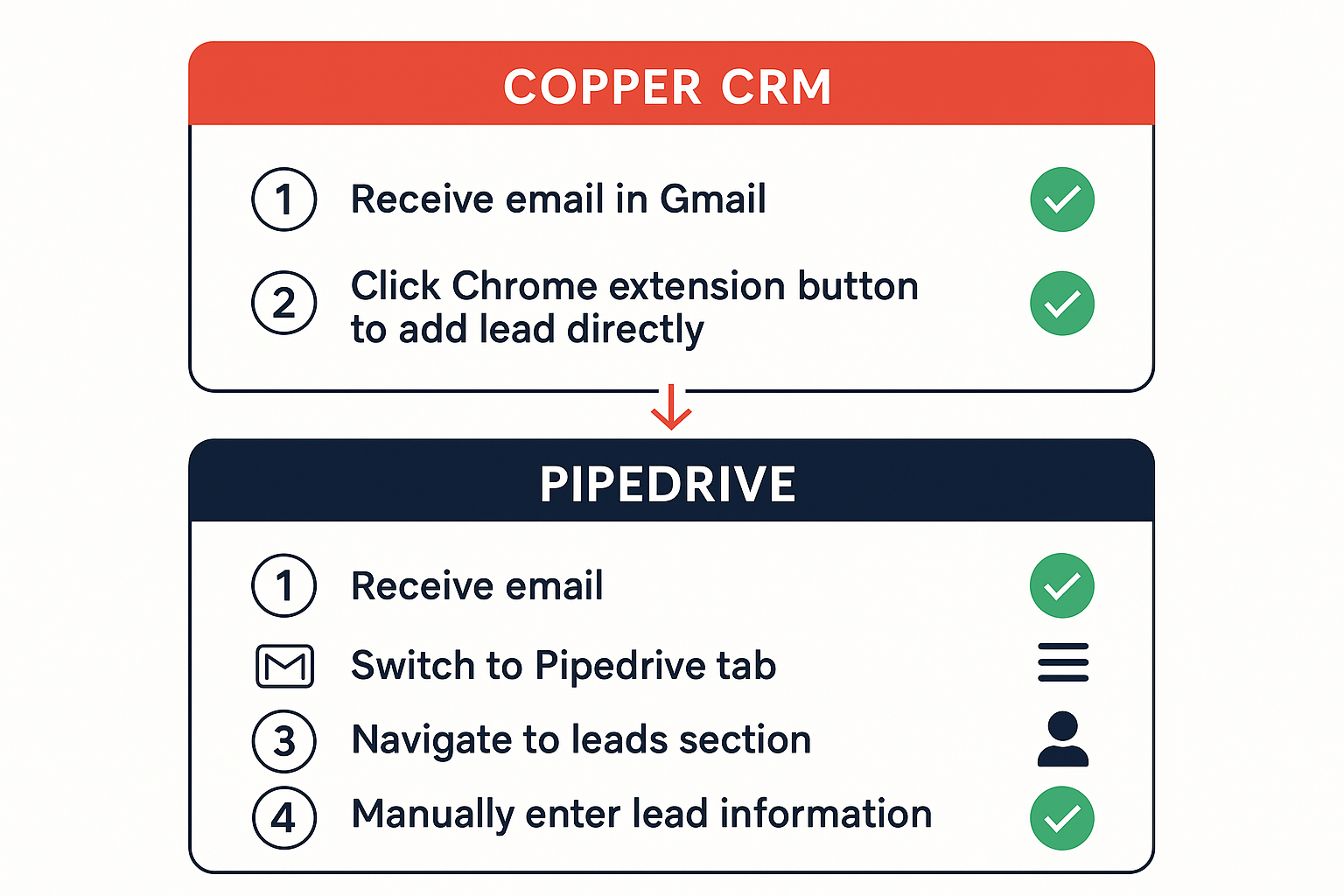
Comparison of user workflows for common CRM tasks
User Interface Design Philosophy
Pipedrive’s interface design centers on visual clarity and intuitive navigation, with the pipeline view serving as the core organizing principle. The platform employs a modern, clean aesthetic with consistent color coding, sharp typography, and a logical information hierarchy. Navigation follows familiar CRM patterns, making the platform easier to adopt for users with prior CRM experience.
The dashboard supports customizable widgets for metrics, recent activities, and upcoming tasks, allowing individuals to shape their workspace. The left-side navigation menu provides quick access to primary functions, while contextual menus and keyboard shortcuts improve productivity for advanced users.
Pipedrive’s progressive disclosure philosophy ensures that essential information is displayed upfront, with advanced features available when needed but not overwhelming. This design works well for teams of varying experience levels, letting new users focus on core functions while offering a growth path for more advanced sales workflows.
Copper CRM’s interface draws directly from Google’s Material Design principles, creating a familiar environment for teams already using Gmail, Google Calendar, and other Workspace applications. Its consistent design language and interaction patterns reduce cognitive load, which accelerates adoption.
Copper emphasizes contextual presentation. Customer data, communication history, and relationship insights appear together within a single view, reducing the need to switch between sections. This unified perspective delivers stronger context at a glance.
Where Pipedrive prioritizes structure and clarity, Copper focuses on workflow integration, making CRM activities feel like a natural extension of daily Google Workspace usage.
Learning Curve and Onboarding Experience
Onboarding is critical for long-term adoption—a poor first impression often leads to resistance and low usage.
Pipedrive offers structured onboarding resources, including interactive tutorials, guided setup wizards, and video training. New users are walked through pipeline creation, contact imports, and automation setup, helping teams establish immediate functionality.
Adoption speed depends on prior CRM experience. Teams familiar with structured pipelines often reach productive usage within 1–2 weeks, while beginners may need 3–4 weeks. Although the wide feature set can be overwhelming at first, Pipedrive’s progressive disclosure approach lets teams start small and scale up over time.
Copper CRM’s onboarding benefits from its familiar Google Workspace interface. Teams already accustomed to Gmail and Calendar often reach productive use within days. Automatic data capture also lowers the learning curve, removing the need for heavy manual data entry and letting users focus on building relationships rather than updating records.
That said, Copper’s simplified interface sometimes hides advanced features. While self-directed learners adapt easily, other users may underutilize certain capabilities unless they actively explore the system.
The trade-off is clear: Pipedrive requires a steeper learning curve for advanced features but supports long-term growth, while Copper accelerates adoption through familiarity and simplicity.
Mobile Experience Comparison
Mobile access has become essential for sales teams, remote workers, and managers who need real-time visibility into customer activity.
Pipedrive’s mobile apps deliver full CRM functionality optimized for smartphones and tablets. Its visual pipeline view adapts cleanly to smaller screens using collapsible sections and swipe navigation. Offline mode ensures uninterrupted productivity, with updates syncing once a connection is restored.
Key mobile features include automatic call logging, GPS-based check-ins, and photo attachments to deal records. Sales reps can also scan business cards, take notes, and add contacts directly from the app. These functions reduce admin work and improve accuracy during customer interactions.
Copper CRM’s mobile apps maintain consistency with the Google Workspace environment. Calendar events, Gmail communications, and Drive documents sync smoothly across devices. The design mirrors the familiar Google mobile experience, lowering the barrier to use.
Rather than supporting deep data entry, Copper’s mobile interface emphasizes quick access to customer context—ideal for reference during calls or meetings. Integration with Gmail and Google Calendar ensures that critical information is always at hand.
Here, Pipedrive provides a more feature-complete mobile experience, while Copper focuses on fast, contextual access aligned with Google’s mobile ecosystem.
Workflow Integration and Context Switching
Context switching between applications directly impacts sales productivity, making workflow integration a defining factor in usability.
Pipedrive requires users to operate primarily inside the CRM. Email and calendar events sync reliably, but reps still need to log into the platform to maintain deal and contact records. This approach offers comprehensive visual sales CRM functionality but demands intentional engagement.
Copper CRM eliminates most context switching by embedding CRM functions inside Gmail and Google Calendar. Relationship management becomes part of natural communication workflows rather than separate sessions. This smooth integration encourages frequent usage and improves data completeness.
Ultimately, Pipedrive prioritizes feature depth at the cost of requiring dedicated CRM time, while Copper prioritizes workflow integration at the expense of broader standalone functionality.
Customization vs. Simplicity Trade-offs
Customization flexibility often increases complexity, while simplicity limits adaptability—and each platform has taken a distinct approach to balancing these priorities.
Pipedrive offers extensive customization: pipelines, fields, automation workflows, and dashboards can all be tailored. This supports complex sales processes but risks overwhelming teams that prefer standardized workflows.
Copper CRM prioritizes simplicity and workflow consistency. Its customization options exist but are limited compared to Pipedrive’s, preserving the familiar Google Workspace feel rather than supporting elaborate business process variations.
For organizations that need CRM systems deeply adapted to their processes, Pipedrive’s flexibility proves invaluable. For teams satisfied with a streamlined, relationship-focused methodology, Copper’s simplicity reduces friction and accelerates adoption.
Reporting Capabilities
Effective reporting transforms raw CRM data into actionable insights that drive better sales productivity and guide strategic decision-making. The reporting capabilities of Pipedrive and Copper CRM reflect their broader philosophies of how sales should be measured, managed, and optimized.
Pipedrive’s Analytics and Reporting
Pipedrive’s reporting system emphasizes sales performance analytics through comprehensive dashboards that track pipeline health, sales velocity, activity levels, and revenue forecasting. The platform includes more than 20 pre-built report types covering core sales metrics, with higher-tier plans unlocking unlimited custom reporting capabilities.
The Insights dashboard serves as the central hub for analytics. Through interactive charts and graphs, it surfaces KPIs for sales managers and executives. Individual and team performance can be tracked, deal progression trends analyzed, and activity patterns monitored across time periods. The visual nature of Pipedrive’s reports makes complex data accessible even to users with limited analytics experience.
Revenue forecasting is a standout feature. By combining deal probability weightings with historical performance data, Pipedrive generates predictive revenue projections. Forecast accuracy improves as the system learns from actual deal outcomes, allowing managers to rely on increasingly precise data for planning.
Advanced reporting features expand into cohort analysis, sales cycle tracking, and conversion optimization. These insights help organizations pinpoint bottlenecks in sales processes, allocate resources effectively, and refine strategies for maximum revenue impact.
Flexibility is another strength. Custom fields can be included in reports, filters applied at multiple levels, and scheduled report delivery ensures stakeholders receive timely updates. Sales managers can automate reports on critical metrics, improving oversight and decision-making.
Overall, Pipedrive’s analytics serve as a reliable toolkit for sales-focused organizations, reinforcing its position as a visual sales CRM designed to drive measurable outcomes through data clarity and structured performance monitoring.
Copper’s Reporting and Analytics
Copper CRM’s reporting system reflects its relationship-centric approach, placing greater emphasis on communication patterns and Google Workspace integration than traditional pipeline analytics alone.
The reporting dashboard covers essentials such as pipeline analysis, activity tracking, and revenue reporting, but its distinguishing feature lies in contextual insights. Reports extend to email engagement, meeting frequency, and relationship progression, giving managers visibility into the quality of customer interactions.
Copper integrates natively with Google Sheets and Looker Studio to extend reporting capabilities. Teams can build custom dashboards that combine CRM data with external metrics, creating a broader view of business performance across marketing, operations, and finance. For executives, Looker Studio provides polished, sharable visualizations that elevate CRM data into full-scale business intelligence.
Automatic data capture ensures reports reflect complete activity logs, eliminating gaps caused by missed manual entries. This reliability often leads to more accurate reporting for relationship-based insights. However, Copper’s built-in reporting is narrower in scope than Pipedrive’s. For advanced analytics, sales forecasting, or granular performance tracking, organizations may need to rely on Google integrations or third-party BI tools.
In practice, Copper’s reporting excels in organizations where the quality of relationships is the key performance indicator, but it is less suited for teams demanding deep sales analytics out of the box.
Customization and Advanced Analytics
The ability to customize reports and extend analytics determines whether a CRM can scale alongside organizational growth and complexity.
Pipedrive allows custom report creation using any CRM data fields, with filtering, grouping, and calculations available through a drag-and-drop builder. This makes advanced reporting accessible to non-technical users, while still flexible enough for sophisticated needs. Its API supports integrations with BI platforms like Tableau or Power BI, enabling organizations to connect CRM data with broader analytics ecosystems.
Copper CRM, meanwhile, leans into its Google-native strategy. Custom reporting is achieved primarily through Google Sheets, where users can manipulate CRM data with formulas, pivot tables, and advanced spreadsheet logic. For teams comfortable with spreadsheets, this offers powerful flexibility in a familiar environment. Coupled with Looker Studio, Copper provides organizations with the ability to build professional-grade dashboards that can be distributed across teams or executives.
This difference highlights a philosophical divide. Pipedrive embeds analytics deeply inside the CRM, aiming to keep sales data and insights within its own ecosystem. Copper decentralizes analytics by leaning on Google tools, providing flexibility and integration at the cost of requiring external platforms for advanced insights.
How Delverise Can Help
Choosing the right tools and strategy is only the first step — executing effectively is what separates high-growth teams from the rest. At Delverise, we help B2B SaaS companies build and optimize their revenue engines, from tool selection and implementation to full GTM execution.
Whether you’re evaluating pipedrive vs copper crm, building your sales tech stack, or scaling your go-to-market operations, our team combines RevOps strategy with hands-on engineering to deliver measurable results.
Ready to build a revenue engine that actually scales? Reach out to Delverise about your GTM strategy.
Making the Right Choice for Your Team
The decision between Pipedrive and Copper CRM ultimately depends on your organization’s technology infrastructure, sales process complexity, and workflow preferences. Both platforms excel in different ways, but they reflect fundamentally different philosophies of what a visual sales CRM should be.
Choose Pipedrive if:
- Your team uses Microsoft 365 or multiple email providers.
- You require extensive customization and automation.
- Your sales process follows predictable, linear stages.
- You need advanced analytics and forecasting tools.
- You value feature richness over simplicity.
- Your team has prior CRM experience.
- You expect significant growth that requires scalable functionality.
Pipedrive is best suited for organizations that want flexibility, data-driven insights, and control over their customer relationship management tools. Its structure supports long-term scaling while offering the reporting and automation power needed to boost sales productivity in complex environments.
Choose Copper CRM if:
- Your organization is fully committed to Google Workspace.
- You value workflow integration more than feature depth.
- Your sales process is complex and relationship-driven.
- You want to minimize training time and accelerate adoption.
- You prefer automatic data capture over manual input.
- Your team prefers Google’s familiar design environment.
- You are willing to pay a premium for smooth integration.
Copper CRM is ideal for teams seeking simplicity, context, and minimal workflow friction. For businesses where Gmail and Google Calendar are already the backbone of operations, Copper provides a CRM comparison advantage by embedding relationship management directly into everyday communication.
Implementation Recommendations
Regardless of which system you choose, CRM success requires careful planning and structured change management. Start with a pilot group of 3–5 users to refine workflows and resolve friction before scaling.
Invest in training and onboarding, even with platforms like Copper that feel intuitive. Define sales stages clearly, establish consistent data entry standards, and build accountability into your CRM usage.
Your long-term technology strategy should also guide the decision. Copper’s deep Google Workspace integration drives immediate adoption but ties your business more tightly to Google’s ecosystem. Pipedrive, with its platform-agnostic approach, supports more diverse technology stacks but requires ongoing management discipline.
In short, Copper accelerates usability through integration; Pipedrive supports adaptability through flexibility. Both paths can work—provided the implementation matches your organizational culture and goals.
Final Verdict
For Google Workspace teams prioritizing workflow efficiency and user adoption, Copper CRM delivers unmatched integration benefits that often outweigh its higher per-user costs. By eliminating context switching and reducing administrative work, it fosters higher adoption rates, better data quality, and greater user satisfaction.
For organizations requiring broader functionality, advanced customization, or multi-platform flexibility, Pipedrive offers superior value. Its competitive pricing, scalable architecture, and reliable integration ecosystem make it a powerful option for teams looking to manage complex sales cycles and drive long-term growth.
Both platforms represent strong choices in the CRM software market. The key is not which tool is “better” in the abstract, but which one aligns with your infrastructure, workflow, and growth strategy. When selected and implemented thoughtfully, either system can transform sales pipeline management into a strategic advantage.
What’s Next?
Choosing between Intercom and Drift is only the beginning. What matters most is how you translate that decision into a strategy that accelerates pipeline growth, improves conversion quality, and scales with your business.
If you’d like a sounding board as you shape your next move, consider setting up a quick conversation with experts who live and breathe these systems every day. Sometimes, a short discussion can help clarify priorities, uncover blind spots, and map out a practical path forward.
Get in touch to explore how to make conversational marketing work for your organization.
Related Articles
- HubSpot vs Salesforce for Startups
- Best Sales Intelligence Tools
- Outbound Sales for B2B SaaS
- Gong vs Chorus Conversation Intelligence
- Clay vs Apollo for Sales Teams