In the competitive market for project management software, two platforms have emerged as dominant forces: Monday.com and ClickUp. As organizations worldwide continue to embrace remote work and digital collaboration, the choice between these powerful tools has become increasingly critical for teams ranging from 10 to 200 people. Both platforms promise to streamline workflows, enhance productivity, and transform how teams collaborate—but which one truly delivers on these promises?
This comprehensive analysis examines every aspect of both platforms, from user experience and feature sets to pricing structures and real-world performance. Drawing on extensive testing, user-feedback analysis, and deep-dive comparisons, we’ll reveal which tool emerges as the winner for different types of teams and use cases in 2026.
The stakes couldn’t be higher. The right project management tool can mean the difference between smooth collaboration and chaotic workflows; between meeting deadlines and missing opportunities; between team satisfaction and frustration. With both Monday.com and ClickUp claiming to be the ultimate solution, project managers and team leaders need clear, unbiased guidance to make the best choice for their organizations.
Quick Verdict: The Winner
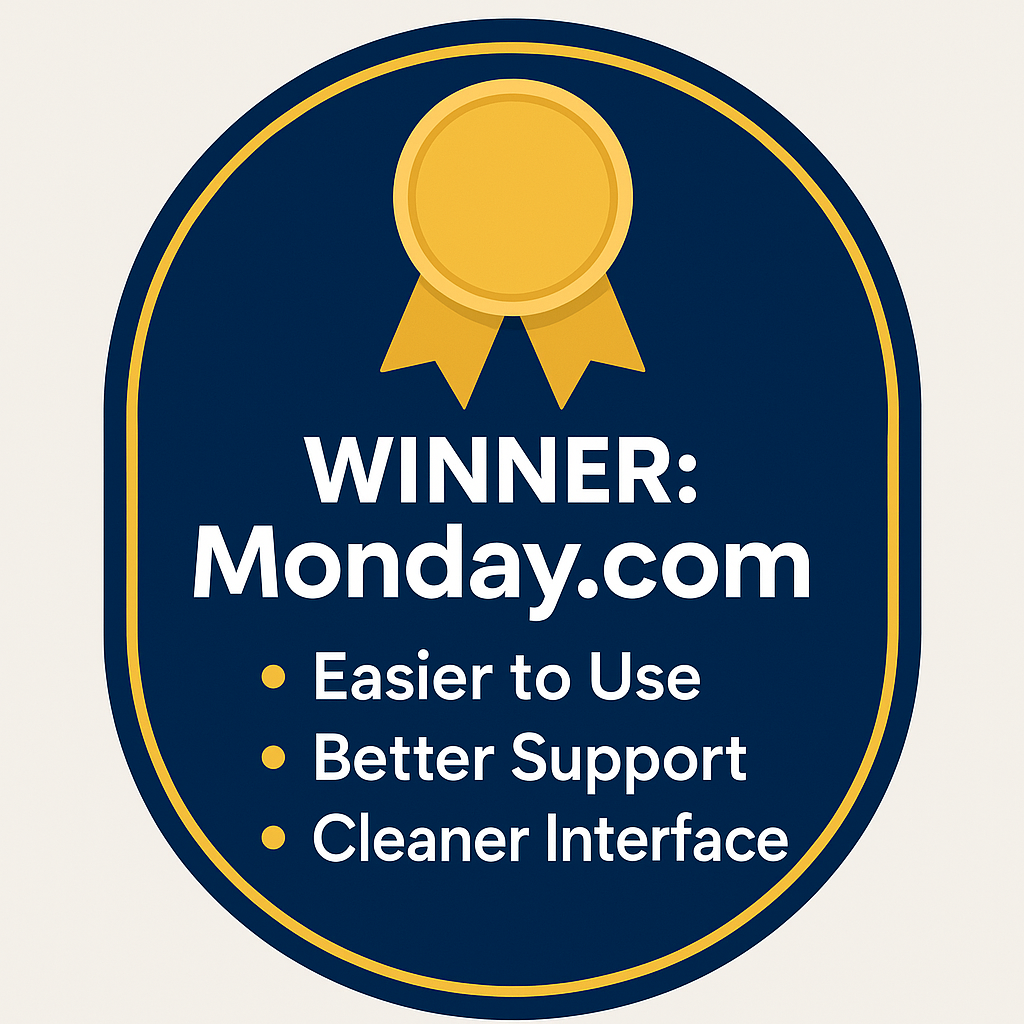
Monday.com takes the crown as the overall winner for most teams in 2026. In the ClickUp vs Monday.com showdown, ClickUp brings impressive breadth and value, but Monday.com’s superior user experience, cleaner interface, and consistently responsive customer support make it the more reliable choice for teams that prize productivity and fast adoption. If you need momentum on day one—not weeks of hand-holding—Monday.com delivers.
30-Second Summary
Monday.com wins on ease of use, interface design, and support quality, making it ideal for teams that want to get up and running quickly without extensive training. Its streamlined workflows, opinionated defaults, and intuitive views reduce onboarding friction and keep projects moving. ClickUp offers better value for money and deeper configurability—automations, custom fields, advanced views—but the steeper learning curve can slow initial adoption and demands more admin time. For most 10–200 person companies, Monday.com’s polished approach drives better long-term results despite the higher cost, especially when executive sponsors want quick wins.
Choose Monday.com if: you prioritize user experience, need rapid team adoption, value excellent customer support, and can invest in a premium solution that minimizes change-management overhead. You want a platform your whole organization can understand at a glance—and you want it to work reliably from day one.
Choose ClickUp if: you’re budget-conscious, need extensive customization options, have technical team members who can handle complexity, and want maximum features for the price. You prefer to fine-tune workflows, accept a learning curve, and optimize for flexibility over simplicity in this Monday vs ClickUp comparison.
Visual Feature Comparison: Head-to-Head Analysis
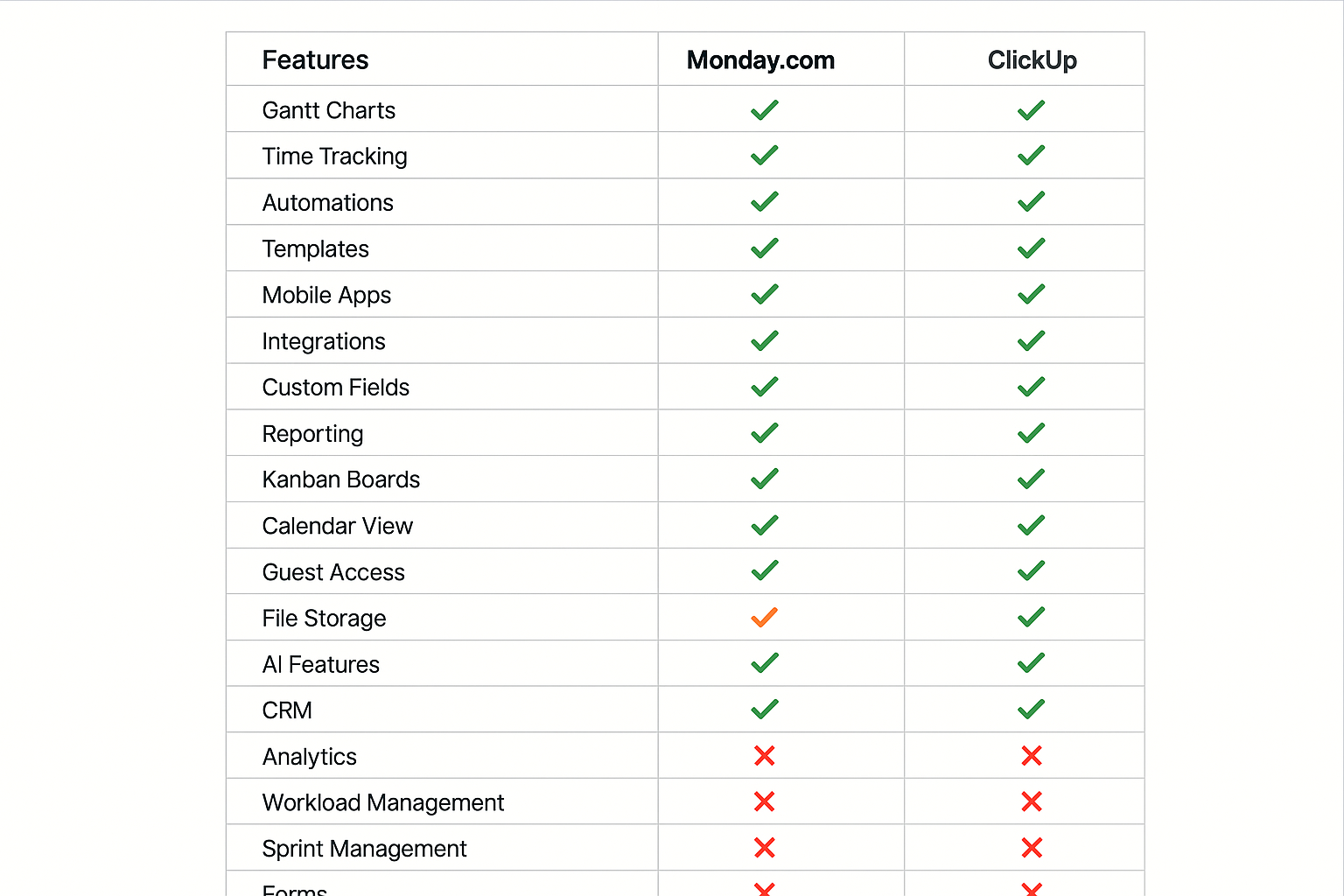
The feature landscape between Monday.com and ClickUp reveals telling insights about each platform’s product philosophy and target audience. Both tools deliver comprehensive project management capabilities, yet their approaches diverge significantly in execution and user experience—one prioritizes visual clarity and instant comprehension, the other depth and configurability. Use this section to map strengths to your team’s day-to-day reality before shortlisting.
Core Project Management Features
Both platforms excel at the fundamentals of project management. Gantt charts, time tracking, automations, and templates are available across both systems, but the implementation varies in meaningful ways. Monday.com leans into visual clarity and intuitive design, making core features immediately accessible to new users. Its color-coded system and clean interface help team members quickly grasp project status, dependencies, and blockers without extensive training, which accelerates adoption for non-technical teams.
ClickUp, by contrast, takes a feature-dense approach, often providing multiple ways to accomplish the same task. While that breadth enables impressive flexibility, it can overwhelm users who simply want to track projects efficiently and move work forward. The platform’s true strength lies in customization—letting teams configure workflows that mirror exact processes and edge cases.
The trade-off: flexibility often comes at the cost of simplicity and a steeper learning curve. Decide whether you value instant clarity or maximum configurability, then align platform choice to that priority.
Advanced Functionality Differences
The most consequential differences appear in advanced features and storage policies. ClickUp’s unlimited storage on paid plans is a substantial advantage for teams handling large files, media assets, or extensive documentation. By contrast, Monday.com’s storage limits can become restrictive for content-heavy projects, especially in creative agencies and software development environments where repositories grow quickly.
Time tracking is another key separator. ClickUp includes unlimited time tracking across all paid plans (and limited tracking on the free tier), enabling granular billing and productivity analysis from day one. Monday.com restricts time tracking to its Pro plan and above, which can be a real constraint for teams that bill by the hour, require auditability, or want consistent utilization insights across all roles. Weigh the storage and time-tracking models against your compliance, billing, and audit needs before you commit.
Integration and Automation Capabilities
Both platforms ship reliable automation features, but the philosophies differ. Monday.com optimizes for simplicity and speed with an approachable, visual builder that non-technical users can master quickly. Typical allowances include 250 automation actions per month on the Standard plan, scaling up to 25,000 on the Pro plan, which supports growing operational complexity without immediate platform sprawl.
ClickUp offers greater overall flexibility in its automation builder, enabling sophisticated, multi-step logic—yet it comes with a steeper learning curve and often benefits from dedicated project admins or technically inclined champions. For organizations with the resources to design and maintain complex workflows, ClickUp’s approach can unlock powerful end-to-end automations. Decide whether you want plug-and-play simplicity or the headroom to engineer nuanced, bespoke flows.
Mobile and Accessibility Features
Mobile performance matters as remote work and hybrid schedules persist. Both platforms provide full-featured mobile apps, but user feedback consistently favors Monday.com’s mobile experience. The app preserves the platform’s visual clarity and intuitive navigation, making it easy for teammates to scan boards, update tasks, and stay aligned on the go.
ClickUp’s mobile app is rich in capability, yet its dense customization doesn’t always translate cleanly to smaller screens, which can slow quick updates or obscure key status signals. If your team relies heavily on mobile—field roles, executives in transit, or globally distributed squads—prioritize hands-on testing of each app’s usability before final selection.
Pricing Breakdown: The Real Cost Analysis
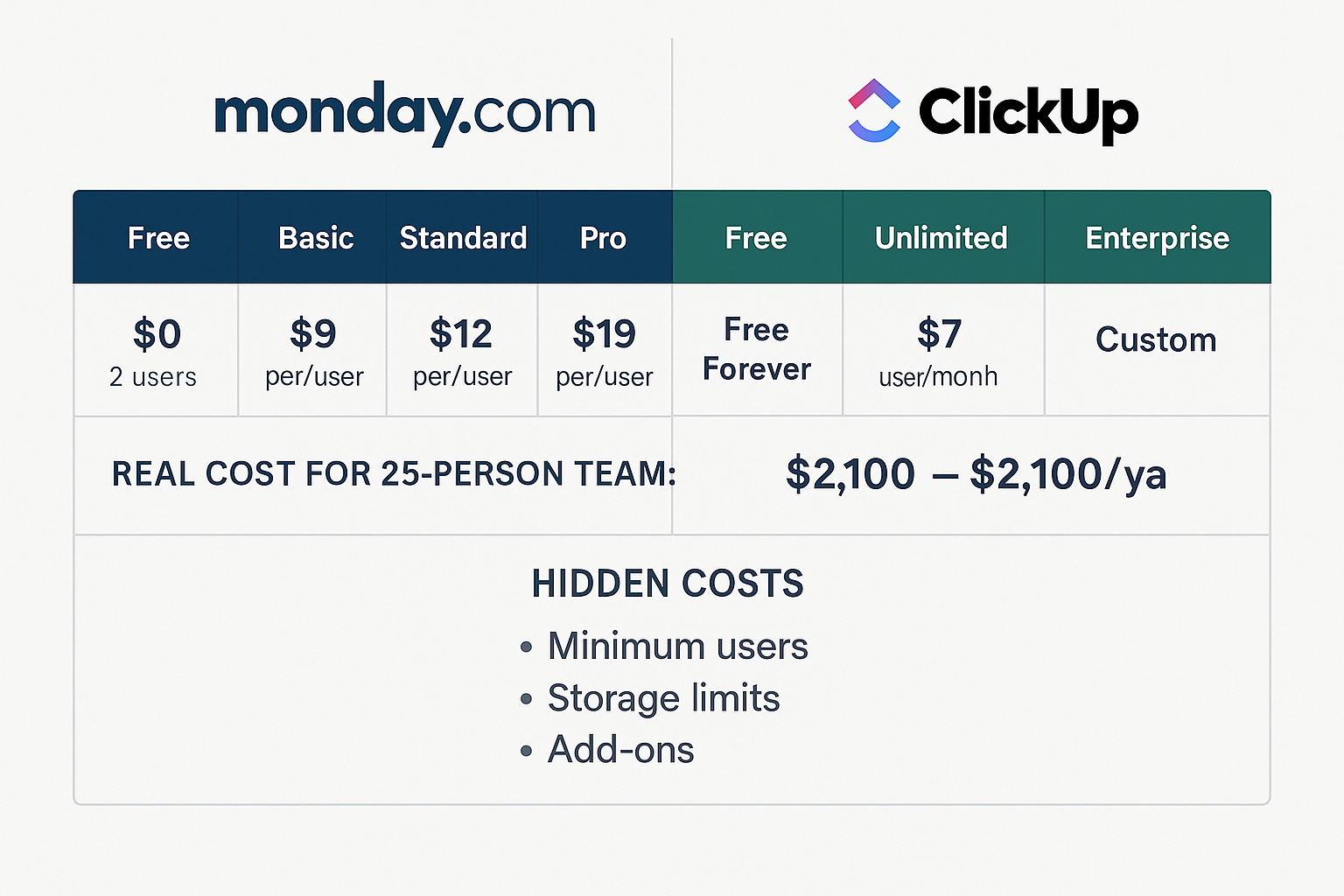
Pricing is one of the sharpest differentiators in the ClickUp vs Monday.com debate—and its impact reaches far beyond a monthly line item. To understand true total cost of ownership (TCO), you have to look past headline prices and examine hidden costs, feature gating, adoption effort, and long-term value.
Subscription Tier Analysis
Monday.com prices for a premium position. The Basic plan starts at $9/user/month (annual billing) but carries meaningful constraints: 5GB storage, basic dashboards, and limited automations. Step up to Standard at $12/user/month and you unlock essentials like Gantt and guest access. The popular Pro tier at $19/user/month adds time tracking and advanced automations, which is where many growing teams land.
Takeaway: If you want polished UX with fewer compromises, expect to start at Standard and often graduate to Pro as workflows mature.
ClickUp emphasizes value and accessibility. The Unlimited plan at $7/user/month packs more than Monday.com’s Basic: unlimited storage, Gantt, and native time tracking. The Business plan at $12/user/month layers on features that, in many cases, map to Monday.com’s Pro or higher.
Takeaway: For feature breadth per dollar, ClickUp is aggressive, especially when you need deep capabilities on a tighter budget.
Hidden Costs and Limitations
The comparison gets real when you account for constraints. Monday.com enforces a 3-user minimum on paid plans, effectively setting a $27/month floor for Basic. That can sting for solo consultants or very small teams that still need advanced features.
Action: If you’re a small shop, model costs with the user minimum before committing.
ClickUp is more flexible: single-user subscriptions are allowed, and the free plan is genuinely useful with unlimited tasks and users. However, factor in ClickUp AI at +$7/user/month. If AI will be a core workflow layer, that add-on materially changes TCO.
Action: Decide early whether AI is must-have or nice-to-have; it shifts ClickUp vs Monday.com pricing more than you think.
Real-World Cost Scenarios
Run the math for a 25-person team. On annual billing:
- Monday.com Standard: ≈ $3,600/year
- Monday.com Pro: ≈ $5,700/year
- ClickUp Unlimited: ≈ $2,100/year
- ClickUp Business: ≈ $3,600/year
Over three years, ClickUp users could save roughly $4,500–$10,800, depending on tier. But price isn’t the whole story. Monday.com’s cleaner UX often yields faster adoption and lower training time—teams report getting productive in days, not weeks—which can offset higher subscription costs via earlier value realization and fewer admin hours.
Action: Combine license math with time-to-productivity and change-management overhead. TCO lives at that intersection.
Enterprise and Scaling Considerations
Both vendors play in enterprise, but with different emphasis. Monday.com leans into governance, security, and advanced reporting: multi-level permissions, strong security controls, and dedicated success management.
Action: If your PMO cares about uniform guardrails, auditability, and standardized reporting, Monday.com’s enterprise posture fits well.
ClickUp favors customization and white-labeling. You can craft branded client experiences and intricate permission models to match nuanced org structures or agency work.
Action: If you’re client-facing or need highly tailored spaces at scale, ClickUp Business/Enterprise may deliver more value—even if list price matches Monday.com.
Value Proposition Assessment
Your decision hinges on priorities and resources. Monday.com’s higher sticker price buys simplicity, reliability, and excellent support. If you want quick implementation, minimal training, and a consistent user experience, the premium often pays for itself in reduced friction and happier teams.
Do this: Optimize for speed to value and predictable rollout if executive sponsors demand quick wins.
ClickUp’s lower costs appeal to budget-conscious teams that can invest time in configuration and training. The platform’s depth and flexibility shine when you have technical champions and specific workflow needs.
Do this: Choose ClickUp vs Monday.com when you prioritize maximum features per dollar and you’re comfortable trading simplicity for control.
Interface Comparison: User Experience Deep Dive
The user interface is often the decisive factor in project management software adoption and long-term success. Features and pricing matter, but the daily experience determines whether teams embrace—or abandon—their platform. In this ClickUp vs Monday.com deep dive, we unpack how design choices shape behavior, shorten (or stretch) onboarding, and influence real productivity. Use these insights to align the tool with how your people actually work.
Design Philosophy and Visual Approach
Monday.com embodies a simple truth: simplicity drives adoption. Its color-coded system creates immediate visual understanding of project status—green for completion, red for delays, yellow for work in progress. The result is instant signal recognition with zero training. Team members scan a board and grasp health at a glance, then act.
The platform’s board-based approach mirrors familiar spreadsheet layouts while adding visual enhancements that make data easier to consume. Each project board presents information in a clean, organized manner that reduces cognitive load, so users focus on work, not wayfinding. A consistent design language runs across views and features; once you learn one pattern, you can transfer that knowledge everywhere. That consistency lowers friction and speeds adoption—especially for cross-functional teams.
ClickUp opts for feature density and breadth. Multiple views, extensive customization options, and numerous configuration settings unlock power users’ creativity. You can model edge cases, nest hierarchies, and fine-tune fields until the system mirrors your exact process. The trade-off: the interface can overwhelm new users. During initial setup, the sheer number of choices makes it harder to decide which configuration to trust. Flexibility is the win; complexity is the cost. Decide whether your teams need instant clarity or the headroom to engineer bespoke workflows.
What to do next: Map your team’s tolerance for complexity. If you need rapid clarity and low cognitive overhead, lean Monday.com. If you’ll invest in designing custom flows, ClickUp’s depth pays off.
Learning Curve and Adoption Rates
User feedback consistently underscores the learning-curve gap. Monday.com teams often reach baseline productivity within the first week; many report comfort with core tasks in a matter of days. Guided onboarding, opinionated defaults, and intuitive navigation minimize the need for long training cycles or heavy documentation. The outcome is momentum.
“We had our entire marketing team up and running on Monday.com within three days. The visual interface just made sense to everyone, regardless of their technical background.”
— Sarah Chen, Marketing Director, TechFlow Solutions
ClickUp’s learning curve runs longer. Teams frequently need weeks—sometimes months—to fully use the platform’s advanced capabilities. When your workflows demand deep customization, that investment can deliver outsized returns. But for organizations seeking quick implementation, the initial ramp can become a barrier, slowing time-to-value and increasing admin load.
“ClickUp has incredible features, but it took our team almost two months to feel comfortable with all the options. The customization is powerful, but the complexity can be overwhelming.”
— Marcus Rodriguez, Operations Manager, Creative Dynamics
What to do next: Calibrate rollout plans to your reality. If you need fast adoption across 10–200-person teams, favor Monday.com’s intuitive UI. If your priority is modeling complex, evolving processes—and you have technical champions—budget time for ClickUp training and governance.
Navigation and Workflow Efficiency
Monday.com keeps navigation clear and fast. The left sidebar gives you consistent access to core areas, while the main workspace stays locked on your current projects and tasks. Search behaves intuitively—you can quickly surface projects, tasks, or teammates without memorizing syntax.
Its automation setup doubles down on usability. You don’t need code. A visual builder makes cause-and-effect obvious, so you can chain triggers and actions with confidence. Sophisticated workflows emerge from simple dropdowns and logical connections, which reduces admin time and boosts reliability.
ClickUp mirrors its comprehensive feature set in the UI—and that can feel overwhelming in daily use. There are multiple paths to the same information, which grants flexibility but also invites decision fatigue about the “best” route. Power users love the optionality; casual users often struggle to pick an optimal flow. In this ClickUp vs Monday.com comparison, decide whether you value optionality or the fastest path to “done.”
Mobile Experience and Cross-Platform Consistency
Mobile is essential, and the platforms diverge in how they optimize. Monday.com’s mobile app preserves the desktop’s visual clarity and straightforward navigation, so you stay productive away from your computer. The design surfaces the most common mobile jobs to be done: check status, update progress, and communicate with your team—fast.
ClickUp’s mobile app aims to deliver full desktop capability on a small screen. Ambitious, but it can feel cramped and heavy for quick interactions. Power users appreciate the reach; however, the density often slows the rapid updates mobile sessions demand. If phone-first productivity matters, validate real-world speed before you commit.
Customization vs. Simplicity Trade-offs
The interface comparison exposes a core trade-off: flexibility vs. simplicity. Monday.com intentionally sacrifices some customization to deliver a consistently excellent user experience. You can tailor boards, create custom fields, and adjust workflows—but within guardrails that prevent runaway complexity and keep teams aligned.
ClickUp offers virtually unlimited customization. You can craft highly specialized workflows and bespoke interfaces that mirror unique processes or complex requirements. The payoff is control; the cost is setup time and training. If you have technical champions and governance in place, the investment returns leverage. If not, complexity becomes overhead.
Accessibility and Inclusive Design
Both platforms have progressed on accessibility, but Monday.com’s simpler interface generally yields better outcomes. Consistent color coding, clear typography, and predictable navigation support a wider range of accessibility needs. Its visual system aligns closely with accessibility best practices, which lowers cognitive load and helps new contributors ramp faster.
ClickUp’s complexity can create challenges—especially for users relying on screen readers or for those with cognitive processing differences. The abundance of options and multiple navigation paths reduce predictability, making it harder to maintain a consistent, accessible experience at scale.
Workflow Examples: Real-World Implementation
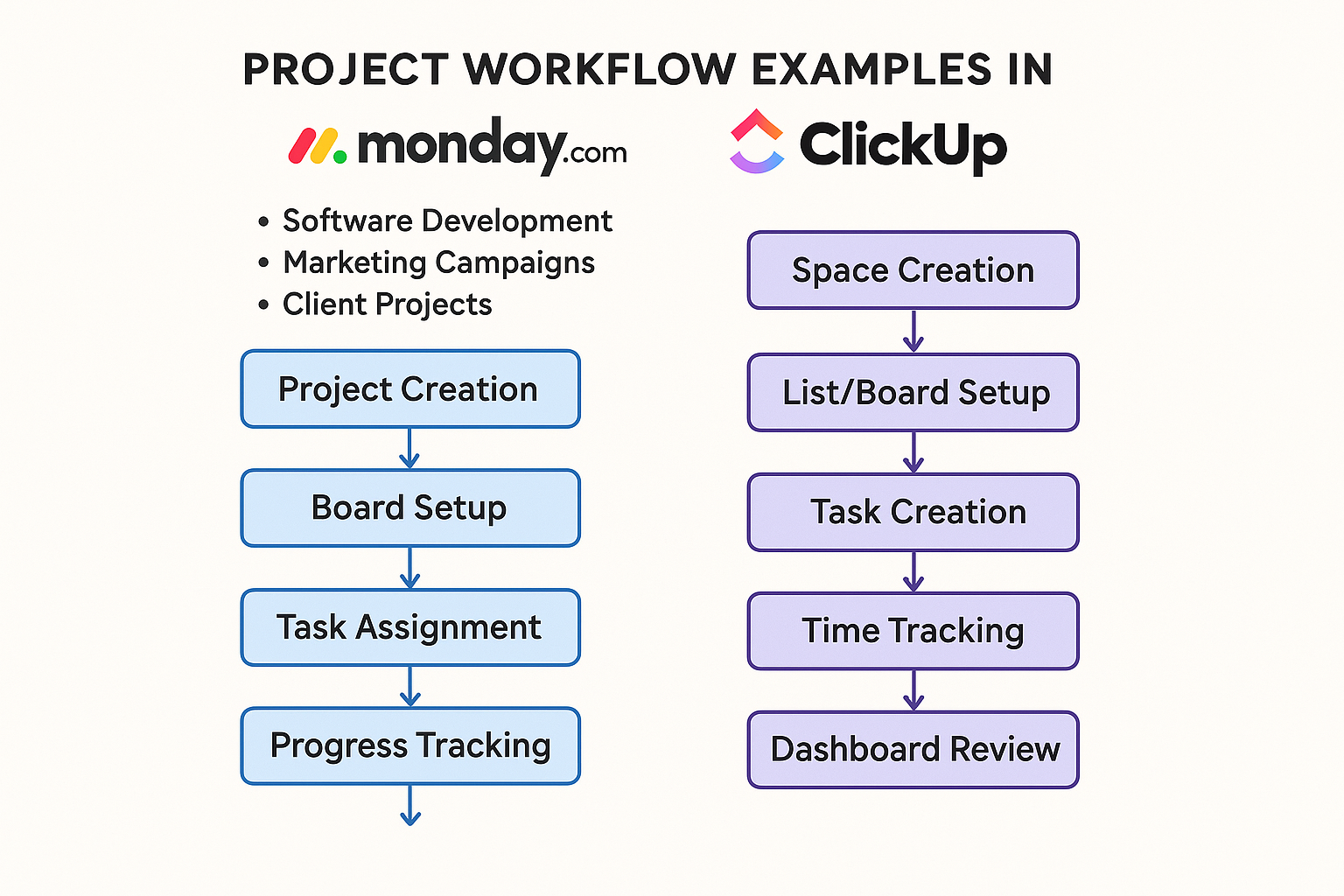
Understanding how these platforms handle real-world workflows is where theory meets delivery. We examined three common scenarios that represent the majority of use cases for 10–200 person companies—software development projects, marketing campaigns, and client service delivery—plus how each tool supports remote collaboration. These examples reveal how ClickUp vs Monday.com decisions play out in day-to-day execution.
Software Development Workflows
Software teams need serious horsepower: complex dependencies, sprint planning, and CI-friendly rhythms. Both platforms show up differently—and with varying degrees of success.
Monday.com starts strong with an intuitive board setup. Teams commonly create boards per product or project, with columns that mirror development stages—Backlog → In Progress → Code Review → Testing → Deployment. Timeline and Gantt views make sprint planning and release schedules obvious, while automations move items through stages on status change.
Strength: visual clarity and stakeholder communication. Product managers can share progress with execs or clients who don’t speak dev, and the story still lands.
Gap: fewer dev-specific features out of the box—no native Git integration and lighter support for burndown charts vs dedicated engineering tools.
ClickUp leans into dev-native capability. Sprints, burndown, velocity tracking, and a space-based structure help separate products or clients while maintaining org-level visibility. Integrations with GitHub, GitLab, and Jira create smooth bridges many engineering teams expect.
“ClickUp’s sprint management features are genuinely helpful for our agile process. The burndown charts and velocity tracking give us insights that Monday.com just doesn’t provide.”
— Jennifer Park, Lead Developer at InnovateTech
Trade-off: ClickUp’s richness can slow teams that want streamlined flows. With so many configuration options, it’s easy to over-engineer your PM layer and lose agility.
What to do next: If your developers demand sprint metrics and Git-first workflows, favor ClickUp. If your org needs universal clarity and exec-ready views without heavy setup, Monday.com keeps momentum high.
Marketing Campaign Management
Marketing teams live in creative workflows, cross-functional approvals, and calendar-driven launches. The UI matters—because clarity speeds feedback.
Monday.com excels here. Visual boards and timelines anchor campaign planning. Columns track creative development, approvals, and launch activities. File sharing and proofing streamline collaboration; automations nudge stakeholders at key milestones.
Strength: stakeholder communication. Color-coded status and calendar views let managers show portfolio health in seconds and avoid resource pileups.
“Monday.com transformed how we manage our marketing campaigns. The visual boards make it easy for our creative team to see what’s in progress, and executives love the clear status updates.”
— David Thompson, Marketing Manager at GrowthCorp
ClickUp adds depth with custom fields for metrics, richer reporting, and integrations with HubSpot and Mailchimp. Forms capture campaign requests and auto-generate structures.
Trade-off: the feature-dense interface can slow creative teams and muddle quick stakeholder reviews. When speed and visual simplicity rule, density becomes friction.
What to do next: If your marketing org values instant comprehension and clean status comms, pick Monday.com. If you track granular KPIs and need reliable reporting tied to tools like HubSpot, ClickUp is compelling.
Client Project Delivery
Service businesses need crisp client comms, time tracking, and deliverable clarity. Both platforms support client-facing work—via different philosophies.
Monday.com emphasizes transparency and ease. Create client-specific boards with guest access so clients see progress without touching sensitive data. Time tracking (Pro and up) supports billing and resource planning; automations trigger updates at key milestones.
Strength: client-ready visuals. Color-coded indicators and timelines reduce status calls and present a polished, professional surface.
ClickUp offers client portals, detailed time tracking, and profitability views. Custom fields capture client requirements; advanced reporting reveals performance and utilization.
“ClickUp’s client portal feature is fantastic for keeping clients informed without overwhelming them with internal project details. The time tracking and profitability reports help us optimize our service delivery.”
— Lisa Chang, Project Manager at ConsultPro
Trade-off: training clients on guest/portal features can be bumpy. The abundance of options occasionally confuses stakeholders who just want to check status or leave feedback.
What to do next: For client experiences that “just work,” lean Monday.com. For agencies optimizing margins and utilization with advanced reporting, ClickUp shines.
Remote Team Collaboration
Remote and hybrid models amplify the need for lightweight, reliable collaboration patterns.
Monday.com focuses on simplicity and clarity. Updates live on the item, minimizing email sprawl. Visual status helps remote teammates scan portfolio health without standing meetings. The effect: fewer blockers, faster alignment.
ClickUp ships a more comprehensive suite—built-in chat, docs, whiteboards, and goal tracking—to keep distributed teams aligned and accountable in one place. If you want a single pane of glass, it’s powerful.
Decision lens: Teams that prefer streamlined, low-cognitive-load communication often gravitate to Monday.com. Teams that want an all-in-one collaboration hub may prefer ClickUp’s feature-rich approach—provided they can handle the complexity.
Integration Ecosystem: Connectivity and Workflow Automation
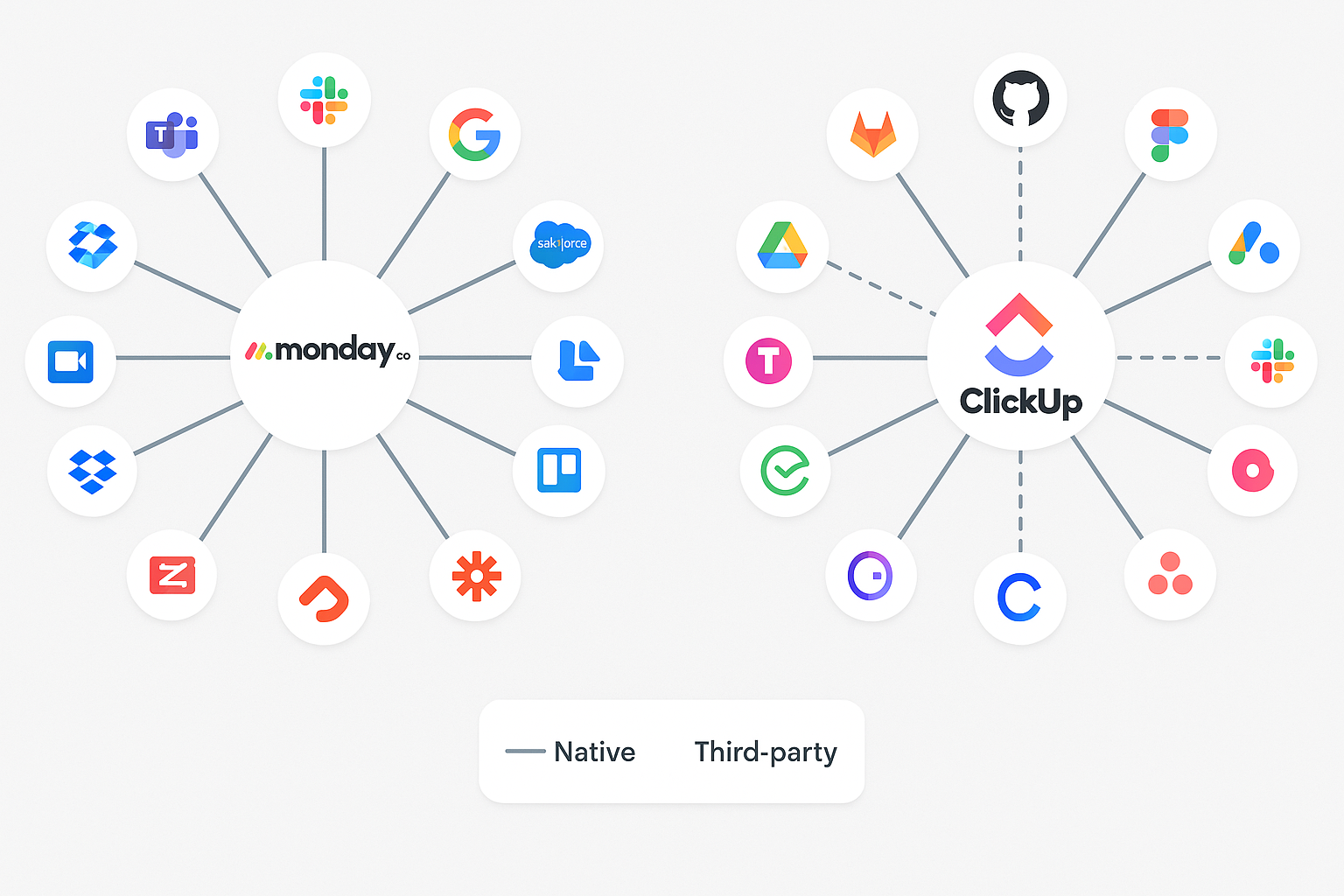
Modern project management platforms must connect cleanly to the software your teams use every day. In this ClickUp vs Monday.com comparison, integration capabilities reveal two distinct philosophies—one favoring curated depth and reliability, the other pursuing maximal coverage and flexibility—with real implications for productivity, data fidelity, and tool consolidation. Use this lens to align platform choice with your stack and governance model.
Native Integration Quality vs. Quantity
Monday.com takes a curated approach, offering ~200 high-quality integrations with popular business tools. The emphasis is depth over breadth: Microsoft Teams, Slack, Google Workspace, Salesforce, HubSpot, and Adobe Creative Cloud feel like native extensions of the Monday.com interface. Each connection is tuned for smooth data flow and predictable behavior.
Why it matters: Fewer options, higher trust. Teams get integrations that “just work,” which reduces support tickets and context switching.
ClickUp casts a wide net with 1,000+ integrations across dev, design, comms, CRM, and niche apps—GitHub, GitLab, Figma, Adobe, and more. You can wire nearly any tool into your workspace.
Trade-off: Coverage can outpace consistency. Some integrations provide basic connectivity without the deep functionality needed for frictionless, end-to-end workflows. Power users love the reach; admins should plan for variance in integration polish.
What to do next: Inventory mission-critical systems. If they’re mainstream and you prize reliability, lean Monday.com. If your stack is eclectic or highly specialized, ClickUp’s breadth may unlock faster system unification.
Automation and Workflow Connectivity
Monday.com optimizes for simplicity and reliability. The visual automation builder lets non-technical users craft multi-step workflows—no code required. Triggers can update CRM records, send Slack alerts, or move items across boards when statuses change.
Strength: Automations are easy to maintain and consistently stable, minimizing troubleshooting and keeping momentum high.
ClickUp enables advanced logic: conditional branching, multi-trigger chains, and complex, cross-tool orchestration. You can model highly specific business processes end to end.
Cost: Setup and upkeep usually require technical champions. Without governance, complexity can creep in and slow teams.
What to do next: If you want wide adoption and low admin overhead, choose Monday.com automations. If you need programmatic, nuanced flows and have ops/PM resources, ClickUp delivers headroom.
API and Custom Development Options
Both vendors offer reliable APIs—each with a distinct developer experience.
Monday.com emphasizes clarity and consistency. Interactive docs, clear examples, and predictable patterns speed up custom integration work and reduce integration debt.
Result: Faster builds, fewer surprises, easier long-term maintenance.
ClickUp offers very broad API coverage, exposing granular controls across the platform.
Result: Deep customizations are possible—but the larger surface area can make projects more complex and time-consuming.
What to do next: If your engineering bandwidth is limited, Monday.com’s DX shortens cycles. If you’re building bespoke, domain-specific integrations, ClickUp’s breadth pays off.
Third-Party Integration Platforms
Both platforms connect to Zapier, Microsoft Power Automate, and Make (Integromat) to extend beyond native integrations.
Monday.com + Zapier surfaces thousands of apps through stable triggers/actions with minimal setup complexity.
Outcome: Rapid wins for non-dev teams; reliable handoffs between systems.
ClickUp’s third-party connections offer similar reach but can demand more careful configuration due to the platform’s density of features and settings.
Outcome: Powerful, but plan time to validate mappings and error handling.
What to do next: Prototype your top three cross-app workflows in Zapier/Make. Measure build time, failure rates, and maintenance effort before scaling.
Industry-Specific Integration Needs
Different industries, different “must-haves.”
Monday.com fits teams using mainstream business tools. Strong Adobe Creative Cloud, Microsoft 365, and major CRM connections cover most general business needs well.
Caveat: Highly specialized or niche software may have limited native options.
ClickUp serves specialized stacks more readily. Dev teams, agencies, and consultants with niche requirements can often find a connector—or build one—without switching core tools.
Caveat: Breadth can mean uneven depth; verify critical field mappings and bidirectional sync.
What to do next: List industry-specific systems (e.g., design, CI/CD, billing). Validate field-level mappings, not just app logos.
Integration Maintenance and Reliability
Long-term stability is where TCO lives: version changes, vendor updates, and support.
Monday.com’s focused catalog enables better ongoing maintenance. Fewer integrations mean the vendor can keep up with partner updates and preserve consistent functionality.
Voice from the field:
“We chose Monday.com partly because of the rock-solid Salesforce integration. It just works consistently, and we never have to worry about data sync issues.”
— Robert Kim, Sales Operations Manager, TechSolutions Inc.
ClickUp’s massive library is powerful but harder to keep uniformly polished. Teams may encounter occasional inconsistencies that require workarounds or admin time.
What to do next: Budget for integration maintenance. On Monday.com, expect lower ongoing overhead. On ClickUp, allocate admin cycles for periodic checks, QA, and remediation.
Performance Metrics: Technical Excellence and Reliability
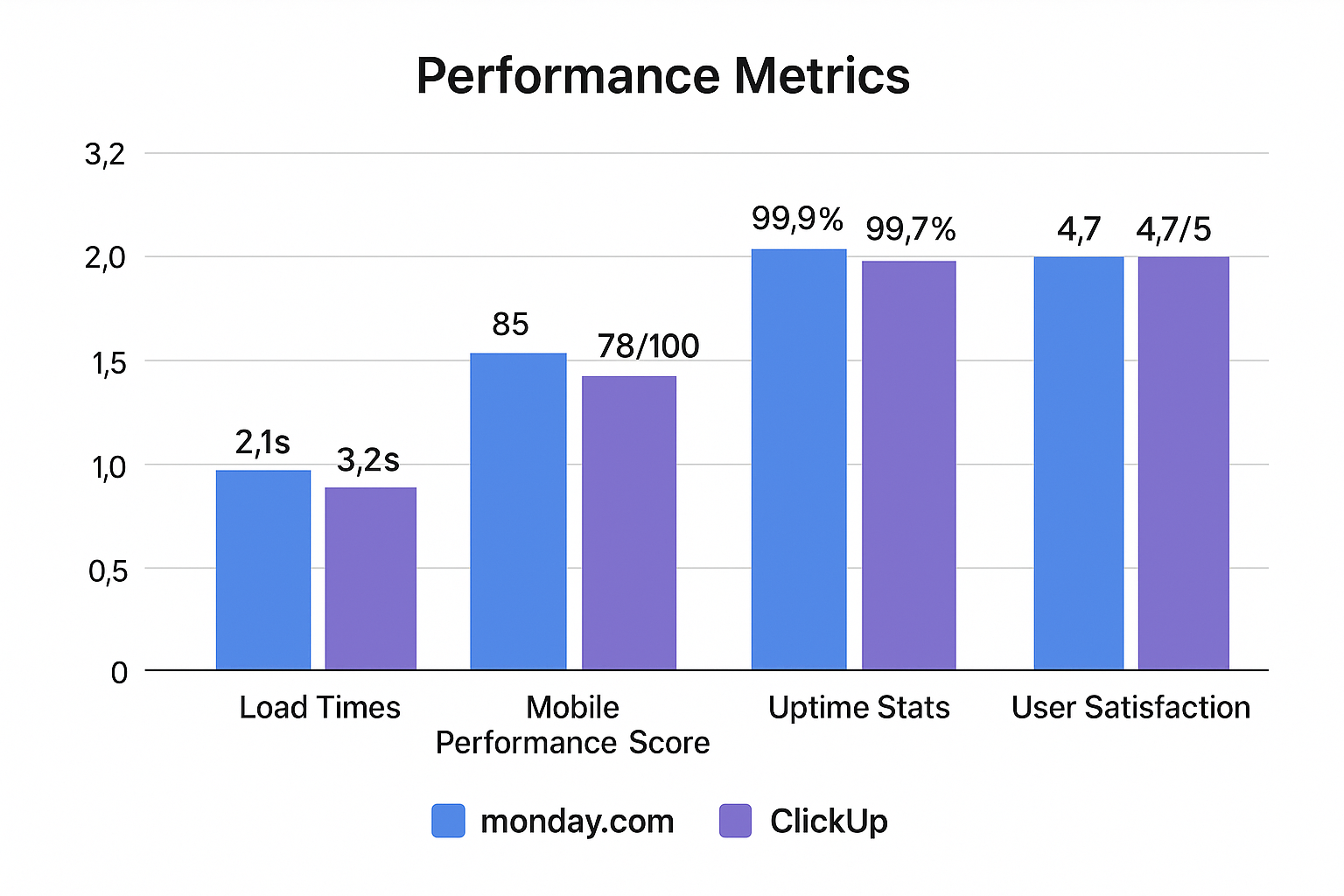
Technical performance directly shapes user productivity and satisfaction, so it’s a make-or-break factor when choosing a platform. Our analysis of load times, mobile performance, uptime, user satisfaction, scalability, and security surfaces meaningful differences in the ClickUp vs Monday.com comparison—differences your team will feel every day.
Load Times and Responsiveness
Page load speed shapes how quickly teams regain context, especially when switching between projects or drilling into task details multiple times per hour. In our tests, Monday.com consistently delivered faster load times, averaging 2.1 seconds for initial page loads and 0.8 seconds for subsequent in-platform navigation. This responsiveness reduces friction during standups, sprint reviews, and executive check-ins where seconds stack into lost momentum.
Several factors contribute to this edge. Monday.com’s optimized architecture and streamlined, visually focused interface minimize render complexity. By foregrounding essential capabilities rather than exposing every configuration layer by default, the platform keeps the DOM lighter and the client path more efficient. Users report that boards remain snappy and responsive even when handling larger projects, broad portfolios, or extensive data sets with many updates occurring in parallel.
ClickUp, by design, offers a feature-rich interface and deep customization, and that breadth requires additional processing. We measured 3.2 seconds for initial loads and 1.4 seconds for internal navigation on typical setups. This delta is most noticeable on slower internet connections, shared Wi-Fi environments, or older devices that struggle with heavier front-end payloads. Importantly, ClickUp 3.0 introduced tangible performance gains: rendering pipelines were refactored, and navigation sequences feel tighter than prior versions. The development team continues to target optimization while preserving the comprehensive feature set that power users value.
What this means for teams: If you prize immediate signal retrieval and low cognitive interruption—e.g., frequent board hopping, rapid status checks, and quick edits—Monday.com’s speed advantage compounds over time. If your workflows depend on advanced configuration and you can accept a bit more latency for that flexibility, ClickUp remains a strong contender, particularly post-3.0.
Mobile Performance and Optimization
Mobile matters more than ever as hybrid work expands and field teams rely on phones for quick updates. Monday.com’s mobile application scores 85/100 on common mobile performance criteria, reflecting a focus on essential functionality and clean visual hierarchy. The app preserves the clarity of the desktop layout, adapts interactions for touch, and avoids burying routine actions. Core mobile use cases—checking project status, updating task progress, and targeted communication—are optimized for fewer taps, faster loads, and better battery efficiency on both iOS and Android.
By contrast, ClickUp’s mobile application scores 78/100. Its goal is to replicate comprehensive desktop power on smaller screens, which advanced users appreciate for depth but which can introduce interface density and heavier payloads. Performance can vary depending on device class and network conditions; older phones or bandwidth-constrained environments accentuate differences that may be negligible on desktop. For power users, the trade-off is acceptable; for teams emphasizing quick, on-the-go interactions, the extra complexity can slow common actions.
Takeaway: If mobile is a first-class channel for your organization—field ops, traveling execs, distributed contributors—validate tap-to-update time in both apps on representative devices and networks. Expect Monday.com to maintain smoother navigation out of the box, with ClickUp offering broader capability if you can tolerate extra steps.
Uptime and Reliability Statistics
Reliability is the backbone of delivery operations. Monday.com maintains an impressive 99.9% uptime record, with most incidents lasting under 30 minutes and typically occurring during scheduled maintenance windows. Just as important, its incident handling receives strong feedback: clear status communications, realistic ETAs, and useful post-incident reports that help PMs and IT coordinate workarounds when they’re needed.
ClickUp posts a 99.9% uptime record—solid and serviceable—but slightly below Monday.com’s baseline. Historically, a handful of higher-profile outages impacted user confidence, though subsequent infrastructure improvements and operational hardening have improved day-to-day stability. The platform’s faster feature cadence occasionally introduces instability alongside innovation, which is attractive for capability growth but requires change-management awareness.
Practical lens: In mission-critical cycles—quarter-end reporting, product launches, or regulatory timelines—the incremental reliability margin may tilt toward Monday.com. Where innovation velocity and new features are prioritized, ClickUp’s pace can be an advantage if paired with good contingency routines.
User Satisfaction and Support Quality
User satisfaction captures the “whole product” experience: interface, capability, stability, and support. Across major review platforms, Monday.com earns 4.7/5, with users praising ease of use, visual design, and notably support responsiveness. Support teams get high marks for clear troubleshooting, precise fixes, and fast follow-through—qualities that matter when deadlines loom.
“Monday.com’s support team is exceptional. They respond quickly and actually solve problems rather than just providing generic responses. It makes a huge difference when you’re trying to meet project deadlines.”
— Amanda Foster, Project Manager at Creative Solutions
ClickUp also holds a 4.7/5 rating, driven by comprehensive features, customization options, and strong value for money. Feedback often notes the learning curve as a headwind to early satisfaction, with support experiences ranging from excellent to uneven during periods of rapid growth and high ticket volume. The company continues to expand support capacity and improve self-serve resources to smooth that variability.
Decision cue: If your user base is mixed in technical comfort and you need predictable, fast resolutions, Monday.com’s support profile reduces risk. If your champions are comfortable troubleshooting and you value expansive features per seat, ClickUp remains competitive.
Scalability and Enterprise Performance
At scale, architecture and governance determine whether performance stays flat or drifts. Monday.com scales smoothly as teams and workspaces multiply, maintaining consistent responsiveness with hundreds of users and thousands of projects. Enterprise customers report stable performance across peak hours, heavy board activity, and large dashboard rollups—important for PMOs driving portfolio visibility.
ClickUp also supports large teams, but performance is more sensitive to extensive customization, deep hierarchies, and complex automation chains. With thoughtful configuration—e.g., reasonable view limits, optimized fields, and measured dashboard widgets—ClickUp performs well; without that care, response times can degrade. The platform rewards orgs that invest in workspace governance and periodic performance audits.
Action advice: If you anticipate rapid scale across heterogeneous departments, stress-test your heaviest workflows. On Monday.com, expect consistent results with less tuning. On ClickUp, plan tuning sprints to keep velocity high.
Security and Compliance Performance
Security and compliance underpin suitability for regulated industries. Monday.com maintains SOC 2 Type II, ISO 27001, and GDPR compliance, with regular security audits and third-party penetration testing. Enterprise security teams give strong marks for documentation, SSO/SCIM, role-based permissions, and audit trails aligned to governance needs.
ClickUp offers similar enterprise-grade certifications and controls, with ongoing investments in monitoring and secure SDLC practices. The platform’s faster release cycle means security reviews and regression testing must remain disciplined, which ClickUp has continued to formalize as part of its maturation.
Bottom line on security: Both vendors meet modern enterprise expectations; choose based on your specific controls (e.g., data residency, retention policies, DLP workflows) and the rigor of your internal audit requirements.
Specific Use Cases: Which Tool Fits Your Team?
Choosing between ClickUp and Monday.com isn’t just a feature shootout—it’s a fit decision. Your workflows, team makeup, and stakeholder expectations determine which platform accelerates delivery versus adds overhead. Below, we map real-world scenarios to each tool’s strengths so you can align platform choice with how your team actually works today—and where you’re headed next.
Remote Teams: Collaboration Across Distances
Remote work has fundamentally changed how teams collaborate, making project management platforms essential for maintaining productivity and connection. Both Monday.com and ClickUp offer remote-friendly features, but their effectiveness varies based on team structure and communication preferences.
Monday.com excels for remote teams that prioritize clear communication and visual project tracking. The platform’s color-coded status system allows team members to quickly assess project health without requiring detailed status meetings. The visual boards provide immediate understanding of who’s working on what, reducing the need for constant check-ins that can disrupt deep work. Use Monday.com when you want fast clarity and fewer meetings.
The platform’s update system creates a centralized communication hub that keeps conversations connected to specific tasks and projects. Remote team members can stay informed about project developments without cluttering email inboxes or requiring attendance at every meeting. The clean interface reduces cognitive load, which is particularly important for remote workers managing multiple projects simultaneously. That simplicity translates into quicker onboarding and more consistent adoption.
“Monday.com transformed our remote team’s productivity. The visual boards give everyone instant visibility into project status, and the update system keeps communication organized and contextual.”
— Michael Chen, Remote Team Lead at DistributedTech
ClickUp offers more comprehensive remote collaboration tools, including built-in chat, document collaboration, and goal tracking features. The platform’s extensive customization options allow remote teams to create workflows that match their specific communication and collaboration preferences. Choose ClickUp if you want an all-in-one collaboration hub and you’re ready to configure it to your operating model.
However, ClickUp’s complexity can create challenges for remote teams, particularly when onboarding new members or collaborating with external stakeholders. The learning curve can be more pronounced in remote settings where informal training and peer support are limited. Plan for structured onboarding and clear governance if you go this route.
Agile Teams: Sprint Management and Development Workflows
Agile development teams require specialized features for sprint planning, backlog management, and velocity tracking. The platforms approach agile methodology support differently, with varying degrees of native functionality and third-party integration requirements.
ClickUp provides superior native agile features, including sprint planning tools, burndown charts, velocity tracking, and story point estimation. The platform’s development-focused features allow agile teams to manage their entire workflow within a single tool, reducing the need for specialized development platforms. If you live and breathe sprint metrics, ClickUp keeps the data where the work happens.
The platform’s integration with development tools like GitHub, GitLab, and Jira creates smooth workflows that connect project management with code development. Agile teams can track feature development from initial planning through deployment without switching between multiple tools, tightening feedback loops and release predictability.
“ClickUp’s agile features are genuinely helpful for our development process. The sprint planning and burndown charts give us insights that help us improve our velocity and predictability.”
— Sarah Kim, Scrum Master at InnovateApp
Monday.com offers basic agile support through timeline views and sprint boards but lacks some advanced features that dedicated agile teams require. The platform works well for teams practicing lightweight agile methodologies or those that combine agile development with traditional project management approaches, especially when stakeholder visibility and ease of understanding are top priorities.
For teams requiring comprehensive agile features, ClickUp represents the better choice despite its complexity. However, teams that prioritize simplicity and stakeholder communication may find Monday.com’s approach more suitable for their agile implementation. Match the tool to the maturity of your agile practice.
Creative Agencies: Visual Workflows and Client Communication
Creative agencies require project management tools that support visual workflows, client collaboration, and creative asset management. The platforms approach creative work differently, with implications for both internal team productivity and client relationships.
Monday.com’s visual approach aligns naturally with creative workflows. The platform’s color-coded boards and timeline views help creative teams track campaign development, approval processes, and launch activities. The clean interface creates professional impressions when sharing project status with clients, which reduces friction and builds trust during reviews.
The platform’s file sharing and proofing capabilities support creative collaboration, though they lack some advanced features that specialized creative tools provide. Creative teams often use Monday.com for project coordination while relying on dedicated tools like Adobe Creative Cloud or Figma for actual creative work. This split keeps production in best-of-breed apps and status tracking in a tool clients can read at a glance.
ClickUp offers more comprehensive creative project features, including advanced file management, detailed time tracking for billing purposes, and custom fields for tracking creative specifications. The platform’s form functionality can capture creative briefs and automatically create project structures, which streamlines intake and reduces manual setup.
However, ClickUp’s interface complexity can hinder creative teams that prefer visual simplicity. Creative professionals often work with clients and stakeholders who need quick understanding of project status, and ClickUp’s feature-dense interface can create communication barriers. If client-facing clarity is paramount, weigh the cost of that complexity before committing.
Software Teams: Development Project Management
Software development teams have unique requirements for project management, including integration with development tools, technical documentation management, and release planning capabilities.
ClickUp provides more comprehensive software development features, including native Git integration, code review workflows, and deployment tracking. The platform’s technical features allow development teams to manage their entire workflow from initial planning through production deployment, consolidating status, artifacts, and discussions in one place.
The platform’s API and webhook capabilities enable deep integration with development toolchains, creating automated workflows that connect project management with continuous integration and deployment processes. This reduces manual handoffs and enforces consistency across environments, from staging to production.
Monday.com offers basic development project support through timeline views and integration with popular development tools. The platform works well for development teams that prioritize stakeholder communication and project visibility over comprehensive technical features. If your engineers already live in GitHub or GitLab and you need leadership-friendly status views, Monday.com covers the last mile cleanly.
Software teams must balance technical functionality with stakeholder communication needs. Teams that work closely with non-technical stakeholders may find Monday.com’s clear visual communication more valuable than ClickUp’s comprehensive technical features. Choose based on whether your bottleneck is engineering throughput or executive alignment—and design your rollout accordingly.
Migration Considerations: Switching Platforms Successfully
Switching project management platforms is a high-leverage move—and a risky one if you underplan. A successful migration balances data fidelity, setup complexity, training, and change management so your team gains capability without losing momentum. Below, we unpack what it truly takes to move between tools in the ClickUp vs Monday.com context, including data migration, onboarding strategy, and the real costs to expect.
Data Migration and Setup Complexity
Migrating from existing project management tools requires careful planning and consideration of data transfer capabilities, setup complexity, and team training requirements. Treat it like a mini-program: scope sources, define mappings, pilot, then scale.
Monday.com provides guided migration assistance and data import tools that simplify the transition from popular platforms like Asana, Trello, and Excel. The platform’s straightforward structure makes it easier to map existing workflows to Monday.com’s board-based approach, preserving key fields (owners, statuses, dates) while reducing surprises. This clarity accelerates the initial cutover because teams recognize the layout immediately, minimizing rework and confusion.
The platform’s quick setup process allows teams to become productive rapidly, minimizing the disruption typically associated with tool migrations. Most teams report achieving full productivity within two weeks of migration, as boards, views, and basic automations can be reproduced quickly. This speed matters when you’re under delivery pressure and can’t afford a prolonged dual-tool period.
ClickUp offers more comprehensive migration tools and services, including dedicated migration specialists for enterprise customers. The platform’s extensive customization options allow teams to recreate complex workflows from previous tools—nested hierarchies, granular custom fields, multi-step automations—which is invaluable if your prior setup was highly tailored. However, that same flexibility can extend the migration timeline, especially when you’re normalizing data across multiple teams or legacy workspaces.
Teams migrating to ClickUp should plan for longer implementation periods and invest in comprehensive training to realize the platform’s full potential. In practice, the migration complexity often correlates with the sophistication of workflows that teams want to implement; the more bespoke the process, the more time you’ll need for mapping, validation, and change control.
What to do next: Inventory current fields, statuses, and automations; define a canonical schema; run a pilot import with one representative team; document gaps; then iterate before organization-wide rollout. For migrating from Monday.com to ClickUp (or vice versa), create a crosswalk that maps statuses, custom fields, and permissions 1:1 to avoid downstream cleanup.
Training and Change Management
Successful platform adoption requires effective training and change management strategies that address both technical skills and workflow adjustments. Tools don’t fail—rollouts do.
Monday.com’s intuitive interface reduces training requirements, with most team members achieving basic proficiency within days. The platform’s visual design and consistent navigation patterns minimize the learning curve for users transitioning from other tools. Quick wins—template boards, color-coded statuses, and simple automations—build momentum and encourage adoption across non-technical teams.
ClickUp requires more comprehensive training programs due to its extensive feature set and customization options. Plan for multi-week training, role-based curricula (admins, PMs, contributors, execs), and ongoing support so users can use advanced capabilities like conditional automations, custom view hierarchies, and sprint tooling. Establish governance early: naming conventions, folder/space structure, field catalogs, and automation guardrails to prevent configuration sprawl.
What to do next: Pair formal training with embedded champions. Run “office hours,” publish a living playbook, and measure adoption via leading indicators (login cadence, item updates, automation success rates). Reinforce behaviors you want to scale.
Cost Implications of Migration
Successful platform adoption requires effective training and change management strategies that address both technical skills and workflow adjustments. Tools don’t fail—rollouts do.
Monday.com’s intuitive interface reduces training requirements, with most team members achieving basic proficiency within days. The platform’s visual design and consistent navigation patterns minimize the learning curve for users transitioning from other tools. Quick wins—template boards, color-coded statuses, and simple automations—build momentum and encourage adoption across non-technical teams.
ClickUp requires more comprehensive training programs due to its extensive feature set and customization options. Plan for multi-week training, role-based curricula (admins, PMs, contributors, execs), and ongoing support so users can use advanced capabilities like conditional automations, custom view hierarchies, and sprint tooling. Establish governance early: naming conventions, folder/space structure, field catalogs, and automation guardrails to prevent configuration sprawl.
What to do next: Pair formal training with embedded champions. Run “office hours,” publish a living playbook, and measure adoption via leading indicators (login cadence, item updates, automation success rates). Reinforce behaviors you want to scale.
Honest Assessment: Platform Limitations
Every platform has trade-offs. A balanced ClickUp vs Monday.com review should surface the edges—where each tool strains under real workloads or organizational constraints—so you can plan mitigations before rollout. Below are the most relevant limitations we’ve seen teams encounter, with plain-English context and practical ways to work around them.
Monday.com Limitations
Storage Limitations
The platform’s storage restrictions can be problematic for teams handling large files or extensive documentation. Creative agencies managing hi-res assets and software teams storing heavy artifacts may hit caps faster than expected.
Mitigate: Offload to cloud storage (e.g., Google Drive, OneDrive, Dropbox) and link files; standardize retention policies; store only “finals” in Monday.com while versioning lives in your DAM or repo.
Advanced Feature Gaps
Monday.com lacks some advanced features power users expect—most notably comprehensive time tracking on lower-tier plans, more granular reporting, and sophisticated automation constructs (e.g., complex conditional logic across multiple boards).
Mitigate: Start on Pro (or higher) if time tracking/reporting are critical; supplement reporting with BI tools (Sheets/Looker Studio/Power BI); keep automations simple and push complex flows to Zapier/Make where needed.
Pricing for Small Teams
The minimum user requirement and premium pricing can pinch small teams or solo consultants who need advanced features without enterprise budgets.
Mitigate: Model a 12-month TCO that includes faster adoption benefits; consider guest access for light collaborators; if the math still doesn’t work, pilot a phased rollout (core team first) before scaling.
Customization Constraints
While Monday.com offers meaningful configuration (boards, custom fields, views), it’s still more opinionated than ClickUp. Teams with highly specialized workflows can feel boxed in when modeling edge cases or deep hierarchies.
Mitigate: Standardize on 80/20 workflows inside Monday.com and keep exceptions in adjacent tools (e.g., dev repos, CRMs); use integrations to bridge gaps rather than forcing intricate process logic into boards.
ClickUp Limitations
Complexity and Learning Curve
The extensive options that make ClickUp powerful can overwhelm new users and slow adoption. Without deliberate governance, teams may struggle to choose optimal configurations, burning time on experimentation.
Mitigate: Create an information architecture playbook (Spaces/Folders/Lists), enforce naming conventions, and run role-based training; appoint workspace admins to gate high-impact changes.
Performance Variability
A feature-rich interface and deep customization can impact responsiveness—especially on older devices or slower networks. Heavier dashboards, dense views, and layered automations compound the effect.
Mitigate: Optimize views (limit columns/widgets), archive stale data, schedule heavy automations off-peak, and test on representative hardware before wider rollout.
Support Consistency
While ClickUp offers strong docs and an active community, support quality can be inconsistent during high-growth periods, leading to longer resolution times for tricky issues.
Mitigate: Build internal champions; document known patterns; use community solutions for common workflows; escalate critical tickets with clear repro steps and logs to speed triage.
Feature Overload
The abundance of features can tempt teams into over-engineering their PM layer—adding fields, statuses, and automations that reduce agility and clarity.
Mitigate: Adopt a “minimum viable workflow” principle; review fields/statuses quarterly; sunset unused automations; measure time-to-update and error rates to keep the system lean.
Interface Overwhelm
A dense interface can create communication barriers with non-technical stakeholders and clients. For quick status checks or executive reviews, the signal can get buried.
Mitigate: Build simplified, read-only dashboards for stakeholders; use client portals with constrained views; standardize card layouts and saved filters for “at-a-glance” comprehension.
How Delverise Can Help
Choosing the right tools and strategy is only the first step — executing effectively is what separates high-growth teams from the rest. At Delverise, we help B2B SaaS companies build and optimize their revenue engines, from tool selection and implementation to full GTM execution.
Whether you’re evaluating monday vs clickup, building your sales tech stack, or scaling your go-to-market operations, our team combines RevOps strategy with hands-on engineering to deliver measurable results.
Ready to build a revenue engine that actually scales? Reach out to Delverise about your GTM strategy.
Making the Right Choice
The “best” platform isn’t universal—it’s contextual. Your team’s technical comfort, rollout timeline, stakeholder needs, and integration landscape determine whether Monday.com or ClickUp moves work faster. Use the guidance below to map real priorities to real outcomes in this ClickUp vs Monday.com decision.
When to Choose Monday.com
Monday.com is the optimal choice for teams that prioritize user experience, rapid adoption, and stakeholder communication over exhaustive customization.
Ideal for:
- Teams that need quick implementation and minimal training requirements
- Organizations with non-technical stakeholders who need clear project visibility
- Creative agencies and marketing teams that value visual project communication
- Companies that prefer premium solutions with excellent customer support
- Remote teams that need clear, visual collaboration tools
- Organizations that prioritize platform reliability and consistent performance
Best-fit scenarios:
- Marketing campaign management and creative project coordination
- Client-facing project management where visual clarity matters
- Cross-functional teams with varying technical skill levels
- Organizations that value simplicity over extensive customization
- Teams that need reliable integrations with mainstream business tools
Monday.com’s opinionated, visually clear design reduces cognitive load, speeds onboarding, and makes status obvious to anyone—ideal when you want momentum and executive-ready visibility from day one.
When to Choose ClickUp
ClickUp provides superior value for teams willing to invest time in customization and training to unlock comprehensive capabilities.
Ideal for:
- Budget-conscious teams that need extensive features at lower costs
- Technical teams that can handle complexity and configuration
- Agile development teams needing native sprint management and dev-tool integration
- Organizations with specialized workflows requiring extensive customization
- Teams that want to consolidate multiple tools into a single platform
Best-fit scenarios:
- Software development project management with agile methodologies
- Complex workflows that require extensive automation and customization
- Teams with dedicated PM/ops resources who can optimize configuration
- Organizations needing comprehensive time tracking and profitability analysis
- Companies requiring extensive integration with specialized or niche software
ClickUp’s breadth—custom fields, advanced automations, dev-focused features—shines when you can govern setup and train users, trading simplicity for power.
Decision Framework
To make the optimal choice for your organization, weigh these factors and score each platform against them:
1. Team Technical Comfort Level: How comfortable is your team with complex software and extensive customization options?
2. Implementation Timeline: Do you need rapid deployment and immediate productivity, or can you invest time in comprehensive setup and training?
3. Stakeholder Communication Needs: How important is visual clarity and ease of understanding for non-technical stakeholders?
4. Budget Constraints: What’s your total budget for project management software, including implementation and training costs?
5. Feature Requirements: Do you need foundational project management or comprehensive workflow automation and customization?
6. Integration Needs: What other tools does your team use, and how important are deep, reliable integrations?
7. Growth Plans: How will your team size and complexity change over the next 2–3 years?
Action tip: Build a simple scorecard (1–5) for each factor, run a two-week pilot in both platforms, and compare time-to-first-value, update speed, error rates, and stakeholder comprehension. The platform that wins your scorecard—and your pilot—wins your roadmap.
The Verdict for 2026
After a full-stack review—features, pricing, user experience, real-world performance, and scalability—the ClickUp vs Monday.com decision comes into focus. The question isn’t just “which tool has more features,” but “which tool helps your team move faster with fewer headaches?” Here’s the clear, practical takeaway for 10–200 person organizations in 2026.
Monday.com emerges as the winner for most teams in 2026. While ClickUp offers impressive features and strong value, Monday.com’s superior user experience, faster adoption, and reliable performance make it the more practical choice for the majority of 10–200 person organizations.
The decision ultimately depends on your team’s priorities and resources. Monday.com’s premium pricing buys simplicity, reliability, and excellent support that can accelerate team productivity and reduce administrative overhead. ClickUp’s lower costs and extensive features appeal to teams that can invest time in customization and training to unlock the platform’s full potential.
For most project managers and team leaders evaluating these platforms in 2026, Monday.com’s streamlined approach delivers better long-term results despite the higher cost. The platform’s focus on user experience and stakeholder communication creates sustainable productivity gains that justify the premium pricing.
However, technical teams with specific requirements for agile development features, extensive customization, or strict budget constraints may find ClickUp’s comprehensive approach more suitable for their needs.
The project management software landscape continues to evolve rapidly, with both platforms investing heavily in new features and improvements. Regardless of which platform you choose, the key to success lies in thoughtful implementation, comprehensive training, and ongoing optimization of workflows to match your team’s specific needs and goals.
Get Ready for the Next Step
Need a second set of eyes? Book a tune-up to validate your Monday.com or ClickUp structure, permissions, and reporting.
Related Articles
- How Marketing Operations Can Help Your Startup Grow
- What Is GTM Engineering?
- How to Build a Go-to-Market Strategy
- Why Marketing Automation Is A Game Changer