←Back to blog
Outbound & Pipeline EngineeringPlaybookMay 20, 202625 min read
How to Do Cold Outreach on LinkedIn: 8-Step System for 50%+ Response Rates [2026]
Master LinkedIn cold outreach with an 8-step system that drives 50%+ connection acceptance and 30%+ response rates through invitation-based selling and precise ICP targeting.
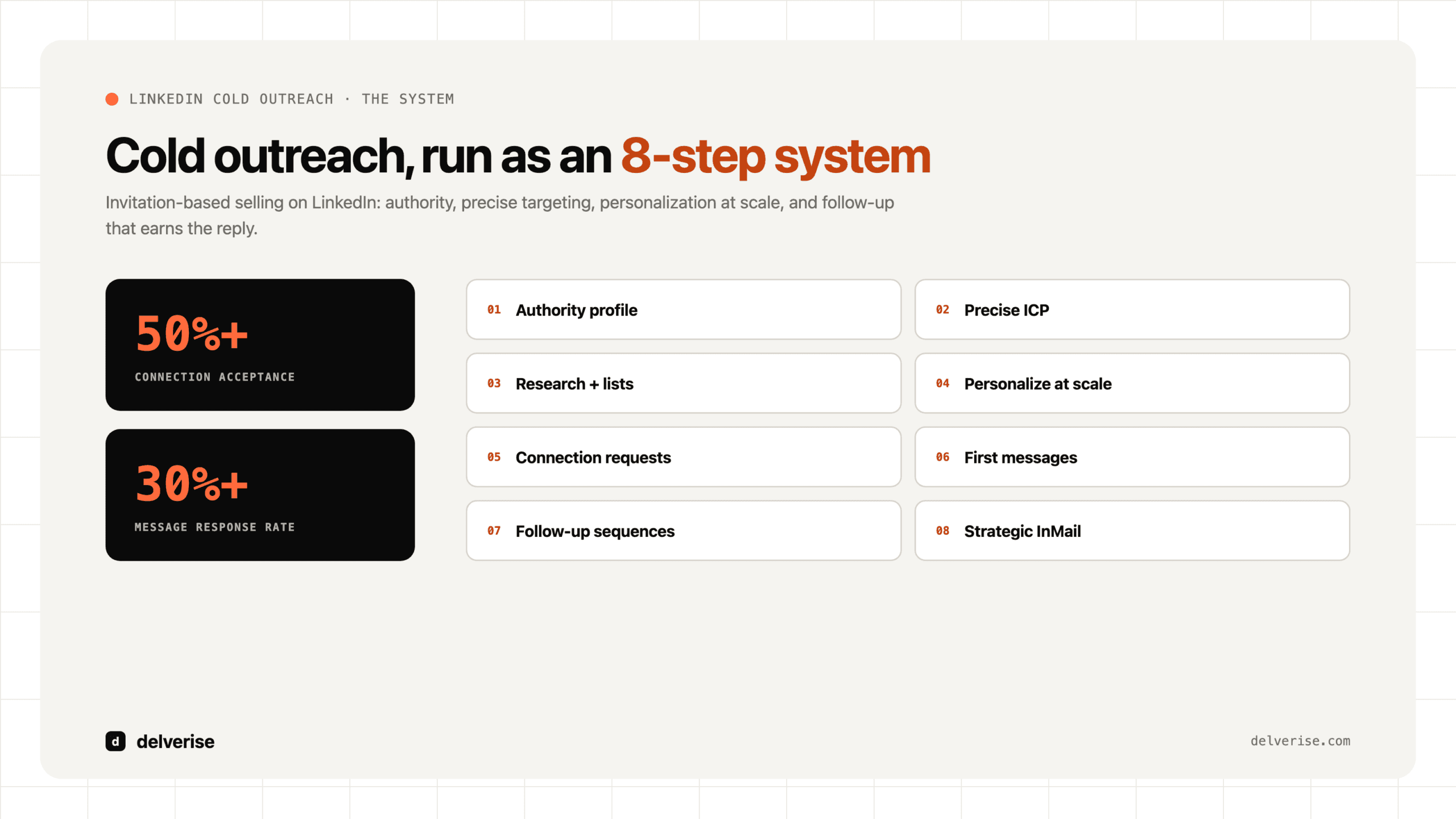
Answer: Effective cold outreach on LinkedIn is a structured outbound system, not a set of one-off connection requests. The system starts with a credible profile, a precise ICP, account research, segmented lists, personalized connection requests, conversation-first messages, thoughtful follow-up, and measurement that shows which conversations become qualified pipeline.
- Targeting determines whether the right accounts enter the workflow.
- Personalization shows the prospect why the message is relevant now.
- Cadence keeps follow-up useful without becoming noise.
- Measurement connects connection rate, reply rate, meeting rate, and pipeline quality.
What an Effective LinkedIn Outreach System Looks Like
Most LinkedIn outreach runs like a high-volume email blaster: generic pitches sent to broad audiences with little account fit or context. That interruption-based approach damages sender reputation and delivers poor results. When you evaluate a LinkedIn motion for your team, the marker of a system worth funding is invitation-based selling, where value, personalization, and systematic execution combine to generate predictable revenue. In 2026, that is the standard to hold any outreach program to.
The channel justifies the attention. LinkedIn carries over 1.1 billion users and 67 million companies, which makes it the digital epicenter of professional life. Four out of five LinkedIn users drive business decisions, so it ranks as the most target-rich environment available to B2B sales teams. A well-built system on this channel consistently outperforms traditional B2B sales outreach, with an average response rate of 10.3%, more than double the 5.1% average for cold email.
According to HubSpot’s State of Marketing report, ‘LinkedIn is 277% more effective at generating leads than Facebook and Twitter,’ a gap that widens once teams adopt invitation-based selling. For delverise clients, that lift is what moves LinkedIn from a supporting channel to the primary revenue engine.
Those numbers depend on execution quality. The systems that reach them send the right messages to the right people at the right time, with message volume following from sharp targeting. This guide breaks down the 8-step system behind 50%+ connection acceptance rates and 30%+ response rates, so you can judge whether your current motion, or a partner’s, is built to the same standard. Teams that operate it correctly see 85% higher response rates as a repeatable result.
Step 1: Build Your LinkedIn Authority Foundation
Before you send a single connection request, you must earn the right to be heard. Your LinkedIn profile is the foundation of your entire outreach strategy. In the 3 seconds it takes a prospect to scan your profile, they make a critical decision: accept, ignore, or delete. A well-optimized profile positions you as a trusted advisor.
Profile Optimization Checklist
- Professional Headshot: Your photo should be high-resolution, well-lit, and feature a professional, approachable expression. Avoid distracting backgrounds or casual attire.
- Headline Formula: Don’t just list your job title. Use a value-driven formula:
[Your Role] at [Your Company] | Helping [Your ICP] achieve [Their Goal] with [Your Solution]. For example: “SDR at GrowthCorp | Helping SaaS startups reduce churn by 20% with predictive analytics.” - About Section Framework: Structure your summary around a problem-solution-proof narrative. Start with the core problem your prospects face, introduce your solution, and provide social proof (case studies, testimonials, metrics).
- Experience Section: Optimize your job descriptions to highlight achievements rather than responsibilities. Use quantifiable results (e.g., “Increased qualified leads by 45% in Q3”).
- Skills & Endorsements: Feature skills that align with your expertise and your ICP’s needs. Proactively seek endorsements from colleagues and clients.
- Featured Section: Use this space to showcase your best content, case studies, and company resources. It’s your personal content hub.
Figure 1: LinkedIn Profile Optimization Checklist – Before and After Comparison

Content Strategy for Authority Building
An optimized profile is static; a content strategy brings it to life. Consistently sharing valuable content transforms your profile from a resume into a resource. Aim to post 3-5 times per week, focusing on content pillars that address your ICP’s pain points and goals. Engage with other users’ content to increase your visibility and build relationships. The goal is to be a trusted advisor who educates and informs, not a salesperson who pitches.
[Tool Integration: LinkedIn profile optimization tools like CrystalKnows for personality insights]
Step 2: Define Your Ideal Customer Profile with Precision
Clarity on your Ideal Customer Profile (ICP) is the single most important factor in achieving high response rates. The difference between a 10% and a 50% response rate is often the quality of your targeting. A well-defined ICP ensures that every message you send is relevant to the recipient.
Research from McKinsey confirms what high-performing SDR teams already know: ‘B2B companies that personalize at the account level generate 40% more revenue from those activities than companies that don’t.’ Precision on ICP is not a nice-to-have layered on top of volume; it is the variable that determines whether a LinkedIn motion clears the 30% response-rate bar.
ICP Framework Components
- Demographic Criteria: Company size, industry, revenue, and geographic location.
- Firmographic Signals: Growth stage (e.g., Series B, post-IPO), funding announcements, and technology stack.
- Psychographic Characteristics: Key pain points, business goals, strategic initiatives, and challenges.
- Behavioral Indicators: Recent hiring sprees, company expansion news, and content engagement on LinkedIn.
Account Tiering Strategy
Not all prospects are created equal. A tiered approach allows you to allocate your time and resources effectively:


- Tier 1 (High-Value Accounts): White-glove personalization. These are your dream clients, and they deserve in-depth, manual research.
- Tier 2 (Mid-Value Accounts): Template-driven with customization. Use a proven template but add a layer of manual personalization.
- Tier 3 (Volume Accounts): Smart automation. Leverage automation tools to send personalized messages at scale using dynamic fields.
Figure 2: Ideal Customer Profile (ICP) Criteria Mapping Framework
Figure 3: Account Tiering Strategy – Three-Tier Approach
[Actionable Framework: ICP Definition Worksheet]
[Tool Integration: Clay for ICP data enrichment and firmographic signal tracking]
Step 3: Advanced Prospect Research and List Building
With a clear ICP, the next step is to build a high-quality prospect list. LinkedIn Sales Navigator is indispensable for this, but true mastery lies in going beyond basic filters. Advanced search techniques and data enrichment separate top performers from the rest.
Boolean Search Strategies
Boolean search allows you to create highly specific queries using operators like AND, OR, and NOT. This is essential for filtering out irrelevant prospects.

- AND: Narrows your search.
"sales manager" AND "saas"will only show profiles containing both terms. - OR: Broadens your search.
"vp of sales" OR "sales director"will show profiles containing either term. - NOT: Excludes terms.
"marketing manager" NOT "assistant"will exclude profiles with the title “assistant.” - Parentheses: Group terms for complex queries.
("vp of sales" OR "sales director") AND (saas OR technology)
Figure 4: LinkedIn Boolean Search Examples with Operators
Sales Navigator Filters Deep Dive
Sales Navigator offers over 50 advanced filters. Key filters to master include:
- Job Titles & Seniority Levels: Target specific decision-makers.
- Company Headcount & Growth: Focus on companies that match your ICP’s size and growth trajectory.
- Posted on LinkedIn: Identify active users who are more likely to respond.
- Years in Current Position: Time your outreach to coincide with job changes or anniversaries.
- Groups & School Alumni: Leverage commonalities for warmer outreach.
Data Enrichment and Validation
Once you have a base list from Sales Navigator, the next step is to enrich it with additional data points. This is where tools like Clay come in, allowing you to waterfall enrichment across dozens of sources to find email addresses, phone numbers, and technographic data. This enriched data is the fuel for your personalization engine.
List Segmentation and Organization
Building a prospect list is only half the battle. Organizing and maintaining it is equally critical. A well-structured list enables targeted messaging and efficient follow-up workflows. Start by creating saved searches in Sales Navigator for each segment of your ICP. This allows you to refresh your lists regularly as new prospects match your criteria. Next, build prospect lists in your CRM with clear tagging and categorization strategies. Use tags like “Tier 1,” “Recent Funding,” “Hiring,” or “Content Engaged” to segment prospects based on their characteristics and behaviors. This segmentation enables you to deploy different messaging strategies for different groups. Finally, implement list refresh and maintenance automation to ensure your data stays current. Set up weekly or monthly automated workflows that check for job changes, company updates, and data decay, then update your CRM accordingly.
[Actionable Framework: Advanced Search Strategy Builder]
[Tool Integration: LinkedIn Sales Navigator, Clay, Apollo.io]
Step 4: Master Personalization at Scale
The personalization paradox (how to be deeply personal with hundreds of prospects) is the biggest challenge in modern outreach. The solution lies in a tiered system and AI-powered research workflows. Personalized messages receive 72% higher response rates, making this a critical step.
Personalization Tier System
- Tier 1 (High-Value): 5+ minutes of manual research per prospect. Focus on their recent activity, company news, and personal interests.
- Tier 2 (Mid-Value): 2-3 minutes of automated + manual research. Use tools to gather data, then add a human touch.
- Tier 3 (Volume): Automated personalization fields only. Use dynamic tokens for name, company, and title.
Personalization Data Points
- Recent LinkedIn activity (posts, comments, shares)
- Company news (funding, product launches, expansion)
- Job changes and promotions
- Mutual connections or groups
- Content they’ve engaged with
- Technology stack and tools they use
AI-Powered Research Workflows
This is where you can gain a significant competitive advantage. Using tools like Clay’s Claygent and the OpenAI API, you can automate the research process. For example, you can build a workflow that:


- Scrapes a prospect’s recent LinkedIn posts.
- Uses AI to identify the main topics of their posts.
- Generates a personalized opening line based on their content.
This allows you to achieve Tier 1 levels of personalization at a Tier 3 scale.
Figure 5: Personalization Tier System – Balancing Quality and Scale
Figure 6: AI-Powered Research Workflow for LinkedIn Outreach
Scalable Personalization Framework
The key to personalization at scale is creating a framework that combines automation with human oversight. Start by creating personalization tokens in your outreach tools: these are dynamic fields that automatically populate with prospect-specific data like {{FirstName}}, {{Company}}, {{JobTitle}}, or {{RecentPost}}. Next, implement dynamic content insertion based on data fields. For example, if a prospect works in healthcare, your message automatically references healthcare-specific pain points. Use conditional logic for different prospect segments. Tier 1 accounts get one template, Tier 2 another, and Tier 3 a third variation. Finally, establish fallback strategies when data is incomplete. If you don’t have a recent post to reference, your template should gracefully fall back to a company-level insight instead of leaving a blank field.
Automation Without Losing the Human Touch
The most common mistake in scaling personalization is over-automating. Knowing when to personalize manually versus automatically is critical. For Tier 1 accounts (high-value prospects), always conduct manual research and write custom messages. For Tier 2 accounts, use automation to gather research but manually review and customize the final message. For Tier 3 accounts, full automation is acceptable as long as quality thresholds are met. Establish quality thresholds for automated personalization. If your AI-generated personalization scores below 7/10 on relevance, flag it for manual review. Implement review and approval workflows for high-value accounts to ensure no message goes out without human oversight. Finally, continuously A/B test personalization approaches to identify which data points and messaging angles drive the highest response rates.
[Actionable Framework: Personalization Research Checklist]
[Tool Integration: Clay (Claygent), OpenAI API, N8n for automation]
Step 5: Craft High-Converting Connection Requests
The 300-character limit on LinkedIn connection requests makes every word count. This is your first direct interaction with a prospect, and it sets the tone for the entire relationship. The goal is to achieve a connection acceptance rate of over 50%, which is the benchmark for top performers.
High-Converting Connection Request Formula
- Hook: Start with a specific, relevant observation. This shows you’ve done your research.
- Common Ground: Mention a shared connection, interest, or challenge.
- Soft Value Proposition: Briefly hint at how you might be able to help them.
- Low-Pressure Ask: End with a simple request to connect.
Connection Request Templates by Scenario
- Content Engagement: “Hi [Name], I saw your recent post on [topic] and was impressed by your insights on [specific point]. I’m also passionate about this space and would love to connect.”
- Mutual Connection: “Hi [Name], I see we both know [Mutual Connection]. I’m reaching out because I’m working on [your project/area] and noticed your expertise in [their area]. Would be great to connect.”
- Company News/Trigger Event: “Hi [Name], congratulations on [Company News, e.g., your recent funding round]. I’ve been following [Your Company]’s journey and am excited to see your growth. Would love to connect and follow along.”
- Shared Group: “Hi [Name], I saw you’re also a member of the [Group Name] on LinkedIn. I’m always looking to connect with fellow [experts/professionals] in this space. Would be great to connect.”
Figure 7: High-Converting Connection Request Formula Breakdown

What NOT to Do in Connection Requests
- Never use the generic “I’d like to add you to my network.”
- Never pitch your product or service.
- Never ask multiple questions.
- Never fake familiarity.
A/B Testing Connection Request Approaches
The only way to know what truly works for your ICP is to test systematically. Implement a testing framework that compares different connection request approaches head-to-head. Start with a minimum sample size of 100 prospects per variation to ensure statistical significance. Test one variable at a time: length (short vs. long), tone (formal vs. casual), personalization depth (generic vs. highly specific), or opening hook (question vs. observation). Track your connection acceptance rate for each variation and measure how long it takes prospects to accept. After reaching your sample size, analyze the results and implement the winning approach. Then, start testing the next variable. This continuous optimization loop ensures your connection requests improve over time rather than stagnate.
[Tool Integration: LinkedIn connection tracking spreadsheets or CRM]
Step 6: Send First Messages That Start Conversations
Once a prospect accepts your connection request, the clock starts ticking. The transition from connection to conversation is critical. Send a first message that is value-driven and starts a dialogue, not a monologue. A 30%+ response rate is a strong indicator of effective messaging.
High-Converting First Message Structure
- Gratitude: A brief “Thanks for connecting.”
- Personalized Observation: Reference something specific from their profile or recent activity.
- Value Proposition or Insight: Offer a helpful resource, insight, or observation. This should be genuinely useful to them, whether they buy from you or not.
- Soft Call-to-Action (CTA): End with a low-commitment question or offer.
First Message Templates by Goal
- Value-First Approach: “Thanks for connecting, [Name]. I saw your post on [topic] and thought you might find this report on [related topic] interesting. It has some great data on [specific insight]. Happy to share it with you.”
- Insight Sharing: “Thanks for connecting, [Name]. I noticed you’re in the [industry] space. We recently compiled some data showing that companies in your industry are struggling with [challenge]. Have you found that to be the case?”
- Problem-Solution Fit: “Thanks for connecting, [Name]. I saw on your profile that you’re responsible for [their responsibility]. Many leaders in your role are struggling with [problem]. We helped a similar company [Social Proof] achieve [result]. Is this something you’re focused on?”
Figure 8: High-Converting First Message Structure with Annotations

Timing and Format
Send your first message within 24 hours of the connection. Keep it concise (150-300 characters) and easy to read with short paragraphs. Avoid links in the first message, as they can trigger spam filters and reduce response rates.
[Tool Integration: Smartlead, Instantly for multi-channel follow-up]
Step 7: Build Strategic Follow-Up Sequences
The fortune is in the follow-up. Most sales professionals give up after one or two attempts, yet a systematic follow-up strategy can increase response chances by over 25%. The key is to add value with every touchpoint instead of just “checking in.”
Optimal Follow-Up Cadence
A patient, value-driven cadence is most effective. Avoid the temptation to follow up every day, which can feel aggressive and lead to being ignored or blocked.

- Follow-Up 1 (5-7 days): A gentle reminder that provides a new piece of value.
- Follow-Up 2 (14 days): Approach from a different angle, perhaps with a relevant case study or social proof.
- Follow-Up 3 (21 days): A more direct but still helpful message, focusing on a specific pain point.
- Follow-Up 4 (35 days): The “break-up” message. A final, polite attempt that acknowledges the timing might not be right and leaves the door open for future conversation.
Figure 9: Optimal Follow-Up Sequence Cadence Over 35 Days
What Makes Follow-Ups Different from Spam
The line between persistent and annoying is thin, but clear. Spam is repetitive, generic, and self-serving. Strategic follow-ups are spaced appropriately, add new value each time, and demonstrate genuine interest in solving the prospect’s problems. Each follow-up should introduce a new angle, resource, or insight, never just “checking in” or repeating the same pitch. Respect the prospect’s time by keeping messages concise and actionable. Most importantly, always provide an easy exit. Your break-up message should acknowledge that timing might not be right and give them permission to disengage without guilt. This respectful approach often prompts responses from prospects who were simply busy, not uninterested.
Follow-Up Message Templates
- Resource Sharing: “Hi [Name], following up on my previous message. I came across this article on [topic] and thought of you. The section on [specific insight] might be particularly relevant to your work at [Company].”
- Social Proof: “Hi [Name], just wanted to share a quick success story. We recently helped [Similar Company] in the [industry] space achieve [result]. They were facing a similar challenge to what we discussed. Here’s a brief case study if you’re interested.”
- Problem-Focused: “Hi [Name], I know how busy things can get. When we last spoke, you mentioned [challenge]. I’ve put together a short document with a framework for addressing that specific issue. Would you be open to me sending it over?”
- Break-Up Message: “Hi [Name], I’ve reached out a few times and haven’t heard back, which tells me this probably isn’t a priority right now. I won’t continue to follow up, but please feel free to reach out if [challenge] becomes a focus for you in the future. All the best.”
Automation Frameworks for Follow-Up
Manually tracking follow-ups is inefficient and prone to error. Use your CRM (like HubSpot or Salesforce) to build automated sequences with time delays and conditional logic. For example, a sequence can be programmed to automatically exit a prospect once they reply. For high-value accounts, build in manual intervention points to ensure a human touch is maintained.
[Tool Integration: HubSpot sequences, Salesforce tasks, N8n for automation]
Step 8: Leverage InMail for High-Value Prospects
While connection requests are the standard for most outreach, LinkedIn InMail serves a strategic purpose for high-value prospects. InMail allows you to bypass the connection request process and land directly in the inbox of senior decision-makers who may have tight privacy settings or receive hundreds of requests per week.
InMail Strategic Scenarios
- C-Suite Executives: Many C-level leaders do not accept connection requests from people they don’t know.
- Prospects Who Didn’t Accept Your Connection: If a high-value prospect doesn’t accept your request after a week, an InMail is a good second attempt.
- Time-Sensitive Opportunities: When you have a compelling, time-sensitive reason to reach out, InMail ensures immediate delivery.
High-Converting InMail Structure
- Compelling Subject Line: This is critical for open rates. Personalize it and make it intriguing.
- Strong Opening Hook: Start with a highly specific and personalized observation.
- Clear Value Proposition: Get straight to the point. What’s in it for them?
- Social Proof: Mention a well-known mutual connection or a similar company you’ve helped.
- Specific, Low-Friction CTA: Make it easy for them to say yes.
InMail Template Examples
- Executive-Level Outreach:
- Subject: Question about [Their Company]”s approach to [Challenge]
- Body: “Hi [Name], I was impressed by your recent interview on [Podcast/Publication] where you discussed [Topic]. Your point about [Specific Insight] was particularly insightful. My team and I have been working with other leaders in the [Industry] space to solve [Problem], and we’ve found that [Key Learning]. I have an idea that could help [Their Company] achieve [Result]. Are you open to a brief 15-minute chat next week?”
Figure 15: InMail vs Connection Request Decision Framework

InMail Performance Optimization
Track your InMail response rates and A/B test your subject lines and body copy. Given that you have a limited number of InMail credits per month, it’s essential to analyze your cost-per-lead and ROI to ensure you’re using them effectively.
Multi-Channel Integration and Omnichannel Sequences
A LinkedIn-only approach is limiting in 2026. The modern B2B buyer journey unfolds across multiple channels. Integrating LinkedIn with email and other touchpoints can increase response rates by as much as 40%. An omnichannel sequence ensures you’re engaging prospects where they are most receptive.
LinkedIn + Email Integration
The most powerful combination is LinkedIn and email. Use LinkedIn for initial connection and social proof, and email for more detailed follow-ups and resource sharing.
- Sequencing Logic: Don’t bombard prospects on both channels simultaneously. Create a sequence that alternates between them.
- Message Coordination: Ensure your messaging is consistent across channels, but not identical. Each touchpoint should build on the last.
- Cross-Channel Personalization: Use insights from LinkedIn (e.g., a recent post) to personalize your email outreach, and vice-versa.
Effective Multi-Channel Sequence
Here is a sample omnichannel sequence that combines LinkedIn, email, and other touchpoints:

- Day 1: LinkedIn connection request (personalized).
- Day 7: First email follow-up (if connection not accepted) or first LinkedIn message (if accepted).
- Day 10: Engage with their content on LinkedIn (like or comment).
- Day 14: Second email follow-up with case study or social proof.
- Day 17: Second LinkedIn follow-up message.
- Day 21: Final LinkedIn message (the “break-up” message).
- Day 24: Final email with resources and open invitation.
Figure 10: Multi-Channel Sequence Timeline – LinkedIn and Email Integration
Complementary Touchpoints Beyond LinkedIn and Email
While LinkedIn and email form the core of most outreach strategies, additional touchpoints can significantly boost engagement for high-value accounts. Phone calls for Tier 1 accounts add a personal touch that digital channels cannot replicate. Video messages via Loom or BombBomb create a face-to-face connection without requiring real-time availability. Commenting on their LinkedIn content and sharing their posts with thoughtful commentary builds familiarity before direct outreach. For strategic accounts with deal values exceeding $100K, consider direct mail: a handwritten note or relevant book can cut through digital noise. The key is to use these touchpoints strategically and selectively.
Social Selling Activities
Before you ever send a connection request, you can warm up prospects through social selling activities. This approach builds familiarity and trust, making your eventual outreach far more effective. Start by engaging with their content consistently, like their posts, leave thoughtful comments that add value, and share their content with your network along with your own insights. Position yourself as someone who shares relevant industry insights they would value. This visibility primes them to recognize your name when you eventually reach out. For the highest-value prospects, request warm introductions via mutual connections rather than cold outreach. A referral from a trusted colleague can increase your response rate by 3-5x compared to cold outreach. Social selling is the long game, but it pays dividends in relationship quality and conversion rates.
Automation and Workflow Orchestration
Manually managing an omnichannel sequence is nearly impossible at scale. Use workflow automation tools like N8n or Zapier to orchestrate the sequence. For example, you can create a workflow that triggers an email to be sent from your CRM (e.g., HubSpot) 3 days after a LinkedIn connection is accepted and no reply is received.
[Tool Integration: N8n, Zapier, HubSpot, Instantly, Smartlead]
Advanced Targeting and Automation Workflows
This is where you graduate from manual prospecting to building a true GTM engine. By combining advanced targeting with automated research and enrichment workflows, you can achieve a level of personalization and efficiency that your competitors can’t match.
Building Automated Prospect Research Workflows
Using a tool like Clay, you can build a workflow that automates the entire research process. Here’s an example:

- Input: A list of LinkedIn profile URLs from a Sales Navigator search.
- Enrichment: Clay automatically enriches this list with data from over 50 sources, finding company details, email addresses, and technographic data.
- AI Research: Clay’s AI agent, Claygent, can then be instructed to visit each prospect’s profile and website to find specific information, such as recent company news or personal interests mentioned in their bio.
- AI Personalization: The workflow then feeds this research into an AI model (like OpenAI’s GPT-4) to generate a hyper-personalized opening line for each prospect.
- Output: A spreadsheet or CRM entry with the prospect’s contact information and a unique, ready-to-use personalized message.
Figure 11: End-to-End Automation Architecture for LinkedIn Outreach
Trigger-Based Outreach
Instead of relying on static lists, you can set up trigger-based workflows that initiate outreach based on specific events.
- Job Changes: Use LinkedIn Sales Navigator to identify when a past champion moves to a new company. This is a warm lead.
- Funding Announcements: Set up alerts for companies in your ICP that announce a new funding round. This often signals a new budget and a willingness to invest in new solutions.
- Hiring Sprees: Monitor companies that are rapidly hiring for certain roles. This can indicate a new initiative or a growing pain point.
[Tool Integration: Clay, N8n, OpenAI API, Apify for scraping]
Building a Sustainable System for Predictable Growth
One-off campaigns produce lumpy results. The ultimate goal is to build a sustainable, repeatable system that generates a predictable flow of qualified leads. Your LinkedIn outreach should be an always-on engine, not a series of start-and-stop sprints.
The Flywheel Model
Think of your outreach as a flywheel, not a funnel. Each step in the process should build momentum for the next.
- Attract: Your content and profile optimization attract prospects.
- Engage: Your personalized outreach engages them in conversation.
- Delight: Your value-driven approach delights them, even if they don’t buy immediately.
Delighted prospects are more likely to refer you to their network, creating a self-sustaining growth loop.
Documentation and Playbooks
As you refine your process, document everything. Create a playbook that outlines your ICP, your messaging templates, your follow-up cadence, and your automation workflows. This playbook is essential for onboarding new team members and ensuring consistency as you scale.
Continuous Improvement
Your system should never be static. Dedicate time each month to review your performance, analyze your metrics, and identify areas for improvement. A/B test your messaging, experiment with new targeting strategies, and always be on the lookout for new tools and technologies that can give you a competitive edge.
Measurement and Optimization: From Data to Decisions
What gets measured gets managed. Without a rigorous approach to analytics, you are flying blind. Track your key metrics, analyze your performance against benchmarks, and use those insights to continuously improve your system.
Core Metrics to Track
- Connection Acceptance Rate: The percentage of connection requests that are accepted. (Target: 50%+)
- Message Response Rate: The percentage of first messages that receive a reply. (Target: 30%+)
- Positive vs. Negative Reply Rate: Categorize replies to understand sentiment and message effectiveness.
- Meetings Booked: The number of qualified meetings scheduled per 100 prospects contacted.
- Cost Per Qualified Meeting: Calculate the total cost of your outreach (tools, time) divided by the number of meetings booked.
Figure 12: LinkedIn Outreach Analytics Dashboard – Key Metrics Visualization

A/B Testing Framework
Systematic A/B testing is the key to unlocking incremental gains that compound over time. Test one variable at a time to ensure you can attribute changes in performance accurately.

Figure 13: A/B Testing Framework for LinkedIn Outreach Optimization
- What to Test:
- Connection request copy (e.g., different hooks or value propositions)
- First message templates (e.g., value-first vs. problem-focused)
- Subject lines (for InMail)
- Follow-up cadence (e.g., timing and number of touchpoints)
- How to Test: Use a control group and a test group of at least 100 prospects each to ensure statistical significance.
[Graphic: Testing framework matrix (what to test, when, how)]
Common Mistakes to Avoid (And What to Do Instead)
Even with the best strategy, small mistakes can derail your outreach efforts. Here are the most common pitfalls and how to avoid them.

- Mistake 1: Generic Connection Requests. The default “I’d like to add you to my network” is a death sentence for your acceptance rate.
- Instead: Always personalize your connection requests, even if it’s just a small detail.
- Mistake 2: Pitching in the First Message. Your first message is for starting a conversation, not closing a deal.
- Instead: Focus on providing value and building rapport. Save the pitch for later.
- Mistake 3: Inconsistent Follow-Up. Most responses come from follow-ups, yet most salespeople give up too early.
- Instead: Use an automated sequence to ensure you are persistent and patient.
- Mistake 4: Ignoring Your Profile. An outdated or unprofessional profile undermines your credibility.
- Instead: Treat your LinkedIn profile as a landing page that is always being optimized.
- Mistake 5: Violating LinkedIn’s Terms of Service. Using unauthorized automation tools can get your account restricted or banned.
- Instead: Use compliant tools and focus on automating research, not outreach.
Figure 14: LinkedIn Outreach Common Mistakes – Do’s and Don’ts Checklist
Need LinkedIn outreach connected to the full outbound system? delverise builds AI outbound and lead generation systems that connect ICP selection, enrichment, LinkedIn signals, CRM workflows, sequencing, and reporting. Explore AI Outbound, AI Lead Generation, Clay Systems, and GTM Engineering, or apply to work with us.
FAQ Section
1. How many LinkedIn connection requests should I send per day?
LinkedIn limits users to approximately 100 invites per week, so about 15 per day. However, quality trumps quantity. Start with 10-15 highly personalized requests per day. If your account is new, warm it up with 5-10 per day for the first two weeks.
2. What’s the best time to send LinkedIn messages?
Data suggests that Tuesday through Thursday, between 9-11 AM and 2-4 PM in the prospect’s local time zone, are the best times. However, always test this and track your own response rates to find what works for your specific audience.
3. How long should my LinkedIn messages be?
Connection requests are limited to 300 characters. First messages should be concise, ideally between 150-300 characters. InMail can be longer (up to 1,900 characters), but always prioritize clarity and scannability.
4. Should I use LinkedIn automation tools?
Be very cautious. Most tools that automate the sending of connection requests and messages violate LinkedIn’s Terms of Service. Focus on automating the research and data enrichment process with tools like Clay, and keep the outreach itself human-driven and compliant.
5. What’s a good response rate for LinkedIn outreach?
Aim for a connection acceptance rate of 50%+, a message response rate of 30%+, and a positive reply rate of 40%+. A meeting booking rate of 5-15% of responses is considered healthy.
6. How do I personalize at scale without spending hours on research?
Use a tiered personalization system. Tier 1 (high-value) accounts get manual research. Tier 2 (mid-value) accounts get a mix of automated and manual research. Tier 3 (volume) accounts are personalized using automated data fields. Tools like Clay can automate the research process, giving you personalization tokens without the manual work.
7. What’s the difference between InMail and regular messages?
InMail allows you to message prospects you’re not connected to. It’s best for C-suite executives or high-value prospects who are unlikely to accept a connection request. Regular messages are free but require a connection first.
8. How many follow-ups should I send before giving up?
Send 3-4 follow-ups over a 4-6 week period. Each follow-up should provide new value. Persistence pays off, as a significant percentage of responses come from follow-up messages.
9. Can I use the same message template for everyone?
No. While you can use a framework, you should customize your templates for different industries, roles, and pain points. A template should be a starting point, not a final message.
10. How do I know if my LinkedIn outreach is working?
Track your core metrics weekly: connection acceptance rate, message response rate, positive vs. negative replies, and meetings booked. If your metrics are below the benchmarks for two consecutive weeks, pause your campaigns and optimize your targeting, messaging, or personalization.
Your System for Predictable Growth
In 2026, systematic, personalized, and data-driven outreach is the only way to win on LinkedIn. By implementing the 8-step system outlined in this guide, you can move beyond inconsistent campaigns and build a predictable engine for B2B pipeline generation.
This requires commitment to quality, dedication to data, and investment in the right tools and processes. But the rewards are immense: higher response rates, more qualified meetings, and a sustainable competitive advantage.
Start by building your authority foundation, defining your ICP with precision, and mastering advanced research techniques. Leverage AI-powered workflows to personalize your outreach at scale. Craft high-converting connection requests and first messages, and build strategic follow-up sequences that add value at every touchpoint. Integrate LinkedIn with your other channels to create a seamless omnichannel experience. Measure everything, optimize relentlessly, and build a playbook that allows you to scale your success.
Frequently Asked Questions
What response rate can you expect from LinkedIn cold outreach?
LinkedIn outreach yields an average response rate of 10.3%, more than double the 5.1% average for cold email. With a systematic 8-step approach, you can achieve 50%+ connection acceptance rates and 30%+ response rates. Following a structured process delivers 85% higher response rates than ad-hoc outreach. The difference comes from invitation-based selling that combines value, personalization, and systematic execution rather than high-volume generic pitches.
How should you write a LinkedIn headline for outreach?
Use a value-driven formula instead of just listing your job title: [Your Role] at [Your Company] | Helping [Your ICP] achieve [Their Goal] with [Your Solution]. For example: ‘SDR at GrowthCorp | Helping SaaS startups reduce churn by 20% with predictive analytics.’ Prospects spend roughly 3 seconds scanning your profile before deciding to accept, ignore, or delete your request, so the headline must immediately signal relevance to your ideal customer.
What is account tiering in LinkedIn prospecting?
Account tiering allocates outreach effort based on account value across three levels. Tier 1 (High-Value Accounts) gets white-glove personalization with in-depth manual research for dream clients. Tier 2 (Mid-Value Accounts) uses template-driven outreach with a layer of manual personalization. Tier 3 (Volume Accounts) leverages smart automation with dynamic fields. This approach ensures your highest-value prospects receive the attention they deserve while still reaching volume targets.
How do Boolean search operators work in Sales Navigator?
Boolean operators let you build precise prospect queries in LinkedIn Sales Navigator. AND narrows results, so ‘sales manager’ AND ‘saas’ returns only profiles containing both terms. OR broadens, returning ‘vp of sales’ OR ‘sales director’ matches. NOT excludes terms, filtering out ‘assistant’ from a ‘marketing manager’ search. Parentheses group complex queries together. Mastering these operators separates top performers from reps relying on basic filters alone.
What makes an Ideal Customer Profile effective for LinkedIn?
An effective ICP combines four components: demographic criteria (company size, industry, revenue, geography), firmographic signals (growth stage, funding announcements, tech stack), psychographic characteristics (pain points, business goals, strategic initiatives), and behavioral indicators (recent hiring, expansion news, content engagement). Clarity on ICP is the single most important factor in response rates. The difference between a 10% and 50% response rate often comes down to targeting precision, not message wording.
Read next