←Back to blog
Revenue Intelligence & Data ToolingGuideMay 20, 202637 min read
7 Best AI CRMs for B2B Teams: Deep-Dive Comparison & Integration Guide [2026]
Compare the 7 best AI CRMs for B2B teams in 2026 — Attio, HubSpot, Close, Clarify, Salesforce, folk, Pipedrive — with integration playbooks and ROI data.
Answer: The best AI CRM for a B2B team is the CRM that can turn enriched account data, sales activity, buyer signals, and workflow automation into cleaner pipeline decisions. AI features only matter when the CRM receives accurate data, supports the team’s sales motion, connects to enrichment and sequencing tools, and makes the next action obvious for reps and operators.
- Data quality determines whether AI recommendations are useful.
- Integration quality determines whether enrichment, routing, and follow-up happen automatically.
- Sales motion fit determines whether the CRM supports outbound, inbound, PLG, enterprise sales, or hybrid motions.
- Reporting quality determines whether leaders can trust pipeline, forecast, and conversion analysis.
The CRM Productivity Crisis
The modern sales team is drowning in busywork. A staggering 65% of a seller’s time is consumed by non-revenue-generating activities like manual data entry and administrative tasks. The promise of Artificial Intelligence (AI) in Customer Relationship Management (CRM) was to solve this productivity crisis, yet the reality has fallen short. While many CRMs now boast AI features, a mere 12% of sales professionals report actually using them effectively. The disconnect lies not in the AI itself, but in its integration with the complex web of tools that make up a modern go-to-market (GTM) stack.
According to Salesforce’s State of Sales report, ‘sales reps spend only 28% of their week actually selling, with the rest lost to administrative work, internal meetings, and data entry.’ That gap is exactly what an AI CRM has to close before any of its smarter features can earn their keep.
This failure to integrate has led to a grim statistic: up to 65% of CRM projects fail to meet expectations. The result is a landscape of expensive, underutilized software that adds to the administrative burden instead of alleviating it. However, a paradigm shift is underway. Leading B2B teams are discovering that the true power of an AI CRM is unlocked when it becomes the destination for enriched, qualified leads, not the starting point for manual data collection. When properly integrated with an automation-first workflow, an AI-powered CRM can deliver a staggering 245% return on investment (ROI), with companies seeing 25% more revenue and 30% lower customer acquisition costs.
‘Through 2026, organizations that fail to operationalize AI within their CRM workflows will see customer retention rates decline by 25%,’ notes Gartner in its CRM market analysis. The failure mode is rarely the technology itself; it is treating the CRM as a destination for raw data instead of qualified intelligence.
This guide cuts through the marketing fluff to provide a definitive, implementation-focused comparison of the 7 best AI CRMs for B2B teams in 2026. We will provide deep-dive analyses of Attio, HubSpot, Close, Clarify, Salesforce, folk, and Pipedrive, with a strong emphasis on their AI capabilities, integration playbooks, and real-world use cases. You will learn what these platforms do and how to integrate them into a modern, automated GTM stack to finally solve the CRM productivity crisis. Your CRM should be where enriched leads land, not another data entry nightmare. Let’s explore how to make that a reality.
UNDERSTANDING AI CRM
1. What Makes an AI CRM Different
An AI CRM represents a fundamental shift in how sales teams operate, going well beyond a traditional CRM with a few extra features. A traditional CRM acts as a static database, a digital rolodex that requires constant manual upkeep. In contrast, an AI-powered CRM is a dynamic, intelligent system that automates data capture, provides predictive insights, and personalizes customer interactions at scale. It moves beyond simple data storage to become an active participant in the sales process, enabling teams to make real-time, data-driven decisions.

The core difference lies in the automation of intelligence. While a traditional CRM relies on salespeople to manually input data and interpret it, an AI CRM leverages machine learning algorithms to perform these tasks automatically. This distinction is crucial for understanding the value proposition of modern CRMs. The most impactful AI features that truly differentiate these platforms from their predecessors include:
- Contact Enrichment: Automatically populating and updating contact and company records with data from dozens of sources, eliminating manual research.
- Lead Scoring: Using behavioral and firmographic data to rank prospects by their likelihood to convert, allowing teams to prioritize their efforts effectively.
- Automated Data Capture: Seamlessly logging emails, calls, and meetings without requiring manual data entry from the sales team.
- Predictive Insights: Forecasting deal outcomes, identifying at-risk opportunities, and recommending the next best actions to move deals forward.
- Workflow Automation: Triggering intelligent actions and sequences based on customer behavior and engagement signals.
- Natural Language Processing (NLP): Analyzing communications for sentiment and intent, providing deeper insights into customer interactions.
- AI Email Writing: Generating personalized and context-aware outreach at scale, saving hours of manual composition.
However, the reality is that only a fraction of teams (a mere 12%) are leveraging these powerful capabilities, primarily due to a failure of integration. The true differentiator of a successful AI CRM implementation is its ability to seamlessly connect with the broader GTM technology stack, particularly with data enrichment and automation platforms like Clay and N8n. A modern CRM should be fed a constant stream of enriched, qualified leads. It should not serve as a repository for raw, unrefined data. You are ready for an AI CRM when you have an existing manual lead qualification process, a workflow for lead enrichment, a steady flow of more than 20 new leads per week, and a clear, defined sales process. Without these prerequisites, it is often more effective to stick with a basic CRM and focus on solidifying the sales process first.
2. The Modern CRM Architecture
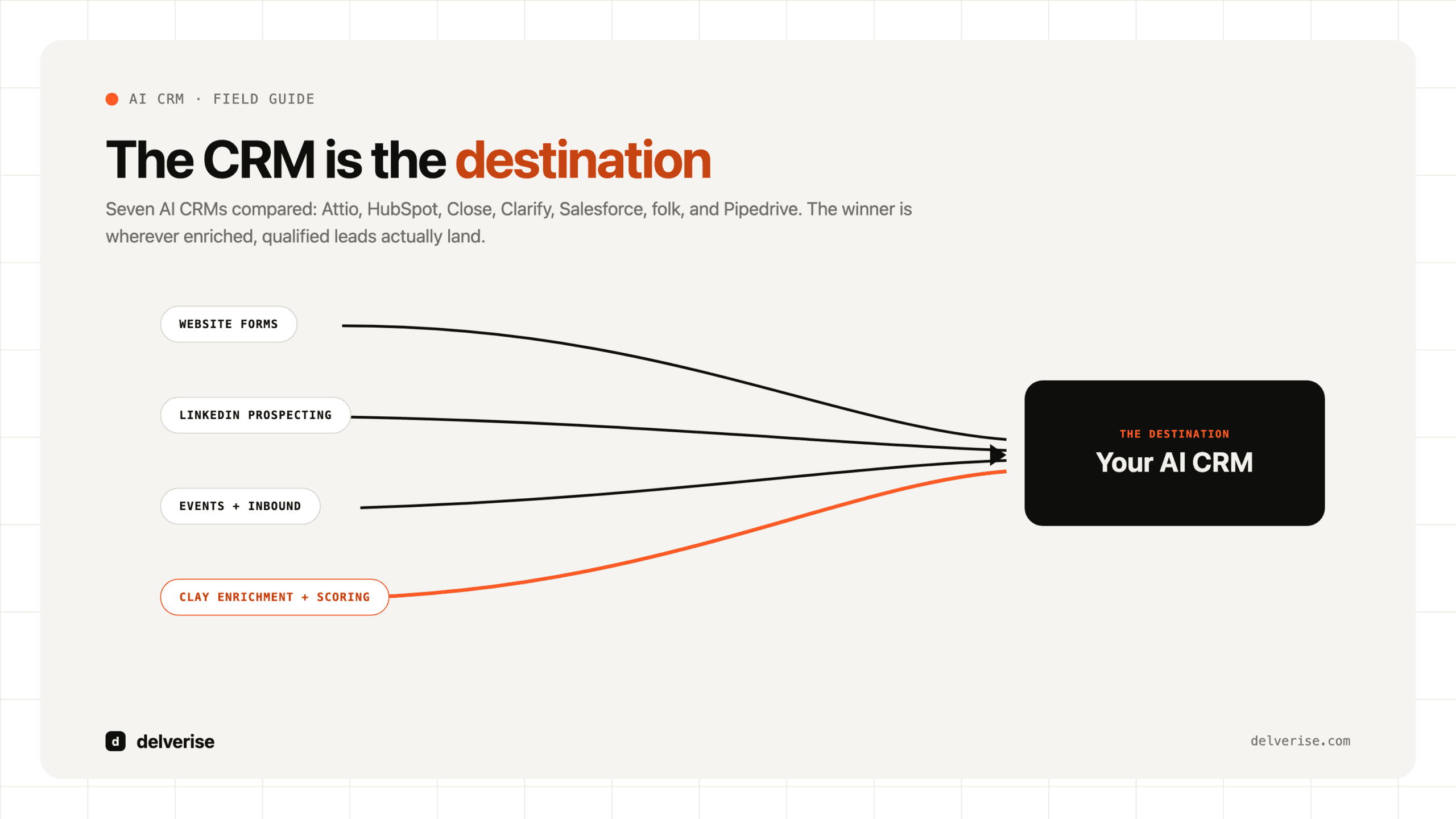
The philosophy of the modern sales organization is that the CRM should be the final destination for intelligence, not the starting point for data collection. Leads should arrive in the CRM already enriched, scored, and qualified, ready for a salesperson to take meaningful action. This approach transforms the CRM from a system of record into a system of engagement, where automation handles the data collection and the sales team focuses on building relationships and closing deals.

This
architecture is built on a layered approach to data flow:
- Prospect Identification: The process begins with identifying potential customers through various channels like LinkedIn Sales Navigator, Apollo, or web scraping.
- Data Enrichment: This is where a tool like Clay becomes critical. A waterfall enrichment process, using over 50 data sources, appends crucial information to the initial prospect data.
- Lead Scoring and Qualification: Using the enriched data, a custom logic in Clay or a similar tool scores and qualifies leads based on predefined criteria.
- CRM Ingestion: Only the enriched and qualified leads are then automatically synced to the CRM.
- Workflow Triggers: The arrival of a new, qualified lead in the CRM triggers automated sequences, tasks, and notifications.
- Sales Action: Finally, a salesperson engages with the qualified lead, armed with all the necessary context and intelligence.
This automated workflow can reduce the time spent on a single lead from over 4 hours of manual work to just 15 minutes of human oversight, an 87% reduction in busywork. The integration of these tools is what makes the modern CRM architecture so powerful. The best AI features are rendered useless without high-quality, enriched data to act upon. Therefore, integration matters more than the sheer number of features a CRM offers.
AI CRM DEEP DIVES
3. Attio – Next-Generation Relationship Intelligence
Rating: 4.7/5 (G2)

Attio has rapidly emerged as a leader in the next generation of CRMs, designed for modern B2B teams that have outgrown the rigid structures of traditional platforms. It is an API-first, highly flexible platform that provides the customizability of a bespoke solution with the user-friendliness of a modern SaaS application. Attio’s core philosophy is built around a flexible data model, real-time collaboration, and powerful, embedded AI capabilities, making it a standout choice for fast-growing companies.
AI Capabilities and Automation:
Attio’s AI features are deeply integrated into the platform, designed to automate and enhance the entire GTM motion. The platform’s automatic data enrichment is a cornerstone of its AI offering, providing real-time company and contact data, including email discovery, social profiles, technology stack detection, and funding information. This is complemented by intelligent relationship mapping, which visualizes connections between contacts and companies, identifies warm introduction paths, and tracks communication history across the entire team. The platform’s AI-powered research agent can be used to automate complex research tasks, qualify leads at scale, and monitor for churn risks by tracking leadership changes. Attio’s workflow automation is another key strength, allowing for the creation of custom, trigger-based automations with conditional logic to handle even the most complex GTM processes.
Standout Strengths:
Attio’s greatest strength is its flexibility. Unlike traditional CRMs that force teams into predefined data structures, Attio allows users to build custom data models that perfectly mirror their unique GTM motion. This is combined with a best-in-class user experience, with a beautiful, intuitive interface that drives high user adoption. The platform’s real-time collaboration features make it ideal for team-based selling, and its API-first architecture ensures deep and reliable integrations with the modern GTM stack. Finally, Attio’s native data enrichment and quality tools ensure that the data within the CRM is always accurate and up-to-date.
Ideal Use Cases:
Attio is best suited for fast-growing B2B SaaS companies and sales teams selling to complex buying committees. Its flexibility makes it ideal for teams with custom GTM processes that don’t fit the rigid molds of traditional CRMs. Companies with technical resources can leverage Attio’s API-first architecture to build deep, custom integrations, while its intuitive interface makes it a great choice for organizations prioritizing user adoption and a positive user experience.
Integration with the Modern GTM Stack:
Attio’s integration with Clay is particularly noteworthy, with a native, bi-directional sync that allows for seamless data enrichment and workflow automation. This allows teams to build sophisticated enrichment waterfalls in Clay and have that data automatically populate and update records in Attio. The platform also integrates seamlessly with email sequencing tools like Instantly and Smartlead, and its API and webhook capabilities allow for deep integrations with automation platforms like N8n and Zapier.
Limitations and Considerations:
As a newer platform, Attio has a smaller native integration marketplace compared to giants like HubSpot and Salesforce. While its API-first approach mitigates this, it may require more technical resources to build out custom integrations. The platform’s advanced customization capabilities can also be overkill for teams with very simple sales processes.
Pricing Structure:
Attio offers a generous free tier, with paid plans starting at $29/user/month for the Plus plan and $59/user/month for the Pro plan. This pricing is competitive, especially considering the native enrichment capabilities that reduce the need for separate data tools. The total cost of ownership is generally lower than HubSpot Sales Hub, and the implementation time is measured in days or weeks, not months.
Best For: Modern B2B teams that want the flexibility of a custom-built CRM with the ease of use of a modern SaaS application, and who prioritize deep integration with their GTM stack.
4. HubSpot – The Comprehensive Revenue Platform
Rating: 4.4/5 (G2)

HubSpot has evolved far beyond its origins as a simple CRM for inbound marketing. Today, it stands as a comprehensive revenue platform, with AI deeply woven into its marketing, sales, and service hubs. Its integrated ecosystem and user-friendly interface have made it a popular choice for businesses of all sizes, particularly those with an inbound-led GTM motion. HubSpot’s extensive marketplace of over 1,000 integrations and its vast library of educational resources have solidified its position as a dominant force in the CRM market.
AI Capabilities and Automation:
HubSpot’s AI features are designed to enhance productivity across the entire customer lifecycle. The Content Assistant uses AI to generate email copy, blog posts, and social media content, while ChatSpot, a conversational AI, allows users to query the CRM, generate reports, and create tasks using natural language. The platform’s predictive lead scoring uses machine learning to rank contacts and companies, and its forecasting and analytics capabilities provide AI-powered predictions on deal outcomes and pipeline health. HubSpot’s visual workflow builder is a powerful tool for creating sophisticated, automated workflows with if/then logic and branching, and its Smart Content feature enables the personalization of website content and email templates at scale.
Standout Strengths:
HubSpot’s primary strength lies in its all-in-one ecosystem. By combining marketing, sales, and service tools on a single platform, it provides a seamless flow of data and a unified view of the customer. Its generous free CRM tier makes it an attractive option for startups and small businesses, and its extensive integration marketplace ensures that it can connect with virtually any tool in a company’s GTM stack. HubSpot Academy, the company’s free online training platform, is another significant asset, providing valuable resources for team training and onboarding.
Ideal Use Cases:
HubSpot is the ideal choice for inbound marketing-led companies and B2B SaaS businesses with a content-heavy GTM strategy. Its tight integration between marketing automation and CRM makes it a powerful tool for converting and nurturing leads generated through content marketing. Teams that want an all-in-one platform and prioritize user adoption will also find HubSpot to be a strong fit.
Integration with the Modern GTM Stack:
HubSpot offers a native integration with Clay, allowing for the seamless syncing of enriched data. This enables teams to build sophisticated enrichment workflows in Clay and use that data to power HubSpot’s automation and personalization features. The platform also integrates with a wide range of email sequencing tools, and its robust workflow engine can be used to orchestrate complex automations between HubSpot and other tools in the GTM stack.
Limitations and Considerations:
The most significant drawback of HubSpot is its escalating pricing. While the free and starter tiers are affordable, the cost can increase rapidly as a company scales and adds more
hubs and contacts. Many of the most valuable AI features are gated behind the expensive Professional and Enterprise tiers. The platform is also more geared towards inbound sales motions, and teams with a heavy outbound focus may find its capabilities in that area to be more limited.
Pricing Structure:
HubSpot’s pricing is complex, with different tiers for each hub. The Sales Hub starts at $20/user/month for the Starter plan, but the Professional plan, which includes most of the AI features, jumps to $100/user/month. The total cost of ownership can easily reach $300-500/user/month when using multiple hubs, making it a significant investment for scaling companies.
Best For: Inbound-led B2B companies that want a comprehensive, all-in-one platform with strong marketing automation capabilities and are willing to invest in the HubSpot ecosystem.
5. Close CRM – Built for Outbound Sales Teams
Rating: 4.7/5 (G2)

Close is a CRM that was purpose-built for outbound and inside sales teams. It is an all-in-one platform that combines a powerful CRM with built-in calling, email, and SMS capabilities. Close is designed for sales velocity, with a focus on minimizing administrative work and maximizing seller productivity. Its native communication tools and intuitive interface make it a favorite among SDRs and high-velocity sales teams.
AI Capabilities and Automation:
Close’s AI features are squarely focused on enhancing the efficiency and effectiveness of outbound sales. The AI Email Composer helps reps write personalized emails at scale, learning from successful emails to improve its suggestions over time. The platform’s Power Dialer and Predictive Dialer are standout features, automating the calling process and dramatically increasing call volume. This is complemented by AI-powered call intelligence, which includes call recording, transcription, and sentiment analysis. Close also offers Smart Views and lead prioritization, using AI to suggest which leads to contact next based on engagement and activity data. The platform’s workflow automation allows for the creation of sophisticated, multi-channel sequences that combine email, SMS, and calls.
Standout Strengths:
The greatest strength of Close is its natively integrated communication suite. By building calling, email, and SMS directly into the CRM, it eliminates the need for separate tools and provides a seamless workflow for sales reps. The platform is also known for its speed and simplicity, with a minimal setup time and an intuitive interface that allows teams to be productive from day one. The Power Dialer is widely considered to be one of the best in the industry, and the platform’s email sequencing capabilities are both powerful and easy to use.
Ideal Use Cases:
Close is the ideal CRM for outbound-focused sales teams, particularly those with a high volume of calls and emails. It is a perfect fit for SDR teams and inside sales organizations that prioritize sales velocity and productivity. Its all-in-one nature also makes it a great choice for small and mid-sized businesses that want a single platform to manage their entire sales process.
Integration with the Modern GTM Stack:
Close integrates with Clay via its API and through Zapier, allowing for the automated syncing of enriched leads. This enables teams to use Clay for data enrichment and then push that data into Close to power its communication and automation features. The platform also integrates with a variety of other tools through its API and Zapier, but its native integration marketplace is smaller than that of HubSpot or Salesforce.
Limitations and Considerations:
While Close excels at outbound sales, its capabilities in other areas, such as marketing automation, are more limited. The platform’s reporting and analytics are also not as advanced as some of its competitors. While its all-in-one approach is a strength, it can also be a limitation for teams that want to use best-of-breed tools for each part of their sales process.
Pricing Structure:
Close offers a range of pricing plans, starting from a Solo plan at $9/month, with the popular Growth plan at $99/user/month. This makes it a more affordable option than HubSpot or Salesforce, especially for teams that need its built-in communication features.
Best For: Outbound sales teams that want an all-in-one platform with best-in-class calling and email automation to drive sales velocity.
6. Clarify – The Autonomous Relationship Intelligence Platform
Rating: 4.8/5 (G2)

Clarify is positioning itself as the world’s first autonomous CRM, a platform designed to completely eliminate the manual data entry that plagues traditional CRMs. It operates on the principle that a CRM should work for the sales team, not the other way around. By connecting to a team’s email, calendar, and communication tools, Clarify automatically captures and analyzes every interaction, building a rich, real-time map of customer relationships and pipeline activity without requiring a single manual log from a salesperson.
AI Capabilities and Automation:
Clarify’s AI is the core of its autonomous engine. The platform’s standout feature is its automatic activity capture and summarization. It ingests data from across all communication channels and uses AI to create concise summaries of meetings, identify action items, and update deal statuses in real-time. Its relationship intelligence capabilities are second to none, automatically mapping the complex web of connections within and between organizations to surface warm introduction paths and identify key decision-makers. Clarify also provides native data enrichment, automatically appending contact and company records with firmographic and technographic data, ensuring the information in the CRM is always complete and accurate. The platform’s AI also powers its deal health scoring and pipeline forecasting, providing predictive insights to help teams focus their efforts on the deals most likely to close.
Standout Strengths:
The primary strength of Clarify is its ability to eliminate manual data entry. This is a game-changer for sales productivity and user adoption. Its deep relationship intelligence provides a level of insight that is difficult to achieve with traditional CRMs, and its beautifully designed, intuitive interface makes it a pleasure to use. The platform’s white-glove migration and support also set it apart, ensuring that teams are able to get up and running quickly and effectively.
Ideal Use Cases:
Clarify is best suited for relationship-driven B2B sales teams that want to free themselves from the burden of manual CRM updates. It is an excellent choice for venture capital firms, private equity, and other organizations where the network is the most valuable asset. Companies that are frustrated with the low user adoption of their current CRM and are looking for a platform that their team will actually love to use should also give Clarify a serious look.
Integration with the Modern GTM Stack:
Clarify’s API-first architecture allows for deep integrations with the modern GTM stack. It offers a bi-directional sync with Clay, enabling sophisticated enrichment workflows where data flows seamlessly between the two platforms. This allows teams to leverage Clay’s powerful enrichment capabilities to further enhance Clarify’s native relationship intelligence.
Limitations and Considerations:
As a newer platform, Clarify has a smaller native integration marketplace than some of its more established competitors. Its focus on relationship-driven sales also means that it may be less suitable for high-volume, transactional sales motions. Finally, its pricing is not publicly available, which can make it difficult to evaluate for teams on a tight budget.
Pricing Structure:
Clarify’s pricing is customized based on team size and needs, with an estimated range of $50-150/user/month. While this puts it in the premium category, the cost can be justified by the significant time savings and productivity gains it delivers.
Best For: Relationship-driven B2B teams that want to eliminate manual data entry and build a deep, actionable understanding of their customer relationships.
7. Salesforce – The Enterprise AI CRM Standard
Rating: 4.2/5 (G2)

Salesforce is the undisputed heavyweight champion of the CRM world. It is the enterprise standard, a massively powerful and customizable platform designed to handle the most complex sales processes and vast volumes of data. With its Einstein AI layer, Salesforce has infused artificial intelligence across its entire suite of products, offering predictive insights and automation at an enterprise scale. Its extensive AppExchange marketplace, with over 4,000 pre-built integrations, and its industry-specific clouds make it the default choice for large organizations.
Einstein AI Capabilities:
Salesforce’s Einstein AI is a comprehensive suite of AI technologies that are deeply embedded within the Sales Cloud. Lead and Opportunity Scoring uses machine learning to predict the likelihood of conversion, while AI-powered forecasting provides more accurate revenue predictions. Einstein Activity Capture automatically logs emails and meetings, mapping out relationship networks within accounts. Einstein Bots can be used to automate customer interactions and qualification processes, and the platform’s predictive insights provide next-best-action recommendations to help sales reps move deals forward.
Standout Strengths:
Salesforce’s greatest strength is its enterprise-grade scale and customizability. It can be configured to support virtually any business process, no matter how complex. The AppExchange marketplace provides an unparalleled ecosystem of integrations and add-ons, and its industry-specific solutions offer pre-built configurations for verticals like healthcare, finance, and manufacturing. The platform’s security and compliance features are also top-notch, meeting the stringent requirements of large enterprises.
Ideal Use Cases:
Salesforce is the go-to choice for enterprise organizations with 500 or more employees. It is best suited for companies with complex, multi-product sales organizations that require deep customization and have the resources to support a dedicated Salesforce administrator. Multi-national corporations and businesses in regulated industries will also find Salesforce’s enterprise-grade features and global support to be a major advantage.
Integration with the Modern GTM Stack:
Salesforce can be integrated with Clay via its robust API, allowing for the creation of custom enrichment workflows. However, this typically requires more development resources than the native integrations offered by platforms like Attio and HubSpot. Salesforce’s own marketing automation platform, Pardot (now Marketing Cloud Account Engagement), and its powerful Flow Builder can be used to create sophisticated internal automations, while tools like N8n and Zapier can be used to orchestrate workflows with external tools.
Limitations and Considerations:
The biggest challenge with Salesforce is its complexity. It has a steep learning curve and typically requires a dedicated administrator to manage and maintain. Implementation times are long, often taking 3-6 months, and the total cost of ownership is the highest in the industry. For small and mid-sized businesses, Salesforce is often overkill, a complex and expensive solution for a problem that could be solved with a simpler, more modern CRM.
Pricing Structure:
Salesforce’s pricing is tiered, with the popular Enterprise edition starting at $150/user/month. However, the true cost of Salesforce is often much higher, with the total cost of ownership reaching $150-300+/user/month when factoring in implementation, customization, and support costs.
Best For: Enterprise organizations with complex sales processes, a dedicated administrative team, and the budget for a comprehensive, long-term implementation.
8. folk – The Simple, Intuitive CRM for Growing Teams
Rating: 4.5/5 (G2)

folk is a CRM that feels more like a collaborative workspace than a rigid sales tool. It has gained a loyal following among startups and small teams for its simplicity, intuitive interface, and powerful LinkedIn integration. folk is designed to be the sales assistant you never had, a proactive and intelligent platform that helps you build stronger relationships and reduce the busywork of sales. Its spreadsheet-like interface and Notion-like feel make it a popular choice for teams that value flexibility and ease of use.
AI Capabilities and Automation:
folk’s AI features are focused on making the process of prospecting and outreach as seamless as possible. The platform offers AI-powered data enrichment, automatically pulling in contact and company information, with a particularly strong integration with LinkedIn. Its Magic Fields feature allows for the creation of custom, AI-generated content, such as personalized icebreakers and follow-up messages. The platform also provides AI-powered pipeline analysis and lead scoring, helping teams to prioritize their efforts and understand the health of their pipeline. The folkX Chrome extension is a key part of its AI offering, allowing users to capture leads from LinkedIn in a single click and have them automatically enriched in the CRM.
Standout Strengths:
Simplicity is folk’s greatest strength. It is incredibly easy to learn and adopt, with a clean, intuitive interface that teams love to use. Its best-in-class LinkedIn integration makes it a powerful tool for teams that do a lot of their prospecting on the platform. The platform is also highly collaborative, with features designed to support team-based selling. Finally, its affordable pricing makes it a great value for small teams and solopreneurs.
Ideal Use Cases:
folk is the perfect CRM for solopreneurs and small sales teams of less than 10 people. It is particularly well-suited for teams that do a lot of LinkedIn-heavy prospecting. Its simplicity and ease of use also make it a great choice for teams that are new to CRM and want a platform that they can get up and running with quickly. Budget-conscious startups will also find its affordable pricing to be a major advantage.
Integration with the Modern GTM Stack:
folk integrates with Clay via Zapier, allowing for the automated syncing of enriched leads. While it doesn’t offer the native, bi-directional sync of a platform like Attio, it is still possible to build effective enrichment workflows. The platform’s native enrichment is best for LinkedIn data, while Clay can be used for more advanced, multi-source enrichment. folk also works well alongside email sequencing tools like Instantly and Smartlead.
Limitations and Considerations:
folk’s simplicity is also its biggest limitation. It lacks the advanced features and deep customization options of platforms like HubSpot and Salesforce. Its integration ecosystem is smaller, and its reporting and analytics capabilities are more basic. As a team scales beyond 20 people, they will likely outgrow folk and need to migrate to a more powerful platform.
Pricing Structure:
folk’s pricing is very affordable, with a Standard plan at $20/user/month and a Premium plan at $40/user/month. This makes it one of the most cost-effective AI CRMs on the market for small teams.
Best For: Small teams, solopreneurs, and LinkedIn-focused sellers who want a simple, intuitive, and affordable CRM.
9. Pipedrive – Visual Sales Pipeline Management
Rating: 4.2/5 (G2)

Pipedrive is a CRM that is built around a visual, pipeline-first philosophy. It is designed to help sales teams manage their deals in a clear and intuitive way, with a drag-and-drop interface that makes it easy to track progress and identify bottlenecks. Pipedrive has infused AI into its platform to provide intelligent recommendations and automate repetitive tasks, making it a popular choice for transactional B2B sales teams that value simplicity and a visual approach to sales management.
AI Capabilities and Automation:
Pipedrive’s AI features are centered around its Sales Assistant, an intelligent system that provides proactive recommendations and insights to help reps win more deals. The Sales Assistant analyzes deal progression patterns to identify at-risk deals and suggest the next best actions to move them forward. The platform also offers AI-powered pipeline intelligence, with features like deal health scoring, win probability predictions, and revenue forecasting. Pipedrive’s Email AI helps reps optimize their email templates and recommends the best time to send messages for maximum engagement. The platform’s workflow automation allows for the creation of automated tasks, deal stage automations, and activity-based triggers.
Standout Strengths:
The visual pipeline is Pipedrive’s standout feature. It provides a clear and intuitive way to manage deals, and its drag-and-drop interface is a pleasure to use. The platform’s strong focus on activity management helps to ensure that reps are consistently taking the right actions to move deals forward. Pipedrive is also known for its simplicity and ease of use, with a clean interface and a straightforward setup process. Its mobile app is excellent, providing a great experience for reps who are on the go.
Ideal Use Cases:
Pipedrive is an excellent choice for transactional B2B sales teams that manage a high volume of smaller deals. Its visual pipeline and activity-driven methodology are well-suited for sales processes with clear, defined stages. Visual learners and managers will also appreciate the platform’s intuitive interface. Teams that need a simple, fast, and affordable CRM will find Pipedrive to be a strong contender.
Integration with the Modern GTM Stack:
Pipedrive integrates with Clay via Zapier and its API, allowing for the automated syncing of enriched leads. While it lacks a native integration, it is still possible to build effective enrichment workflows. The platform also offers native email campaign functionality and integrates with a variety of other tools through its marketplace.
Limitations and Considerations:
Pipedrive’s customization options are more limited than those of Salesforce or even HubSpot. Its marketing automation capabilities are also basic, and it is less suitable for complex, multi-stage sales processes. The platform’s reporting and analytics, while solid, are not as advanced as some of its competitors.
Pricing Structure:
Pipedrive offers a range of affordable pricing plans, with the Advanced plan, which includes AI and automation features, starting at $27.90/user/month. This makes it a cost-effective option for small and mid-sized businesses.
Best For: Transactional B2B sales teams that want a visual, easy-to-use CRM with a strong focus on activity management.
SELECTION & IMPLEMENTATION
10. AI CRM Selection Framework
Choosing the right AI CRM is a critical decision that can have a significant impact on your sales team’s productivity and your company’s bottom line. With so many options on the market, it can be difficult to know where to start. This framework provides a structured, three-step process to help you make an informed decision.

Step 1: Assess Your Current Tech Stack
Before you can choose a new CRM, you need to have a clear understanding of your existing GTM technology stack. What tools are you already using for lead generation, data enrichment, email outreach, and automation? The best AI CRM for your team will be the one that integrates most seamlessly with your existing workflows. Consider the following:
- Enrichment Tools: Do you use Clay, Apollo, or another data enrichment platform?
- Email Infrastructure: Are you on Gmail or Outlook? Do you use a sequencing tool like Instantly or Smartlead?
- Automation Platforms: Do you use N8n, Zapier, or Make to automate workflows?
- Analytics Needs: What are your requirements for reporting and analytics?
Step 2: Define Team Size and Sales Complexity
The right CRM for a two-person startup is very different from the right CRM for a 500-person enterprise. Consider your current team size and your growth projections for the next 12-24 months. You also need to evaluate the complexity of your sales process. Is it a high-volume, transactional sale, or a complex, multi-stage enterprise deal?
| Team Size | Recommended CRMs |
|---|---|
| 1-5 | folk, Close CRM, Attio |
| 5-25 | Attio, Close, HubSpot, Pipedrive |
| 25-100 | HubSpot, Attio, Clarify, Pipedrive |
| 100-500 | HubSpot, Salesforce, Attio |
| 500+ | Salesforce, HubSpot |
Step 3: Evaluate Total Cost of Ownership (TCO)
The sticker price of a CRM is only one part of the equation. To get a true sense of the cost, you need to evaluate the total cost of ownership, which includes direct and indirect costs. Direct costs include the monthly subscription fees, any required add-ons, and implementation and training fees. Indirect costs include the time and resources required for ongoing administration, integration development, and customization.
| CRM | Estimated TCO (per user/month) |
|---|---|
| folk | $20 – $40 |
| Pipedrive | $30 – $100 |
| Attio | $29 – $59 |
| Close | $99 – $149 |
| Clarify | $50 – $150 (estimated) |
| HubSpot | $100 – $500+ |
| Salesforce | $150 – $300+ |
CRM Selection Matrix:
| Category | Best CRM |
|---|---|
| Best for Simplicity | folk |
| Best for Outbound | Close CRM |
| Best for Flexibility | Attio |
| Best for Relationships | Clarify |
| Best for Ecosystem | HubSpot |
| Best for Visual Pipeline | Pipedrive |
| Best for Enterprise | Salesforce |
11. Integration and Automation Playbooks
The true power of an AI CRM is unlocked through its integration with the broader GTM technology stack. A well-designed integration architecture automates the flow of data, eliminates manual work, and provides a unified view of the customer. This section provides a universal integration architecture that can be adapted for any CRM, as well as specific integration playbooks for our top-rated platforms.

Universal Integration Architecture:
This five-layer architecture provides a blueprint for building a modern, automated GTM stack:
- Lead Capture and Identification: This layer is responsible for identifying potential customers through various channels, such as website forms, LinkedIn prospecting, and event registrations.
- Data Enrichment and Qualification: This is where a tool like Clay comes in. A waterfall enrichment process appends crucial data to each lead, which is then scored and qualified based on predefined criteria.
- CRM Ingestion: Only the enriched and qualified leads are automatically synced to the CRM, ensuring that the data in the CRM is always clean and actionable.
- Sales Activation: The arrival of a new, qualified lead in the CRM triggers automated sequences, tasks, and notifications, prompting the sales team to take action.
- Analytics and Optimization: This layer is responsible for tracking key metrics, such as conversion rates, deal velocity, and ROI, providing the insights needed to optimize the entire GTM process.
CRM-Specific Integration Guides:
- Attio Integration Playbook: Leverage Attio’s native, bi-directional sync with Clay to build sophisticated enrichment workflows. Use Attio’s powerful workflow automation to trigger sequences in tools like Instantly based on the enriched data from Clay.
- HubSpot Integration Playbook: Use HubSpot’s native integration with Clay to sync enriched data and create custom properties for all of your Clay fields. Use HubSpot’s powerful workflow engine to build complex internal automations and trigger sequences based on lead scores.
- Close Integration Playbook: Connect Close to Clay via its API or Zapier to automatically sync enriched leads. Use this data to power Close’s multi-channel sequences, combining email, calls, and SMS for a powerful outbound motion.
- Clarify Integration Playbook: Use Clarify’s API to build a deep, bi-directional sync with Clay, leveraging Clay’s enrichment capabilities to enhance Clarify’s native relationship intelligence.
- Salesforce Integration Playbook: Connect Salesforce to Clay via its API, using custom objects to store the enriched data. This will likely require development resources, but it allows you to build powerful, custom enrichment workflows.
- folk Integration Playbook: Use Zapier to connect folk to Clay, syncing enriched leads and using folk’s native LinkedIn integration to build a powerful prospecting workflow.
- Pipedrive Integration Playbook: Connect Pipedrive to Clay via Zapier or its API, creating automated deal creation and activity-based automations based on the enriched data.
12. CRM Migration and Implementation Roadmap
A successful CRM implementation is about more than just choosing the right software; it’s about having a clear plan for migration, setup, and user adoption. This eight-step roadmap provides a proven framework for a smooth and successful transition to your new AI CRM.

The 8-Step Implementation Process:
- Audit and Goal Setting (Week 1): Before you do anything else, you need to have a clear understanding of your current processes and what you want to achieve with your new CRM. Audit your existing sales process, identify bottlenecks, and define clear, measurable goals for the implementation.
- Data Cleanup and Mapping (Week 1): Don’t migrate dirty data. Export your data from your old CRM, clean it up, and map the fields to your new CRM. This is a critical step that will save you a lot of headaches down the road.
- Core System Setup (Week 2): Configure your new CRM to match your sales process. Set up your pipeline stages, custom fields, and user permissions.
- Key Integrations (Week 2): Set up the core integrations with your email, calendar, and, most importantly, your data enrichment tool (Clay).
- Data Migration (Week 3): Import your clean, mapped data into the new CRM. Validate the data to ensure that everything has been migrated correctly.
- Team Training and Enablement (Week 3): Train your team on how to use the new CRM. Provide them with clear documentation, SOPs, and training videos.
- Parallel Run (Week 4): Run the new CRM alongside your old one for a week or two. This will allow you to identify and fix any gaps in your new system and build user confidence.
- Full Cutover (Week 5): Sunset your old CRM and fully transition to the new platform. Monitor adoption closely and provide ongoing support to your team.
Migration Timelines by CRM:
| CRM | Estimated Migration Timeline |
|---|---|
| folk | 1-2 weeks |
| Attio | 2-3 weeks |
| Close | 2-3 weeks |
| Pipedrive | 2-4 weeks |
| Clarify | 2-4 weeks |
| HubSpot | 4-6 weeks |
| Salesforce | 8-12+ weeks |
Common Migration Pitfalls:
- Migrating dirty data: The most common mistake is to migrate messy, incomplete data. Clean your data before you migrate it.
- Inadequate testing: Don’t skip the parallel run. It’s the best way to ensure that your new system is working as expected.
- Poor user training: If your team doesn’t know how to use the new CRM, they won’t. Invest in comprehensive training and enablement.
- Over-customization from day one: Start simple and customize based on usage and feedback. Don’t try to build the perfect system from day one.
OPTIMIZATION & BEST PRACTICES
13. Maximizing AI CRM ROI
The promise of a 245% ROI on an AI CRM is not a myth, but it is not a given either. Achieving this level of return requires a commitment to proper integration, high user adoption, and continuous optimization. The key to maximizing your ROI is to think of your CRM not as a standalone tool, but as the central hub of an integrated GTM technology stack. The highest returns are realized when high-quality, enriched data from a tool like Clay is consistently fed into the CRM, and automation is used to eliminate manual work and drive efficient action.

Measuring AI CRM Success:
To ensure you are on track to achieve a high ROI, you need to be tracking the right metrics. These can be broken down into three categories:
- Efficiency Metrics: These measure the time and effort saved by the AI CRM. Key metrics include time saved per lead, reduction in manual data entry, and a decrease in administrative tasks.
- Effectiveness Metrics: These measure the impact of the AI CRM on sales performance. Key metrics include lead conversion rates, deal velocity, win rates, and forecast accuracy.
- Business Impact Metrics: These measure the ultimate impact of the AI CRM on the bottom line. Key metrics include revenue per rep, customer acquisition cost (CAC) reduction, and overall sales productivity.
Optimization Tactics by CRM:
- All CRMs: Conduct weekly data quality audits, monthly workflow optimizations, and quarterly integration reviews. Solicit regular feedback from your users to identify areas for improvement.
- Attio: Take advantage of its flexible data model to build a CRM that perfectly matches your GTM motion. Use its powerful automation engine to build custom workflows for your most common repetitive tasks.
- HubSpot: Regularly audit and optimize your workflows. Use campaign influence reporting to understand the impact of your marketing efforts on sales.
- Close: Optimize your call scripts and dispositions. Analyze the performance of your email sequences to identify what is working and what is not.
- Clarify: Maximize the platform’s relationship mapping capabilities to identify new opportunities and warm introduction paths.
- Salesforce: Dedicate regular admin time to optimization. Use Einstein Analytics to uncover new insights and opportunities.
- folk: Streamline your LinkedIn workflows. Optimize your tag taxonomy to keep your data organized and easy to navigate.
- Pipedrive: Optimize your pipeline stages and probabilities. Review your activity-based automations to ensure they are driving the right behaviors.
14. Conclusion: Making the Right Choice
There is no single “best” AI CRM; the right choice depends entirely on your team’s specific context, including your GTM motion, team size, budget, and existing technology stack. All seven of the CRMs we have reviewed are excellent platforms that excel in different scenarios. The key is to choose the platform that best aligns with your unique needs and workflows.
Quick Recommendation Guide:
- Want simplicity? → folk
- Outbound-focused? → Close CRM
- Need flexibility? → Attio
- Relationship-driven? → Clarify
- Want a full ecosystem? → HubSpot
- Visual pipeline priority? → Pipedrive
- Enterprise complexity? → Salesforce
The most critical takeaway from this guide is the integration imperative. Your CRM is only as good as the data within it and its connection to your other GTM tools. A modern, automated workflow that combines the power of a data enrichment platform like Clay with a flexible, AI-powered CRM is the key to unlocking a 10x improvement in sales productivity. The reality of implementation is that it requires expertise and a significant time investment. Most teams lack the bandwidth to properly set up and integrate a new CRM, which is why partnering with an expert can be the fastest path to ROI.
Need the CRM operating layer behind AI features? delverise builds CRM enrichment and GTM systems that connect data quality, lead scoring, routing, workflow automation, and reporting into a CRM your team can actually operate. Explore CRM Enrichment, GTM Engineering, Revenue Operations Automation, and Clay Systems, or apply to work with us.
15. Frequently Asked Questions (FAQ)
How long does it take to see ROI from an AI CRM?
Most organizations see measurable ROI within weeks to months of a proper implementation. Companies that successfully adopt AI-powered CRM solutions report an average 25% increase in sales revenue and a 30% reduction in customer acquisition costs. However, these results are entirely dependent on the quality of the setup and integration. Without a consistent flow of high-quality, enriched data from a platform like Clay, even the most advanced AI features will fail to deliver a positive return. A realistic timeline is 1-2 weeks for basic setup, 4-8 weeks for full integration and automation, and 2-3 months to see a measurable impact on business-level metrics. Quick wins, such as time saved on manual data entry, will be apparent almost immediately, while revenue impact takes longer to materialize.
What’s the typical cost range for an AI CRM?
The cost of an AI CRM varies significantly based on the platform, the size of your team, and the features you require. The platforms can be broadly categorized into the following tiers:
- Budget-friendly: folk ($20-40/user/month), Pipedrive ($15-100/user/month)
- Mid-range: Attio ($29-59/user/month), Close ($49-149/user/month)
- Premium: HubSpot ($100-500/user/month with all hubs), Clarify ($50-150/user/month estimated)
- Enterprise: Salesforce ($150-300+/user/month)
It is crucial to look beyond the per-seat price and consider the Total Cost of Ownership (TCO), which includes implementation, training, integrations, and ongoing optimization. The TCO can often be 1.5-2x the monthly subscription cost in the first year.
Can AI CRMs integrate with Clay and other enrichment tools?
Yes, all modern AI CRMs can integrate with enrichment platforms like Clay, but the quality and depth of the integration vary. Attio and HubSpot offer the best native, bi-directional integrations with Clay. Salesforce, Close, and Clarify provide robust APIs that allow for deep, custom integrations, while folk and Pipedrive can be connected to Clay via Zapier. The most effective architecture is to use Clay as the primary intelligence layer that enriches and qualifies leads before they enter the CRM. This ensures that your CRM is always populated with clean, actionable data.
What’s the biggest mistake when choosing an AI CRM?
The most common and costly mistake is choosing a CRM based on its features rather than its integration capabilities and ease of use. An astonishing 65% of CRM projects fail to meet expectations, largely due to poor user adoption. This often happens when teams choose a complex, feature-rich platform like Salesforce but then fail to properly integrate it with their existing workflows. A simpler CRM that your team actually uses every day is infinitely more valuable than a powerful one that sits on the shelf. Before you make a decision, ask yourself: Does it integrate seamlessly with Clay? Does it work with our email and sequencing tools? And most importantly, will our team actually use it?
How long does CRM implementation and migration take?
The implementation timeline depends on the complexity of the platform and the quality of your existing data:
- Quick (1-2 weeks): folk, Attio, Close
- Medium (2-4 weeks): Pipedrive, Clarify
- Long (4-8 weeks): HubSpot
- Enterprise (8-16+ weeks): Salesforce
A thorough migration will typically add 4-7 weeks to the timeline, including data export and cleaning, field mapping, data validation, and user training.
Do I need technical skills to use these AI CRMs?
For day-to-day use, no technical skills are required. All of these platforms have intuitive interfaces designed for salespeople. However, for advanced customization and integration, the technical requirements vary. folk, Pipedrive, and Close are designed to be user-friendly and require no technical skills for setup. Attio and HubSpot are also easy to use, but power users with some technical knowledge can unlock deeper customization. Salesforce and Clarify, with their API-first architectures, benefit from having technical resources available to build out custom integrations and workflows.
Which AI CRM is best for small teams (under 10 people)?
For small teams, the top recommendations are:
- folk: The simplest and fastest to set up, perfect for LinkedIn-heavy prospecting.
- Attio: The best balance of simplicity and power, with a beautiful interface and a great native integration with Clay.
- Close: The ideal choice for outbound-focused teams, with its all-in-one communication suite.
Avoid the complexity and cost of HubSpot and Salesforce, which are overkill for most small teams.
Can I switch CRMs later if I outgrow my choice?
Yes, but migrating CRMs is a disruptive and costly process. Modern, API-first CRMs like Attio, folk, and Close make it relatively easy to export your data, but migrating from a highly customized platform like Salesforce can be a major undertaking. It is best to choose a CRM that can scale with your business for at least the next 2-3 years. Attio and HubSpot are both excellent choices for scaling companies, while you will likely outgrow folk. Close and Pipedrive are great for their specific use cases but may be less flexible as your GTM motion evolves.
How do AI CRMs handle data privacy and compliance (GDPR, CCPA)?
All of the CRMs reviewed in this guide are GDPR and CCPA compliant. They provide features like data processing agreements, data deletion and export tools, and consent management. However, compliance is a shared responsibility. It is up to you to ensure that you have a lawful basis for processing data, that you are honoring opt-out requests, and that your data retention policies are in line with regulations.
What’s the difference between CRM AI and using Clay for enrichment?
CRM AI analyzes the data that is already inside your CRM to provide predictive insights, such as lead scoring and deal forecasting. Its effectiveness is limited by the quality of the data it has to work with. Clay, on the other hand, is an external enrichment platform that gathers data from over 50 sources before it enters your CRM. The best approach is to use both together: Clay provides the rich, high-quality data, and the CRM AI analyzes that data to provide actionable insights. This combination of external enrichment and internal intelligence is what creates a truly powerful revenue engine.
Should I buy a CRM first or set up Clay enrichment first?
We strongly recommend setting up your Clay enrichment workflows first. This will allow you to understand what data you can capture, how you will score and qualify leads, and what custom fields you will need in your CRM. This, in turn, will help you to choose the CRM that best integrates with your enrichment strategy. Starting with the CRM first often leads to a poor architecture where you are manually entering raw data and then trying to enrich it within the CRM, which is a far less effective approach.
Can these AI CRMs replace my sales team?
No. AI CRMs are designed to augment and enhance sales teams, not replace them. AI is incredibly effective at automating the 65% of a seller’s time that is currently spent on manual, non-revenue-generating tasks. This frees up salespeople to focus on what they do best: building relationships, solving complex problems, and closing deals. Companies that effectively adopt AI see a 25% increase in revenue per rep because their team is able to spend more time actually selling.
How much time will an AI CRM actually save my team?
With a proper implementation, an AI CRM can save a sales rep 15-20 hours per week. The time spent on manual lead research can be reduced by as much as 87%, from 2-3 hours to just 5 minutes with a tool like Clay. Manual data entry can be virtually eliminated, and email composition can be reduced by 90% with AI-powered writing assistants. These time savings translate directly into increased sales productivity and higher revenue per rep.
Which AI CRM has the best mobile app?
Attio and HubSpot are widely considered to have the best mobile apps, with full functionality and a beautiful, intuitive interface. Pipedrive and Close also offer excellent mobile experiences, while the mobile apps for Salesforce, folk, and Clarify are more limited in their functionality.
What is the difference between a Power Dialer and a Predictive Dialer?
A Power Dialer, like the one in Close, automatically dials the next number on a list as soon as a rep finishes a call. This eliminates the time wasted on manual dialing. A Predictive Dialer takes this a step further by dialing multiple numbers at once and only connecting the rep when a real person answers. This is a powerful tool for high-volume outbound teams, but it can also lead to a higher rate of dropped calls.
Frequently Asked Questions
What makes an AI CRM different from a traditional CRM?
An AI CRM is a dynamic, intelligent system that automates data capture, provides predictive insights, and personalizes interactions at scale, while a traditional CRM is a static database requiring manual upkeep. Key differentiators include contact enrichment from dozens of sources, behavioral lead scoring, automated logging of emails and calls, predictive deal forecasting, NLP for sentiment analysis, and AI email writing. The core shift is automation of intelligence rather than manual data entry and interpretation.
When is a B2B team ready for an AI CRM?
A team is ready for an AI CRM when they have four prerequisites in place: an existing manual lead qualification process, a workflow for lead enrichment, a steady flow of more than 20 new leads per week, and a clear, defined sales process. Without these foundations, it is more effective to stick with a basic CRM and solidify the sales process first. Skipping these steps typically leads to underutilized software and adds to administrative burden rather than reducing it.
Why do most CRM AI features go unused?
Only 12% of sales professionals report effectively using AI features in their CRM, and up to 65% of CRM projects fail to meet expectations. The disconnect is not in the AI itself but in its integration with the broader GTM stack. Sellers still spend 65% of their time on non-revenue activities like manual data entry. The true differentiator is whether the CRM connects seamlessly with data enrichment and automation platforms like Clay and N8n to receive pre-qualified leads.
What ROI can companies expect from an AI-powered CRM?
When properly integrated with an automation-first workflow, an AI-powered CRM can deliver a 245% return on investment. Companies implementing this approach see 25% more revenue and 30% lower customer acquisition costs. These results depend on treating the CRM as the destination for enriched, qualified leads rather than the starting point for manual data collection. Without integration into a modern GTM stack, the same platforms become expensive, underutilized software that fails to deliver returns.
How should leads flow into a modern AI CRM?
Leads should arrive in the CRM already enriched, scored, and qualified, ready for a salesperson to take meaningful action. The modern architecture follows five layers: prospect identification through channels like LinkedIn Sales Navigator or Apollo, data enrichment via waterfall processes using over 50 data sources in Clay, lead scoring and qualification using custom logic, automated CRM ingestion of only qualified leads, and workflow triggers that activate when a new qualified lead arrives.
Read next