←Back to blog
Revenue Intelligence & Data ToolingPlaybookMay 20, 202623 min read
HubSpot vs Salesforce for Startups: Which CRM is Better in 2026?
HubSpot vs Salesforce for startups in 2026: pricing, ease of use, implementation time, and features compared to help you pick the right CRM.
Answer: For most startups, HubSpot is the better CRM when the team needs fast implementation, simple adoption, built-in marketing tools, and predictable cost. Salesforce is the better fit when the company has complex sales processes, enterprise customization needs, dedicated CRM administration, or a clear path into a larger Salesforce ecosystem.
- Choose HubSpot for speed, usability, integrated marketing, and lower operating complexity.
- Choose Salesforce for advanced customization, enterprise reporting, complex permissions, and technical administration.
- The real decision is not feature count. It is which CRM your team can implement, maintain, and trust as the revenue system scales.
30-Second Verdict

For most startups with 2-50 employees and under $5M ARR, HubSpot is the better choice in 2026. Here’s why:
- Start free, scale affordably: HubSpot offers a robust free tier and transparent pricing that grows with your business, while Salesforce starts at $25/user/month with significant hidden costs
- Faster time to value: Self-implementation in 2-4 weeks vs 6-16 weeks for Salesforce, with no technical expertise required
- All-in-one marketing + sales: Built-in email marketing, landing pages, and social media tools vs Salesforce’s $1,250+/month Marketing Cloud add-on
- Superior ease of use: 91% of small businesses report HubSpot is easier to learn and use than Salesforce
Choose Salesforce if you have complex sales processes, need advanced customization, or have dedicated technical resources for implementation and maintenance.
The CRM Decision That Makes or Breaks Startups

The global CRM market is exploding, projected to reach $114.4 billion by 2027 with a 14.2% compound annual growth rate. For startups, this growth represents both opportunity and overwhelming choice. With 91% of businesses with over 11 employees now using CRM systems, your startup needs a CRM, and the real question is which one will accelerate your growth without breaking your budget or overwhelming your team.
The stakes couldn’t be higher. Companies using CRM see an average 41% increase in sales revenue and 32% reduction in marketing costs. But here’s the catch: 50% of CRM projects fail due to poor implementation and user adoption. For cash-strapped startups where every dollar and day counts, choosing the wrong CRM can mean the difference between scaling successfully and burning through runway while your team struggles with an overly complex system.
This comprehensive analysis cuts through the marketing noise to deliver the honest comparison startup founders need. We’ve analyzed real pricing data, implementation timelines, and feature sets specifically through the lens of companies with 2-50 employees and under $5M in annual recurring revenue. Whether you’re a technical founder evaluating options or a revenue leader tasked with making this critical decision, this guide provides the data-driven insights you need to choose confidently.
The two platforms dominating startup conversations are HubSpot and Salesforce, and for good reason. HubSpot has captured the hearts of small businesses with its inbound marketing roots and user-friendly approach, while Salesforce remains the enterprise gold standard with unmatched customization and advanced features. But which one actually serves startups better in 2026? The answer might surprise you.
Comprehensive Comparison Table
 marketing automation, and ease of use compared side by side” loading=”lazy” decoding=”async” />
Before diving into the details, here’s how HubSpot and Salesforce stack up across the metrics that matter most to startups:
| Feature | HubSpot | Salesforce | Startup Winner |
|---|---|---|---|
| Starting Price | Free (with limitations) | $25/user/month | 🏆 HubSpot |
| Best Paid Plan for Startups | Starter: $20/user/month | Professional: $100/user/month | 🏆 HubSpot |
| Ease of Use | ⭐⭐⭐⭐⭐ Intuitive interface, minimal learning curve | ⭐⭐⭐ Steeper learning curve, more complex | 🏆 HubSpot |
| Time to Implement | 1-4 weeks (self-implementation possible) | 2 weeks to 12+ months (often needs developers) | 🏆 HubSpot |
| Marketing Features | ⭐⭐⭐⭐⭐ Extensive built-in marketing tools | ⭐⭐⭐ Requires separate Marketing Cloud ($1,250+/month) | 🏆 HubSpot |
| Sales Reporting | ⭐⭐⭐⭐ Advanced reporting on paid plans | ⭐⭐⭐⭐⭐ Superior forecasting and analytics | 🏆 Salesforce |
| Customization | ⭐⭐⭐⭐ Good customization options | ⭐⭐⭐⭐⭐ Highly customizable (requires technical expertise) | 🏆 Salesforce |
| Integration Ecosystem | 400+ integrations | 5,000+ apps in AppExchange | 🏆 Salesforce |
| Scalability | Excellent for SMBs, good for mid-market | Excellent for all company sizes | 🏆 Salesforce |
| Support Quality | Strong onboarding and support | Comprehensive but complex | 🏆 HubSpot |
| Hidden Costs | Minimal, transparent pricing | Significant add-on costs | 🏆 HubSpot |
The Verdict: HubSpot wins 7 out of 11 categories that matter most to startups, particularly excelling in cost-effectiveness, ease of use, and speed to value. Salesforce dominates in advanced features and enterprise scalability but at a significant cost and complexity premium.
Forrester’s Total Economic Impact research reinforces this trade-off: ‘Organizations that selected CRM platforms aligned to their current operational maturity achieved payback in under 12 months, while those that over-bought saw payback periods extend beyond 30 months.’ For a startup under $5M ARR, buying for the company you are — not the company you hope to be — is the move that protects runway.
Deep Dive: Real Pricing Analysis

Pricing is where the rubber meets the road for startups. Let’s break down what you’ll actually pay, including the hidden costs that can blindside growing companies.
HubSpot Pricing Reality Check
HubSpot’s pricing structure is refreshingly transparent, especially compared to enterprise software standards. The free tier is a fully functional CRM that many early-stage startups can use for months or even years.
HubSpot Free Plan: Includes unlimited contacts, basic CRM functionality, email marketing for up to 2,000 sends per month, live chat, and landing page creation. The catch? HubSpot branding appears on your materials, and you’re limited to basic features. For a pre-revenue startup testing product-market fit, this is often sufficient.
This matches what Harvard Business Review has observed about early-stage tooling decisions: ‘Startups that defer heavyweight system investments until they have validated repeatable revenue motions consistently outperform peers who front-load infrastructure spend.’ Translation: a free tier that covers 80% of what you need today is worth more than a paid tier built for problems you don’t have yet.
HubSpot Starter ($20/user/month): Removes HubSpot branding and adds conversation routing, ticket automation, goals tracking, and basic automation workflows. This tier works well for startups with 2-5 team members who need professional-looking customer communications.
HubSpot Professional ($100/user/month): The sweet spot for most growing startups. Includes sales analytics, predictive lead scoring, advanced automation, video messaging, and custom reporting. Teams typically upgrade here when they hit 5-10 employees and need deeper insights into their sales funnel.
HubSpot Enterprise ($150/user/month): Advanced features like custom objects, sandboxes, conversation intelligence, and advanced permissions. Most startups don’t need this level until they’re approaching mid-market size.
Salesforce Pricing: The Hidden Cost Iceberg
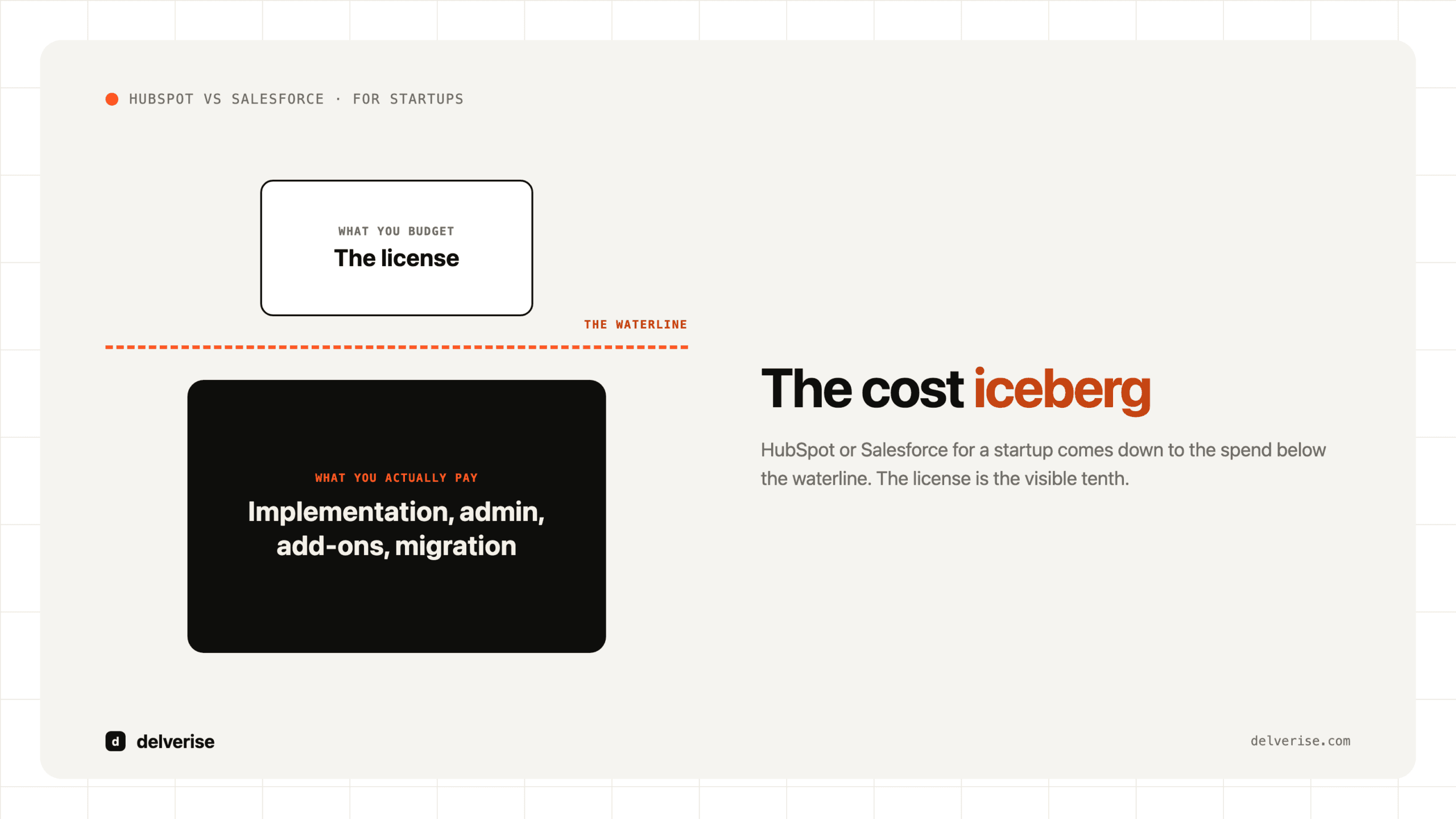
Salesforce’s pricing appears competitive at first glance, but the total cost of ownership tells a different story. The advertised prices are just the tip of the iceberg.
Salesforce Essentials ($25/user/month): Basic CRM with email integration and custom reports. Sounds reasonable until you realize it lacks many features startups expect, like marketing automation or advanced analytics.
Salesforce Professional ($100/user/month): Adds forecasting, quote tracking, and unlimited custom applications. This is where most startups land, but it’s just the beginning of the cost story.
Salesforce Enterprise ($165/user/month): Workflow automation, territory management, and advanced reporting. The features startups actually need often require this tier or higher.
The Hidden Cost Reality: Marketing automation requires Marketing Cloud Account Engagement (formerly Pardot), starting at $1,250/month for up to 10,000 contacts. Advanced analytics? That’s an additional cost. Custom development? You’ll need certified Salesforce developers at $150-300/hour. Implementation costs range from $10,000-100,000+ depending on complexity.
Three-Year Cost Projection: A Startup’s Journey
Let’s model the real costs for a typical startup growing from 5 to 25 employees over three years:
HubSpot Journey:
- Year 1 (5 employees): Starter plan = $1,200/year
- Year 2 (12 employees): Professional plan = $14,400/year
- Year 3 (25 employees): Professional plan = $30,000/year
- Implementation costs: $2,000-5,000 (mostly internal time)
- Total 3-year cost: ~$50,000
Salesforce Journey:
- Year 1 (5 employees): Professional plan = $6,000/year
- Year 2 (12 employees): Enterprise plan = $23,760/year
- Year 3 (25 employees): Enterprise + Marketing Cloud = $74,250/year
- Implementation costs: $25,000-50,000 (consultants required)
- Total 3-year cost: ~$150,000-180,000
The difference is staggering: Salesforce costs 3-4x more than HubSpot for a typical startup’s growth trajectory. This goes beyond the monthly subscription. It’s about the total investment required to get value from the platform.
The Budget Reality for Startups
For startups operating on tight budgets, these cost differences are make-or-break. A typical seed-stage startup with $1M in funding might allocate 2-5% of their budget to sales and marketing tools. HubSpot fits comfortably within this constraint, while Salesforce can consume 10-15% of the budget when you factor in implementation and ongoing costs.
The transparency factor matters too. HubSpot’s pricing is straightforward, what you see is what you get. Salesforce’s modular approach means costs can spiral as you add necessary features. Many startups report surprise bills when they discover core functionality requires additional licenses or add-ons.
This pricing reality explains why 71% of small businesses choose HubSpot over Salesforce when cost is a primary consideration. For startups where every dollar counts and cash runway is precious, HubSpot’s transparent, all-inclusive pricing model provides predictable costs that scale reasonably with growth.
Feature Comparison for Startups

Features matter, but not all features are created equal for startups. Let’s examine how HubSpot and Salesforce perform in the areas that actually impact early-stage company growth.
Core CRM Functionality: The Foundation
Both platforms excel at basic CRM functions: contact management, deal tracking, and pipeline visualization. Where they diverge is in how these features are implemented and how quickly teams can extract value.
Contact Management: HubSpot shines with its unified contact timeline that automatically captures website visits, email interactions, and social media engagement. This gives startups rich context about prospects without manual data entry. Salesforce offers similar functionality but requires more configuration to achieve the same level of automation.
Deal Pipeline Management: Both platforms offer visual pipeline management, but HubSpot’s approach is more intuitive for non-technical users. Salesforce provides more customization options for complex sales processes, but most startups don’t need this complexity early on. The ability to quickly set up and modify pipelines matters more than advanced customization when you’re still figuring out your sales process.
Activity Tracking: HubSpot automatically logs emails, calls, and meetings when using their tools or browser extension. Salesforce requires more manual input or additional configuration to achieve the same level of automation. For small teams wearing multiple hats, this automation difference is significant.
Marketing Automation: The Startup Growth Engine
This is where the platforms show their most dramatic differences, and it’s often the deciding factor for startups focused on growth.
HubSpot’s Marketing Advantage: Even the free plan includes email marketing, landing page creation, and basic automation. The Professional plan adds advanced workflows, A/B testing, and social media management. This integrated approach means startups can run sophisticated marketing campaigns without juggling multiple tools or vendors.
Salesforce’s Marketing Challenge: Basic Salesforce plans include minimal marketing features. Real marketing automation requires Marketing Cloud Account Engagement (formerly Pardot), which starts at $1,250/month, more than many startups’ entire software budget. This creates a painful choice: live without marketing automation or dramatically increase costs.
The practical impact is enormous. A startup using HubSpot can create landing pages, set up email nurture sequences, and track campaign performance all within their CRM. A Salesforce user either pays significantly more for Marketing Cloud or uses separate tools, creating data silos and workflow friction.
Reporting and Analytics: Data-Driven Decisions
Startups need actionable insights, not data dumps. Both platforms offer reporting, but with different philosophies.
HubSpot’s Approach: Reports are designed for clarity and actionability. The dashboard shows key metrics at a glance, and custom reports are relatively easy to create. The focus is on providing insights that drive immediate action rather than comprehensive data analysis.
Salesforce’s Strength: Superior forecasting capabilities and more sophisticated reporting options. The analytics are more powerful but require more expertise to configure and interpret. For startups with dedicated analysts or complex sales processes, this depth is valuable. For most early-stage companies, it’s overkill.
The reality check: Most startups need to know their conversion rates, pipeline velocity, and campaign performance. Both platforms provide this, but HubSpot makes it easier to access and understand without specialized training.
Mobile Capabilities: The Remote Work Reality
With remote and hybrid work becoming standard, mobile CRM access is crucial for startup teams.
Mobile Experience: Salesforce has a slight edge in mobile app functionality, with more features available offline and better performance on slower connections. HubSpot’s mobile app is solid but not quite as feature-complete. However, for most startup use cases (checking contacts, updating deals, and reviewing reports), both apps are sufficient.
Mobile-First Design: HubSpot’s web interface is more responsive and mobile-friendly than Salesforce’s, which matters when team members are accessing the CRM from various devices and locations.
Integration Ecosystem: Playing Well with Others
Startups typically use 10-20 different software tools, so integration capabilities matter enormously.
Salesforce’s Integration Advantage: The AppExchange marketplace offers over 5,000 apps and integrations. This breadth is unmatched and provides solutions for virtually any business need. However, many integrations require additional costs and technical setup.
HubSpot’s Practical Approach: With 400+ integrations, HubSpot covers the most common startup tools, Slack, Zoom, Stripe, QuickBooks, and major email platforms. While fewer options than Salesforce, the integrations are typically easier to set up and often included in the base pricing.
For most startups, HubSpot’s integration ecosystem is sufficient and more accessible. Salesforce’s broader ecosystem becomes valuable as companies grow and need specialized tools.
AI and Automation: The Future-Proofing Factor
Both platforms are investing heavily in AI, but with different approaches that impact startup usability.
HubSpot’s Breeze Copilot: Integrated AI features that help with content creation, lead scoring, and task automation. The AI feels natural and doesn’t require special training to use effectively. Features like automated email responses and smart content recommendations work out of the box.
Salesforce’s Einstein: More sophisticated AI capabilities with advanced predictive analytics and custom AI models. However, many Einstein features require higher-tier plans or additional costs. The power is impressive, but the complexity can overwhelm small teams.
For startups, HubSpot’s AI approach is more practical: useful features that work immediately without requiring AI expertise or additional investment.
The Feature Reality Check
Here’s the honest assessment: Salesforce has more features, more customization options, and more advanced capabilities. But for startups, more isn’t always better. The real question is which platform delivers the features you need in a way your team can actually use.
HubSpot excels at providing 80% of what most startups need in a package that’s 50% easier to use and implement. Salesforce provides 100% of what any company could need, but at 200% of the complexity and cost. For resource-constrained startups focused on growth rather than optimization, HubSpot’s approach typically wins.
The tipping point comes when startups need advanced customization, complex sales processes, or specialized industry features. At that point, Salesforce’s additional complexity becomes worthwhile. But for most startups in their first 2-3 years, HubSpot’s feature set is optimal.
Implementation & Time to Value
For startups, time is money, literally. Every week spent implementing a CRM is a week not spent on product development, customer acquisition, or fundraising. The implementation experience differs dramatically between HubSpot and Salesforce.
HubSpot: The Self-Service Success Story
HubSpot was designed with self-implementation in mind. The onboarding process feels more like setting up a consumer app than enterprise software. New users are guided through a step-by-step setup that covers importing contacts, creating deal pipelines, and configuring basic automation, all achievable in a few hours.
Week 1: Basic setup, contact import, and team training. Most startups are actively using the system by day 3.
Week 2-3: Pipeline customization, email template creation, and workflow setup. Teams typically see their first automated lead nurturing campaigns running by week 2.
Week 4: Advanced features like reporting dashboards and integration setup. By month’s end, most startups have a fully functional CRM that’s generating insights and automating routine tasks.
The key advantage is that non-technical team members can handle most of the setup. A marketing manager or sales lead can configure HubSpot without involving developers or IT consultants. This matters enormously for startups where technical resources are focused on product development.
Salesforce: The Consultant-Dependent Journey
Salesforce implementation follows a more traditional enterprise software model. While simple setups are possible, extracting real value typically requires professional services or certified consultants.
Week 1-2: Initial setup and basic configuration. This often requires decisions about data models and system architecture that have long-term implications.
Week 3-8: Custom object creation, workflow development, and integration setup. Most startups need external help during this phase, adding $10,000-50,000 to the project cost.
Week 9-16: User training, testing, and refinement. Salesforce’s complexity means longer training periods and more change management.
The timeline can stretch much longer for companies with complex requirements or limited technical resources. It’s not uncommon for Salesforce implementations to take 6-12 months for full deployment.
The Technical Expertise Factor
This difference in implementation complexity reflects a fundamental philosophical divide. HubSpot prioritizes ease of use and quick wins. Salesforce prioritizes power and customization, which requires more expertise to unlock.
For startups, this creates a resource allocation decision. Do you want your team focused on CRM configuration or customer acquisition? HubSpot lets you choose the latter; Salesforce often requires significant investment in the former.
Training and Adoption: The Make-or-Break Factor
The best CRM is the one your team actually uses. Adoption rates vary significantly between platforms, largely due to ease of use differences.
HubSpot Adoption: The intuitive interface means most team members are productive within days. The learning curve is gentle, and the system feels familiar to anyone who’s used modern web applications. Training typically requires a few hours rather than days.
Salesforce Adoption: The more complex interface requires formal training for most users. Many companies invest in Salesforce certification programs for key team members. While this creates power users, it also creates barriers for casual users who just need basic CRM functionality.
For startups where everyone wears multiple hats, HubSpot’s lower training requirements mean faster adoption and less disruption to daily operations.
Choose HubSpot If…
HubSpot is the right choice for most startups, but it’s particularly well-suited for specific scenarios and company profiles.
You’re a Marketing-Led Growth Company
If your startup relies on content marketing, inbound lead generation, or digital marketing campaigns, HubSpot is purpose-built for your needs. The platform originated as a marketing automation tool and still excels in this area. You can create landing pages, run email campaigns, manage social media, and track website visitors all within the same platform that manages your sales pipeline.
Consider a typical SaaS startup: they publish blog content, offer free trials, run webinars, and nurture leads through email sequences. HubSpot handles this entire funnel seamlessly, while Salesforce would require multiple additional tools and integrations to achieve the same result.
Your Team is Non-Technical
If your founding team consists of domain experts rather than technical specialists, HubSpot’s ease of use becomes a major competitive advantage. You can implement and customize the system without hiring consultants or diverting engineering resources from product development.
This is particularly relevant for startups in traditional industries (healthcare, professional services, retail) where the founding team may have deep industry knowledge but limited technical expertise. HubSpot allows these teams to implement sophisticated CRM and marketing automation without technical barriers.
You Need Quick Wins and Fast Implementation
Startups often need to show traction quickly for investors, customers, or internal morale. HubSpot’s rapid implementation means you can have professional marketing campaigns and sales processes running within weeks rather than months.
This speed advantage compounds over time. While a competitor is still implementing Salesforce, you’re already generating leads, nurturing prospects, and optimizing your sales funnel. In the startup world, this head start can be decisive.
Budget Constraints are Real
For bootstrapped startups or companies with limited runway, HubSpot’s transparent pricing and lower total cost of ownership make it the practical choice. The free tier can support early-stage companies for months, and the paid plans scale reasonably with growth.
The predictable costs also help with financial planning. You can budget for HubSpot costs with confidence, while Salesforce implementations often exceed initial budgets due to hidden costs and scope creep.
You Value Integrated Solutions
If you prefer having marketing, sales, and customer service tools in one platform rather than managing multiple vendors, HubSpot’s all-in-one approach is appealing. This integration reduces data silos, simplifies reporting, and creates a more cohesive customer experience.
For small teams, managing fewer vendor relationships also reduces administrative overhead and simplifies contract negotiations and renewals.
Choose Salesforce If…
While HubSpot wins for most startups, Salesforce is the better choice in specific scenarios where its advanced capabilities justify the additional complexity and cost.
You Have Complex Sales Processes
If your startup sells to enterprise customers with long sales cycles, multiple decision makers, and complex approval processes, Salesforce’s advanced workflow capabilities become valuable. Features like territory management, approval workflows, and advanced forecasting are designed for these scenarios.
Consider a startup selling cybersecurity solutions to Fortune 500 companies. The sales process might involve technical evaluations, security reviews, procurement processes, and multiple stakeholders. Salesforce’s ability to model and automate these complex workflows provides real value.
Technical Resources are Available
If your team includes experienced developers or you have budget for certified Salesforce consultants, you can unlock the platform’s full potential. Salesforce’s customization capabilities are unmatched, allowing you to build exactly the system your business needs.
This is particularly relevant for technical startups where the founding team includes experienced engineers who can handle Salesforce development and administration internally.
Industry-Specific Requirements
Certain industries have specialized CRM requirements that Salesforce’s ecosystem addresses better than HubSpot. Financial services, healthcare, and manufacturing often have compliance, regulatory, or operational requirements that benefit from Salesforce’s specialized apps and configurations.
If your startup operates in a heavily regulated industry or has unique operational requirements, Salesforce’s broader ecosystem may provide solutions that HubSpot cannot match.
Aggressive Growth Plans
If your startup is planning rapid scaling from 10 to 100+ employees within 12-18 months, Salesforce’s enterprise-grade infrastructure and advanced features may justify the upfront investment. The platform can handle virtually unlimited growth without requiring platform migrations.
This is particularly relevant for well-funded startups with aggressive expansion plans or companies in winner-take-all markets where rapid scaling is essential for competitive advantage.
Advanced Analytics and Reporting Needs
If your business model requires sophisticated forecasting, advanced analytics, or complex reporting structures, Salesforce’s Einstein Analytics and advanced reporting capabilities provide more depth than HubSpot’s offerings.
This might apply to startups with complex pricing models, multiple revenue streams, or sophisticated commission structures that require detailed tracking and analysis.
Integration with Existing Salesforce Ecosystem
If your startup is spinning out of a larger organization that uses Salesforce, or if key partners and customers use Salesforce extensively, staying within the ecosystem can provide integration and collaboration advantages.
The decision often comes down to whether your startup needs Salesforce’s advanced capabilities enough to justify the additional complexity, cost, and implementation time. For most early-stage companies, the answer is no. For startups with specific requirements or aggressive growth plans, Salesforce’s capabilities can provide competitive advantages that justify the investment.
Migration Paths & Scalability
One of the most important considerations for startups is what happens when you outgrow your initial CRM choice. The migration path and long-term scalability differ significantly between platforms.
Growing with HubSpot
HubSpot’s scaling path is generally smooth and predictable. The platform is designed to grow with companies from startup to mid-market size. Most startups can scale from the free plan to Professional or Enterprise tiers without major disruptions or data migrations.
The upgrade process typically involves enabling additional features rather than fundamental system changes. A company moving from Starter to Professional gains access to advanced automation and reporting but doesn’t need to restructure their data or retrain their team extensively.
HubSpot’s limitations become apparent around the 200-500 employee mark or when companies need highly specialized industry features. At this point, some companies migrate to Salesforce or other enterprise platforms, but this transition usually happens after achieving significant scale and revenue.
Salesforce’s Enterprise Trajectory
Salesforce is built for unlimited scale. Companies can grow from small startups to Fortune 500 enterprises without outgrowing the platform’s capabilities. The upgrade path involves adding more sophisticated features, additional clouds (Marketing, Service, Commerce), and custom development.
However, this scalability comes with complexity. Each upgrade often requires additional configuration, training, and potentially consultant involvement. The platform can handle any requirement, but extracting value requires ongoing investment in expertise and customization.
Migration Complexity
HubSpot to Salesforce: This migration is relatively common and well-supported. Both platforms offer migration tools, and many consultants specialize in this transition. The main challenges involve mapping HubSpot’s simpler data model to Salesforce’s more complex structure and retraining teams on the new interface.
Salesforce to HubSpot: This migration is less common and more complex. Salesforce’s customization capabilities often create unique data structures and workflows that don’t map cleanly to HubSpot’s standardized approach. Companies typically make this move to reduce complexity and costs rather than add capabilities.
The key insight for startups: it’s easier to migrate from simple to complex (HubSpot to Salesforce) than from complex to simple. This suggests starting with HubSpot unless you have specific requirements that demand Salesforce from day one.
Real Startup Examples
To illustrate these principles in action, here are anonymized examples of how different startups approached the CRM decision:
These examples illustrate that the “right” choice depends heavily on company context, team capabilities, and specific requirements. However, they also show that HubSpot works well for the majority of startup scenarios, while Salesforce excels when specific advanced features justify the additional investment.
Alternative Options
While HubSpot and Salesforce dominate startup CRM discussions, several alternatives deserve consideration for specific use cases:
Pipedrive: The Budget-Conscious Choice
Best for: Solo founders and very small teams with simple sales processes
Pricing: Starting at $14.90/user/month
Strengths: Extremely intuitive pipeline management, affordable pricing, quick setup
Limitations: Limited marketing features, basic reporting, fewer integrations
Pipedrive excels at core sales pipeline management without the complexity or cost of larger platforms. It’s ideal for startups with straightforward B2B sales processes who don’t need integrated marketing automation.
Monday.com CRM: The Visual Alternative
Best for: Teams already using Monday.com for project management, visual learners
Pricing: Starting at $12/user/month
Strengths: Highly visual interface, excellent customization, strong project management integration
Limitations: Less robust sales features, limited marketing automation, newer to CRM market
Monday.com CRM works well for startups that prioritize visual workflow management and already use Monday.com for other business processes.
Zoho CRM: The Comprehensive Suite
Best for: Startups wanting an all-in-one business suite
Pricing: Starting at $14/user/month
Strengths: Comprehensive business applications, affordable pricing, good customization
Limitations: Steeper learning curve, less intuitive interface, smaller ecosystem
Zoho CRM is part of a broader business suite that includes accounting, project management, and other tools. It’s cost-effective for startups that want to standardize on one vendor for multiple business functions.
When to Consider Alternatives
Consider these alternatives if:
- Budget is extremely tight (under $500/month for all software)
- You have very simple sales processes that don’t require marketing automation
- You’re already invested in a specific ecosystem (Monday.com, Zoho, etc.)
- You need specific features that HubSpot and Salesforce don’t provide
However, for most startups, the ecosystem benefits, feature completeness, and long-term scalability of HubSpot or Salesforce outweigh the cost savings of alternatives.
delverise’s Implementation Perspective
At delverise, we’ve helped dozens of startups navigate the CRM selection and implementation process. Our experience consistently shows that the right CRM choice depends more on company context and team capabilities than on feature checklists.
Our Recommendation Framework
We guide startups through a structured decision process:
- Assess team technical capabilities: Can you handle self-implementation, or do you need consultant support?
- Evaluate growth timeline: How quickly do you need to scale, and what’s your 18-month headcount projection?
- Analyze sales complexity: Are you selling to SMBs with short cycles or enterprises with complex processes?
- Review budget constraints: What’s your realistic total cost of ownership tolerance?
- Consider integration requirements: What other tools must your CRM work with seamlessly?
Implementation Best Practices
Regardless of platform choice, we’ve identified key success factors:
Start Simple: Implement core functionality first, then add complexity gradually. Many startups over-engineer their initial setup and delay time to value.
Focus on Adoption: The best CRM is the one your team actually uses. Prioritize ease of use and quick wins over comprehensive feature sets.
Plan for Growth: Choose a platform that can scale with your business, but don’t over-optimize for hypothetical future needs.
Measure Success: Define clear metrics for CRM success (lead conversion rates, sales cycle length, team productivity) and track them from day one.
Getting Up and Running Fast
Our typical implementation timeline for startups:
Week 1: Platform setup, data import, basic configuration
Week 2: Team training, workflow creation, integration setup
Week 3: Testing, refinement, and go-live preparation
Week 4: Full deployment and optimization
This timeline works for both HubSpot and Salesforce, though Salesforce often requires additional weeks for complex customizations.
The key is balancing speed with sustainability. A quick implementation that requires major changes later is often more disruptive than taking extra time upfront to get the foundation right.
Final Recommendation & Next Steps
After analyzing pricing, features, implementation complexity, and real-world startup experiences, the recommendation for most startups is clear: HubSpot is the better choice for companies with 2-50 employees and under $5M ARR.
The Decision Framework
Choose HubSpot if you:
- Want to start free and scale affordably
- Need integrated marketing and sales tools
- Prefer self-implementation and ease of use
- Have budget constraints or want predictable costs
- Focus on inbound marketing and digital lead generation
Choose Salesforce if you:
- Have complex sales processes or enterprise customers
- Need advanced customization and have technical resources
- Require specialized industry features
- Plan aggressive scaling (10x growth in 18 months)
- Have budget for professional implementation and ongoing optimization
Your Next Steps
-
Start with a trial: Both platforms offer free trials. Test them with your actual data and use cases.
-
Calculate total cost of ownership: Factor in implementation, training, and ongoing costs, in addition to monthly subscriptions.
-
Involve your team: The people who will use the CRM daily should have input on the decision.
-
Plan for growth: Consider where your company will be in 18-24 months, beyond current needs.
-
Get expert guidance: Consider working with implementation specialists who can help you avoid common pitfalls and accelerate time to value.
The Bottom Line
The CRM market will continue evolving, but the fundamental trade-offs between ease of use and advanced capabilities will persist. For most startups, HubSpot’s combination of functionality, affordability, and accessibility provides the best foundation for growth.
The goal is to choose the CRM that will help your startup grow faster, serve customers better, and achieve your business objectives with minimal friction and maximum ROI.
Ready to make your CRM decision?
Need the CRM decision connected to your revenue operating model? delverise builds CRM enrichment, RevOps automation, and GTM systems that help startups choose, implement, and operate the stack that fits their sales motion. Explore CRM Enrichment, Revenue Operations Automation, GTM Engineering, and Growth Engineering, or apply to work with us.
Frequently Asked Questions
Is HubSpot or Salesforce better for startups in 2026?
For most startups with 2-50 employees and under $5M ARR, HubSpot is the better choice in 2026. It wins 7 out of 11 categories that matter most to startups, including cost-effectiveness, ease of use, and speed to value. HubSpot offers a robust free tier with transparent pricing, while Salesforce starts at $25/user/month with significant hidden costs. Choose Salesforce only if you have complex sales processes, need advanced customization, or have dedicated technical resources.
How much does HubSpot cost compared to Salesforce?
HubSpot starts free with unlimited contacts and basic CRM functionality, while Salesforce starts at $25/user/month with no free tier. HubSpot Starter is $20/user/month, Professional is $100/user/month, and Enterprise is $150/user/month. Salesforce’s advertised prices are just the starting point, with significant add-on costs like Marketing Cloud at $1,250+/month. HubSpot offers transparent pricing that grows with your business, making it more predictable for cash-strapped startups.
How long does it take to implement HubSpot vs Salesforce?
HubSpot can be self-implemented in 1-4 weeks with no technical expertise required, while Salesforce typically takes 2 weeks to 12+ months and often requires developers. This faster time to value is critical for startups where every day counts. The implementation gap is one of the biggest practical differences between the two platforms, especially considering that 50% of CRM projects fail due to poor implementation and user adoption.
Which CRM is easier to use for small teams?
HubSpot is significantly easier to use, with 91% of small businesses reporting it is easier to learn than Salesforce. HubSpot earns a 5-star ease-of-use rating for its intuitive interface and minimal learning curve, while Salesforce rates 3 stars due to its steeper learning curve and complexity. For startups without dedicated CRM administrators, this difference directly impacts user adoption rates and time to productivity across the sales team.
Does HubSpot include marketing tools or do you need add-ons?
HubSpot includes extensive built-in marketing tools across all tiers, including email marketing, landing pages, and social media tools. Salesforce requires a separate Marketing Cloud subscription starting at $1,250+/month for comparable functionality. Even HubSpot’s free plan includes email marketing for up to 2,000 sends per month, live chat, and landing page creation. This all-in-one approach saves startups thousands per month compared to assembling a Salesforce-based marketing stack.
Read next