←Back to blog
Revenue Intelligence & Data ToolingGuideAugust 5, 20268 min read
SignalHire Extension: What It Does and Where It Fits in Your Revenue System
The SignalHire extension is a browser add-on that reveals contact details, work emails and phone numbers, for people you are viewing on LinkedIn, GitHub, or a company website. For revenue teams it works as a manual, per-profile reveal tool. It fills gaps for individual reps, and it does not replace a systematic enrichment pipeline.
The SignalHire extension is a browser add-on that reveals contact details, work emails and phone numbers, for people you are viewing on LinkedIn, GitHub, or a company website. For revenue teams it works as a manual, per-profile reveal tool. It fills gaps for individual reps, and it does not replace a systematic enrichment pipeline.
Key takeaways
- Browser extensions solve a single-rep problem: getting one contact, right now, without leaving the profile page.
- Coverage and accuracy vary by geography and seniority. Test on your actual ICP before you standardize on any single provider.
- Per-profile reveals do not create a system of record. Data that lands in a spreadsheet ages badly and never reaches your CRM cleanly.
- The scalable pattern is batch enrichment with multiple providers chained in sequence, writing verified records into your CRM automatically.
- Extension credits and API credits are usually priced and metered differently. Model both before you buy.
What does the SignalHire extension actually do?
SignalHire is a contact database with a Chrome and Edge extension layered on top. When you open a LinkedIn profile, a company page, or a search result list, the extension surfaces a button that reveals stored contact details for that person: work email, personal email in some cases, and direct or mobile phone numbers. You can save revealed contacts to a SignalHire list, push them to a connected CRM or ATS, or export them to CSV.
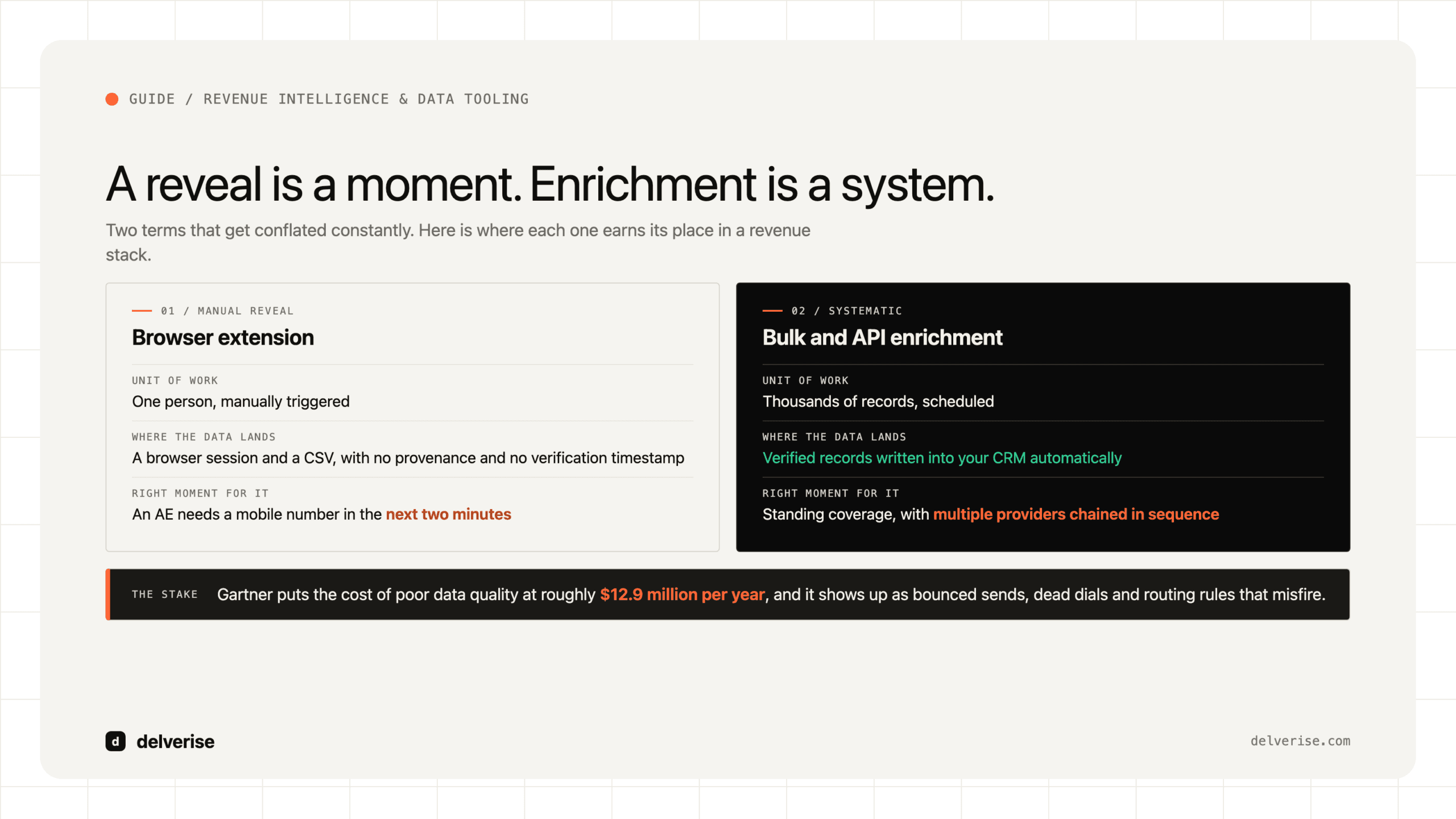
Two terms matter here and get conflated constantly. Reveal means looking up a person you have already identified and returning their contact details. Enrichment means taking a record you already hold, a CRM lead or a target account contact, and appending missing fields to it at scale. The extension does the first. Your revenue system needs the second.
SignalHire also supports bulk work through its web app and an API, which is where most teams eventually end up. If you are still evaluating the platform itself rather than the extension specifically, our breakdown of what to test during a SignalHire free trial covers the coverage and accuracy checks worth running.
Where does a browser extension fit in a revenue system?
Extensions earn their place in three situations. An AE researching a live opportunity needs a mobile number in the next two minutes. A founder is doing manual prospecting before any system exists. A rep hits a record where your automated enrichment came back empty and needs a human fallback.
Outside those cases, per-profile reveals create quiet problems. The data lives in a browser session and a CSV rather than in your CRM. Nobody records where the number came from or when it was verified. Two reps reveal the same contact and spend credits twice. Six months later you have a contact table with no provenance, no verification timestamps, and no way to tell which records are still good.
Gartner has estimated that poor data quality costs organizations an average of roughly $12.9 million per year. Most of that damage is not dramatic. It shows up as bounced sends that hurt domain reputation, dials to disconnected numbers, and routing rules that misfire because the firmographic fields are stale. Contact data collected by hand, one profile at a time, is a reliable source of exactly that decay.
How does extension-based reveal compare to bulk enrichment?
| Dimension | Browser extension | Bulk / API enrichment |
|---|---|---|
| Unit of work | One person, manually triggered | Thousands of records, scheduled or event-driven |
| Best for | Live research, one-off gaps, pre-system prospecting | List builds, CRM hygiene, inbound routing, territory refresh |
| Provenance | Usually lost unless the rep logs it | Source, timestamp, and confidence stored per field |
| Duplicate spend | Common across a team | Prevented by dedup before the call |
| Fallback when empty | Rep tries another tool by hand | Next provider fires automatically in sequence |
| Cost model | Per-seat plus reveal credits | Per-record credits, often cheaper at volume |
Neither column is the correct answer on its own. Mature teams run both and know which one they are using and why. The failure mode is a team of eight reps each doing manual reveals while believing they have an enrichment strategy.

What does this cost at real volume?
Work the math on a concrete build. Say two SDRs need to construct a 3,000-contact list across 400 target accounts.

Manual path: open each LinkedIn profile, click reveal, wait, copy the result, paste into a sheet, tag the account. Call it 45 seconds per contact when the reveal succeeds on the first try, which it will not always do. That is roughly 37 hours of pure clicking, before anyone writes a single line of outbound copy. Add rework for the 20 to 35 percent of profiles that return nothing and need a second tool.
Batch path: export the 400 accounts, run title and seniority filters to identify the right 3,000 people, push the list through enrichment in one job, verify the emails, and write the results into the CRM with source and date on every field. Setup is a few hours the first time and near zero after that.
The time saving is the obvious benefit. The durable benefit is that the second path produces a data asset your team can re-run next quarter, while the first produces a spreadsheet that starts rotting the day it is created. Our guide to building a leads map covers how to structure that asset so it stays usable.
How do teams scale past manual reveals?
The pattern that holds up is a provider waterfall: query your cheapest or highest-coverage source first, and for every record that comes back empty, pass it to the next provider in sequence. SignalHire sits comfortably as one link in that chain, particularly for phone data and for technical profiles sourced from GitHub. We break down how to sequence and cost these chains in our guide to the waterfall map.

Most teams orchestrate this in Clay, which lets you chain providers, set conditional logic on empty results, verify deliverability before anything reaches your sequencer, and push clean records into HubSpot or Salesforce. The honest tradeoff: Clay is a build surface rather than a finished product. It rewards teams with someone who owns the configuration and punishes teams who set it up once and walk away. If you want that pipeline designed and maintained rather than assembled in-house, that is what our Clay partner work covers.
Whatever you orchestrate with, the decision framework is the same one we lay out for evaluating any lead intelligence platform: coverage on your specific ICP, verification quality, provenance tracking, and how cleanly it writes to your system of record.
What should you check before standardizing on it?
Run this before you roll any reveal tool out to a team. Pull 100 real contacts from your ICP, not a generic sample, and measure honestly.
- Match rate on your ICP by seniority, and separately by region if you sell outside North America
- Email deliverability measured through an independent verifier, not the provider’s own confidence score
- Phone accuracy tested by actually dialing a sample of 25
- Whether the extension writes to your CRM directly or forces a CSV step
- How credits are consumed on failed or partial reveals
- Whether extension credits and API credits draw from the same pool
- Team-level duplicate protection: does rep B pay again for a contact rep A already revealed
- Your legal position on processing this data under GDPR or CCPA, documented before rollout
That last item is not paperwork. If you sell into the EU, the lawful basis for processing contact data sourced from a third-party database is a question your team should answer once, in writing, rather than per campaign.
Does better contact data actually move pipeline?
Only to a point, and it is worth being clear about the ceiling. Gartner’s buying research has found that B2B buyers spend a small share of the total buying journey with any supplier’s sales reps, roughly 17 percent when the time is split across all vendors under consideration. McKinsey’s work on B2B buying behavior points the same direction: buyers move across many channels and do most of their evaluation without you present.
Contact data determines whether you reach the right person at all. It does nothing for whether that person finds the message relevant. Teams that treat a reveal tool as a pipeline strategy tend to send more volume to better-verified addresses and see the same conversion rate. The compounding gains come from targeting logic, timing, and message relevance, which is where a properly built GTM operations function earns its keep. Data quality is the floor under that work rather than a substitute for it.
If the broader question is which category of tooling to invest in first, our buying guide to AI prospecting tools compares the options by what they actually change in your funnel, and our CRM enrichment page covers keeping records accurate after the initial build.
Frequently Asked Questions
Is the SignalHire extension free?
SignalHire offers a limited free tier with a small monthly credit allowance, which is enough to test match rates on a sample but not to build a list. Paid plans are priced per seat with credit bundles. Verify whether your plan’s credits cover both extension reveals and API calls, since providers often meter these separately.
Does it work outside LinkedIn?
Yes. The extension reads profiles on LinkedIn, GitHub, and various company and directory pages. GitHub coverage is genuinely useful if you sell developer tools, since technical buyers are often thin in general-purpose B2B databases.
Will using a contact extension get my LinkedIn account restricted?
Any browser extension that reads LinkedIn pages carries some account risk, and LinkedIn’s user agreement prohibits automated data collection. Risk rises with volume and with automated scrolling or bulk actions. Manual, low-volume use by an individual rep is lower risk than running a scraper. Do not build your prospecting motion on an account you cannot afford to lose.
Should we buy an extension or an API?
Buy the extension for rep-level, in-the-moment lookups. Buy API or bulk access when you are building lists, refreshing a database, or enriching inbound leads on submission. Teams above roughly five reps almost always need both, with the API path carrying the volume and the extension covering exceptions.
How often does contact data go stale?
B2B contact data decays continuously as people change roles, and annual decay rates in the 25 to 30 percent range are widely reported across the data industry. Treat any list older than a quarter as suspect. The practical fix is scheduled re-enrichment on your active CRM records rather than one-time list builds.
Read next