←Back to blog
Revenue OperationsGuideAugust 17, 20268 min read
What Is folk CRM? A Revenue Leader’s Guide to Where It Fits
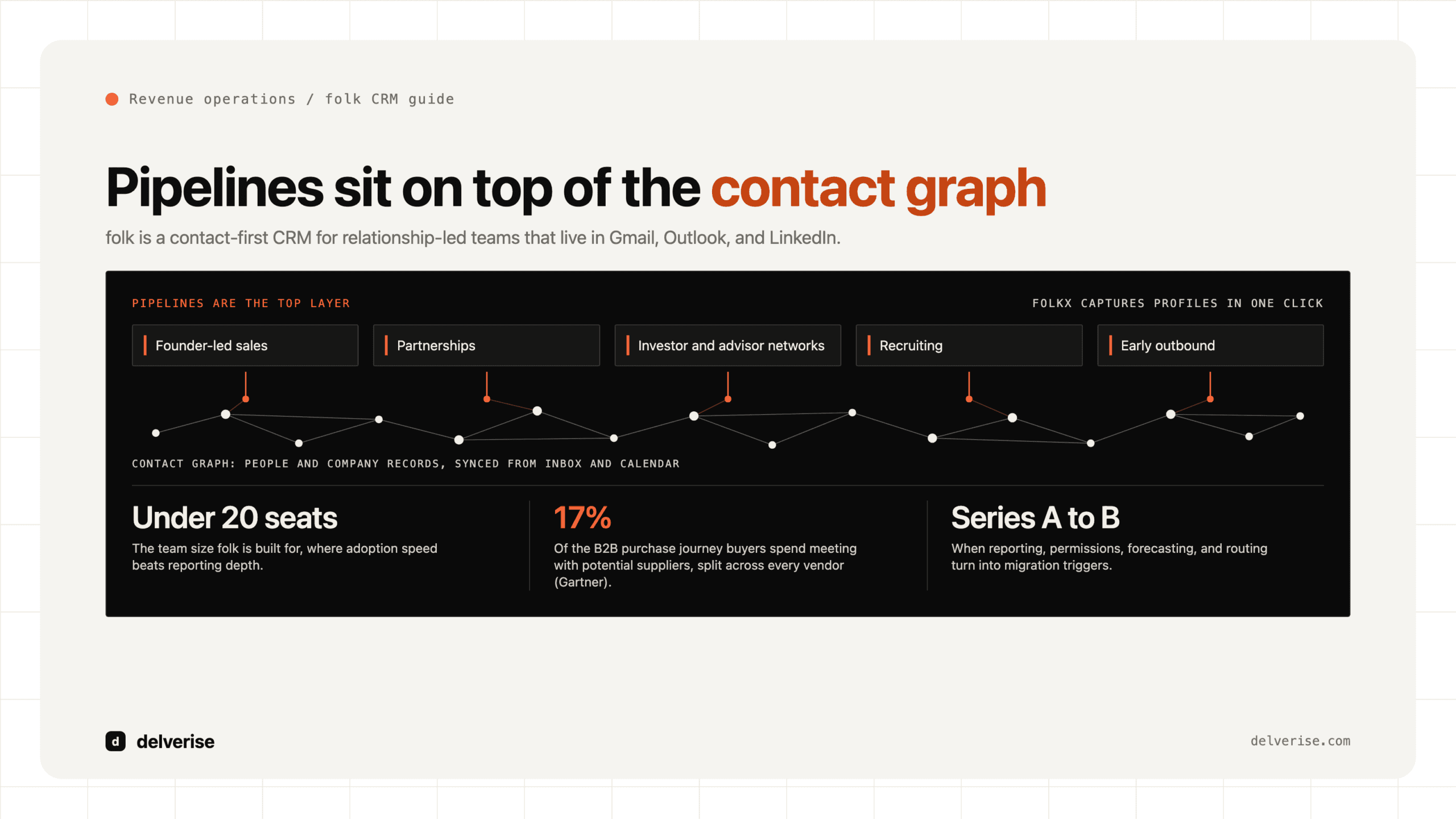
folk is a lightweight, contact-first CRM built for relationship-led teams that work out of email and LinkedIn. It pulls people and companies in from your inbox and browser, organizes them into simple pipelines, enriches records, and sends sequences. It fits small GTM teams, roughly under 20 seats, that value adoption speed over reporting depth.
folk is a lightweight, contact-first CRM built for relationship-led teams that work out of email and LinkedIn. It pulls people and companies in from your inbox and browser, organizes them into simple pipelines, enriches records, and sends sequences. It fits small GTM teams, roughly under 20 seats, that value adoption speed over reporting depth.
Key takeaways
- folk is a contact-first CRM. The unit of work is a person or company record, and pipelines sit on top of that graph rather than the other way around.
- Its strongest use cases are relationship-led motions: founder-led sales, partnerships, investor and advisor networks, recruiting, and early outbound where the deal count is low and the relationship count is high.
- Adoption is the real advantage. Reps actually update folk because capture happens where they already work, inside Gmail, Outlook, and LinkedIn.
- It runs out of room on reporting depth, permissions, forecasting, quoting, and complex routing. Those are the migration triggers, and they usually arrive somewhere around Series A to Series B.
- The CRM you pick matters less than the data model underneath it. A clean account, contact, and stage definition survives a migration. A messy one gets more expensive with every tool you add.
What is folk CRM, exactly?
folk is a CRM product built around contact management rather than opportunity management. You create groups of people and companies, add custom fields, and move records through pipeline stages. A browser extension called folkX captures profiles from LinkedIn and other sites in one click. Email and calendar sync means every thread and meeting attaches itself to the right record without anyone logging activity by hand.

Two capabilities push it past a shared spreadsheet. First, built-in enrichment: folk spends credits to append emails, phone numbers, and firmographic data to records, pulling from multiple data sources behind the scenes. That is the same pattern we describe in our breakdown of the data enrichment waterfall, just packaged and priced as a single credit balance. Second, native email sequences with merge fields and reply detection, sent from connected mailboxes.
Pricing sits in the tens of dollars per seat per month, with higher tiers adding enrichment credits and larger sending limits. For a five-person GTM team, folk costs less per year than a single week of a sales engineer’s time.
Who is folk CRM actually built for?
The honest answer: teams whose revenue comes from a manageable number of high-context relationships. Seed-stage B2B SaaS with founder-led sales. Partnership teams tracking a few hundred co-sell contacts. Venture and search funds. Recruiting-heavy operations. In all of these, the volume of people is high and the volume of structured deals is low.

That maps to a real buying reality. Gartner’s research on B2B buying found that customers spend only about 17% of the total purchase journey meeting with potential suppliers, and that time gets divided across every vendor in consideration. McKinsey’s B2B Pulse work found buyers now move across ten or more channels in a single decision. When your actual selling time is that thin and that fragmented, the CRM that wins is the one your team updates without being asked. folk wins on that axis.
Where folk fits poorly: PLG companies with product-usage signals driving expansion, teams with more than a handful of segments and routing rules, anyone whose board asks for cohort-level pipeline conversion by source. Those needs demand a system of record with real object depth. If you are still working out which roles own which part of that system, our guide to GTM operations covers the ownership question before the tooling question.
What does folk do well, and where does it break?
Strengths, stated plainly:

- Capture with almost no friction. The extension and inbox sync mean records get created during the work, not after it. Reviewers on G2 consistently rate folk high on ease of use and setup speed, and that pattern holds in practice.
- Time to value measured in days. A working pipeline with enriched contacts and a live sequence is a one-afternoon build for someone who knows what they want.
- Flexible fields and views. Custom fields, filtered views, and shared group ownership cover most early-stage tracking needs.
- Open enough to automate. An API plus Zapier, Make, and n8n connections let you push folk records into enrichment and scoring flows without waiting on a vendor roadmap.
The limits show up in four places. Reporting stays shallow: you can see stage counts and basic activity, and you cannot build a stage-conversion-by-segment cohort report your CFO will trust. Automation is linear, so multi-branch routing, SLA escalation, and conditional territory assignment need an external orchestration layer. Permissions are simple, which becomes an issue once you have contractors, partners, and a full sales team touching the same data. And there is no quoting, no forecast object, and no attribution model, so revenue planning happens in a spreadsheet parallel to the CRM.
None of that makes folk a bad product. It makes folk a product with a defined ceiling, which is a more useful thing to know before you buy.
How does folk compare to HubSpot, Attio, and Pipedrive?
| Dimension | folk | Attio | Pipedrive | HubSpot Sales Hub |
|---|---|---|---|---|
| Core model | Contact-first, groups and pipelines | Flexible data model, custom objects | Deal-first, linear pipelines | Full CRM plus marketing objects |
| Best fit | Relationship-led teams under ~20 seats | Technical GTM teams that want to model their own objects | Transactional SMB sales teams | Companies wanting sales and marketing in one system |
| Enrichment | Native, credit-based | Native plus strong API | Add-on and partner apps | Native at higher tiers plus a large app ecosystem |
| Automation depth | Basic, linear | Strong, workflow builder plus API | Moderate | Deep, with branching workflows |
| Reporting | Light | Moderate and improving | Solid sales reporting | Strong, dashboards and attribution |
| Practical ceiling | Pre-Series A to early Series A | Series A through Series C | SMB and mid-market sales orgs | Mid-market and up |
The choice usually comes down to one question: does your revenue motion need custom objects and branching logic in the next 18 months? If yes, buy for that now. If no, buy for adoption now and plan the migration deliberately.
What does a real folk implementation look like?
Here is a concrete build for a seed-stage B2B SaaS company with two founders selling and one SDR, working a target list of roughly 400 accounts.
Accounts get loaded as company records with three fields that drive everything: ICP tier, trigger type, and owner. Contacts sit under those companies, captured from LinkedIn during research and enriched for work email and mobile. An external enrichment step, usually Clay running against the account list, appends headcount, tech stack, and hiring signals, then writes back to folk through the API so the CRM stays the single view reps look at.
Sequences run from folk for the warm and semi-warm tiers, where sending from a founder mailbox matters. Cold volume runs from a dedicated sending tool on separate domains, with replies pushed back into folk as activity. Pipeline stages stay at five, each with a written exit criterion, because stage definitions are what make later reporting possible. A weekly automation flags any record with no activity in 14 days and posts it to a Slack channel, which is the cheapest version of the discipline covered in our piece on lead follow up.
Total build time: two to three days. Total monthly cost including enrichment: less than one qualified meeting is worth. That is the case for folk in a sentence.
When should you plan the migration off folk?
Watch for these signals. Any two together mean you should start scoping.
- Your board deck pipeline numbers are rebuilt by hand in a spreadsheet each month.
- More than one person needs restricted visibility into records they do not own.
- Routing rules have more than two conditions, or you have an inbound SLA to enforce.
- You need product usage or billing data joined to the account record for expansion plays.
- Two or more people spend a meaningful part of each week reconciling data between folk and another system.
- Sales headcount is above roughly 15, or you have separate AE and CS motions on the same accounts.
Migrations get expensive when the underlying data model was never defined. Gartner’s work on buying groups puts six to ten stakeholders in a typical complex B2B purchase, which means your account record needs to hold multiple contacts with roles, not a single primary. Build that structure in folk from day one, and the eventual move to a heavier system becomes a data export rather than a rebuild. This is the part most teams skip, and it is where CRM enrichment and data architecture work pays for itself several times over.
One more thing worth saying: the tool rarely causes the problem. Pipeline stalls trace back to unclear stage definitions, missing contact coverage inside accounts, and no agreed owner for data quality. A larger CRM inherits all three. If you are evaluating the wider category, our lead intelligence platform buying guide covers what actually differentiates these systems once you get past the demo.
Frequently Asked Questions
Is folk CRM good enough to be a company’s only CRM?
Yes, for early-stage teams with a low deal count and a relationship-led motion. It handles contacts, pipelines, enrichment, and outbound email in one place. It stops being sufficient when you need segmented conversion reporting, granular permissions, quoting, or forecasting, which for most B2B SaaS companies lands somewhere between Series A and Series B.
How does folk compare to a spreadsheet plus a sequencer?
folk wins on three things a spreadsheet stack cannot do: automatic activity capture from email and calendar, a shared record that does not drift between copies, and native enrichment. The spreadsheet approach wins on cost and on custom analysis. Once two or more people touch the same list, folk is the better call.
Can folk handle high-volume cold outbound?
Send your cold volume from dedicated domains and a purpose-built sending tool, then sync replies and interested contacts back to folk. Use folk sequences for warm, referral, and founder-network outreach where sending from the real mailbox is the point. Mixing high-volume cold sending into your primary domain creates deliverability risk that outlives any short-term gain.
What breaks first when a team outgrows folk?
Reporting, almost always. The first symptom is someone exporting records into a spreadsheet every Monday to answer a question the CRM cannot. The second is routing logic living in a person’s head. Both are fixable with an orchestration layer for a while, and both eventually justify a heavier system of record.
Does the CRM choice actually affect pipeline?
Indirectly. CRM choice affects data completeness, and data completeness affects targeting, routing, and follow-up speed, which do move pipeline. A tool your reps update beats a more capable tool they avoid. That is the strongest argument for folk at the early stage, and the reason delverise treats CRM selection as one decision inside a wider GTM engineering build rather than the decision itself.
Read next