←Back to blog
Revenue OperationsGuideSeptember 11, 20268 min read
Close CRM: What It Actually Does, Who It Fits, and Where It Breaks
Close CRM is a sales-first CRM built for small and midsize B2B teams that sell by phone and email. It bundles calling, SMS, email sequencing, and pipeline management into one system, so reps work from a single screen. It fits high-velocity inside sales and struggles with complex enterprise deal structures.

Close CRM is a sales-first CRM built for small and midsize B2B teams that sell by phone and email. It bundles calling, SMS, email sequencing, and pipeline management into one system, so reps work from a single screen. It fits high-velocity inside sales and struggles with complex enterprise deal structures.
Key takeaways
- Close is a consolidation play. It absorbs the CRM plus dialer plus sequencer trio that most teams under roughly 50 seats buy separately.
- Its strongest argument is data quality. Calls, texts, and emails happen inside the CRM, so activity logs itself instead of depending on rep discipline.
- It has a customization ceiling. Multi-product pricing, partner hierarchies, territory rules, and deep custom object modeling eventually push teams toward Salesforce.
- Reporting covers activity and pipeline well and thins out fast for cohort analysis, attribution, and revenue modeling.
- The CRM choice matters less than the data flowing into it. Routing rules, enrichment, and shared definitions decide whether any CRM produces a forecast you trust.
What is Close CRM?
A CRM (customer relationship management system) is the system of record for your accounts, contacts, opportunities, and every interaction attached to them. Close is a CRM that came out of an outsourced sales operation: the founders ran a sales team first, built tooling for their own reps, and sold the tooling instead of the service.
That origin shows up in the product. Close ships with VoIP calling and a power dialer, two-way SMS, native email sync, and Workflows (its term for multi-step sequences that mix email, call tasks, and SMS). It also ships Smart Views, which are saved search queries that behave as live rep worklists: “open opportunities with no activity in 14 days” becomes a queue a rep dials through, refreshed continuously.
Most B2B teams assemble that capability from three vendors. Close puts it behind one login and one data model.
Who is Close CRM actually built for?
The fit is narrower than the marketing suggests, which is a good thing. Close works best for teams with these characteristics:

- Five to fifty revenue seats, without a full-time CRM administrator
- Deal sizes roughly between $5,000 and $75,000 in annual contract value
- Sales cycles measured in weeks rather than quarters
- A phone-heavy or high-volume motion where activity throughput drives the number
- One product line, or a small number of simple SKUs
If your buying committee runs eight people across three departments and your cycle involves security review, procurement, and a pilot, Close will hold the data but stop helping. Gartner’s research on B2B buying found that 77% of buyers described their most recent purchase as very complex or difficult, and complex purchases need a CRM that models the committee, the competing initiatives, and the multi-threaded relationship map. That is where Close runs out of room.
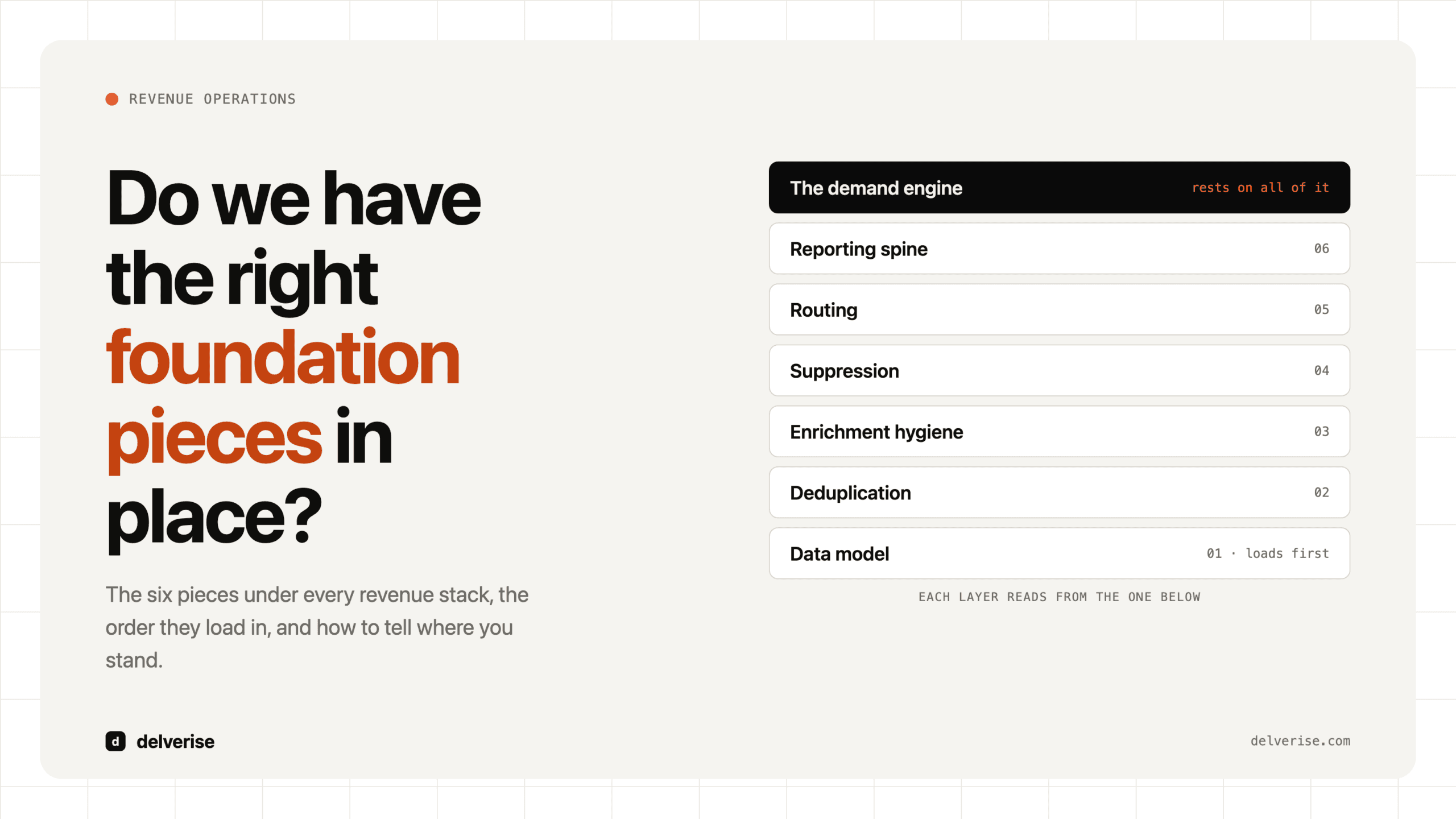
Before you evaluate any CRM, confirm the layers underneath it are settled. We wrote about the six pieces every revenue stack needs in this breakdown of foundation pieces, and CRM selection is downstream of nearly all of them.
What does Close do better than a general-purpose CRM?
Three things, concretely.

Activity capture happens by default. When the dialer lives inside the CRM, there is no sync job, no Chrome extension, and no rep deciding whether to log the call. Salesforce’s State of Sales research has consistently found reps spend well under a third of their working time actually selling, with administrative work eating much of the rest. Removing the logging step recovers real hours and, more importantly, removes the silent gaps that corrupt pipeline reporting.
Time to value is measured in days. Close consistently scores well on G2 for ease of setup relative to larger suites. A team can import accounts, build Smart Views, and have reps dialing inside a week. Compare that with a Salesforce implementation, where the honest timeline includes a partner, a discovery phase, and a quarter.
The API is genuinely buildable. Close exposes a clean REST API with webhooks and bulk endpoints, which means enrichment, routing, and lifecycle automation can be engineered against it with n8n, Clay, or your own service. For a team that wants to build rather than configure, that matters more than the size of the app marketplace. Our CRM enrichment work lives almost entirely at this layer.
Where does Close CRM break down?
Vendor-neutral means naming the ceiling, so here it is.

Data model depth. Usage-based pricing, multi-product bundles, renewals with expansion tracked separately, and partner-sourced revenue all need object relationships Close handles awkwardly. Teams work around it with custom fields until the workarounds become the problem.
Analytical reporting. Close answers “how many calls did we make and what moved” well. It answers “what is our net revenue retention by acquisition cohort and channel” poorly. Most serious teams end up piping Close into a warehouse and reporting from BI, which is fine as long as you budget for it.
No native marketing automation. Lifecycle nurture, scoring, and content-driven follow-up need a second system. That is a real cost, and it is worth reading our take on choosing a nurture tool before assuming your CRM covers it.
Permissions and territories. Role hierarchies, field-level security, and complex territory or comp rules are thin compared to Salesforce. Above roughly fifty reps this becomes a governance problem.
The migration you will eventually pay for. Moving off Close later costs field mapping, historical activity migration, integration rework, and a reporting rebuild. Budget four to eight weeks of focused work, and price that into the decision now.
How does Close compare to the alternatives?
| CRM | Best fit | Native calling and SMS | Customization ceiling | Admin load |
|---|---|---|---|---|
| Close | 5 to 50 seats, high-velocity inside sales | Included, with power dialer | Low to medium | Low, no dedicated admin needed |
| HubSpot Sales Hub | Marketing-led teams wanting one suite | Basic calling, sequencing included at higher tiers | Medium | Medium, one part-time owner |
| Salesforce Sales Cloud | Complex enterprise, multi-product, partner channels | Add-on or third party | Very high | High, dedicated admin required |
| Pipedrive | Small teams wanting simple visual pipeline | Limited, mostly add-on | Low | Low |
If you are comparing dedicated sales engagement tools alongside a CRM, our Outreach vs Salesloft comparison covers that layer specifically. And if you sell into venture, private equity, or relationship-driven markets, look at Affinity instead, since the relationship intelligence model beats a velocity CRM there.
What does Close really cost?
Close prices per seat across tiers, with calling minutes billing as usage on top. Get your own quote rather than trusting any published figure, since tiers change. What matters more is the comparison math.
Take a Series A team: four AEs, three SDRs, one sales lead. Eight seats. A typical unbundled stack runs roughly $100 per seat for a mid-tier CRM, $100 to $150 per seat for a sales engagement platform, and $50 to $75 per seat for a dialer. Call it $275 per seat, or about $26,000 a year. A consolidated Close deployment at a mid tier plus telephony usage lands closer to half that.
The $13,000 delta is real, and it is the smaller number in this analysis. Here is the larger one: those seven customer-facing reps make roughly 100 outbound touches a week each. If 20% of that activity fails to log cleanly because it happens outside the CRM, you lose about 140 recorded touches a week, or 7,000 a year. Every conversion rate, every capacity model, and every forecast you build on top of that data inherits the gap. Fixing the license bill is easy. Fixing a pipeline model built on 80% of the truth takes a quarter.
Is Close the right fit for your revenue system?
Run this before you book a demo:
- Our median deal closes in under 90 days
- Phone and email carry the majority of our pipeline creation
- We sell one product line with simple pricing
- We have no dedicated CRM administrator and do not want one
- Our reporting needs stop at pipeline, activity, and conversion rates
- We are comfortable building integrations against an API instead of installing them
- We can absorb a migration in two to three years if we outgrow it
Five or more checks means Close deserves a serious evaluation. Three or fewer means you are shopping for a platform, and the CRM decision should wait until your outbound funnel design and qualification logic are settled.
One caution worth stating plainly. McKinsey’s B2B Pulse research found buyers now move across roughly ten channels in a single purchase decision, about double what it was a decade ago. No CRM captures that on its own. The system that produces reliable revenue data is the combination of the CRM, the enrichment feeding it, the routing rules governing it, and the definitions everyone agrees on. Our work on what qualification models actually score covers the layer most teams skip while they argue about CRM vendors.
Frequently Asked Questions
Is Close CRM good for B2B SaaS companies?
Yes, for Seed through Series A companies with transactional deal cycles and a phone-heavy motion. It is a weaker fit once you sell multi-product bundles, run usage-based pricing, or manage a partner channel, since the data model does not represent those cleanly.
Can Close replace Outreach or Salesloft?
For most teams under 50 reps, yes. Close Workflows handle multi-channel sequencing well enough that a separate engagement platform is redundant. Larger teams that need granular A/B testing, conversation intelligence, and sophisticated deal execution features will find the dedicated platforms deeper.
When should we migrate off Close?
Three signals: your custom field workarounds have become the de facto data model, your reporting lives entirely in spreadsheets or BI because the CRM cannot answer the question, or your rep count and territory complexity have outgrown the permission model. Any two of those means start planning.
How good is the Close API for building automation?
Good. It is a well-documented REST API with webhooks, bulk operations, and predictable behavior, which makes it a reasonable foundation for enrichment pipelines, routing logic, and custom lifecycle automation. The tradeoff is that you build integrations that other CRMs let you install.
Close CRM or HubSpot for a Series A team?
If pipeline creation runs through outbound calling and email, choose Close for the bundled execution layer and lower admin overhead. If marketing generates most of your pipeline and you want CRM and marketing automation in one place, HubSpot wins on suite coherence. The decision follows your dominant motion.
Read next