←Back to blog
Outbound & Pipeline EngineeringGuideMay 20, 202627 min read
How to Create a Lead Generation Campaign in LinkedIn Ads: Complete 2026 Guide to $50 CPL
Engineer LinkedIn lead gen campaigns that hit $50-75 CPL with precise ICP targeting, Lead Gen Forms, account tiering, and data-driven optimization tactics.
What Separates LinkedIn Ad Programs That Work From Ones That Burn Budget
LinkedIn looks like a B2B paradise on paper: a digital ecosystem with over one billion professionals, including 65 million decision-makers. The statistics reinforce the appeal. Research shows that LinkedIn is responsible for 80% of B2B social media leads and is 277% more effective for lead generation than Facebook and X (formerly Twitter) combined. With conversion rates 2-3x higher than other platforms, 89% of B2B marketers turn to LinkedIn for lead generation.
‘LinkedIn has become the de facto B2B demand channel, but spend efficiency varies by an order of magnitude across advertisers,’ notes Forrester in its B2B Marketing Benchmarks report. The takeaway for revenue leaders: platform access is commoditized, while the operating model around targeting, creative, and attribution is where the real economic moat sits.
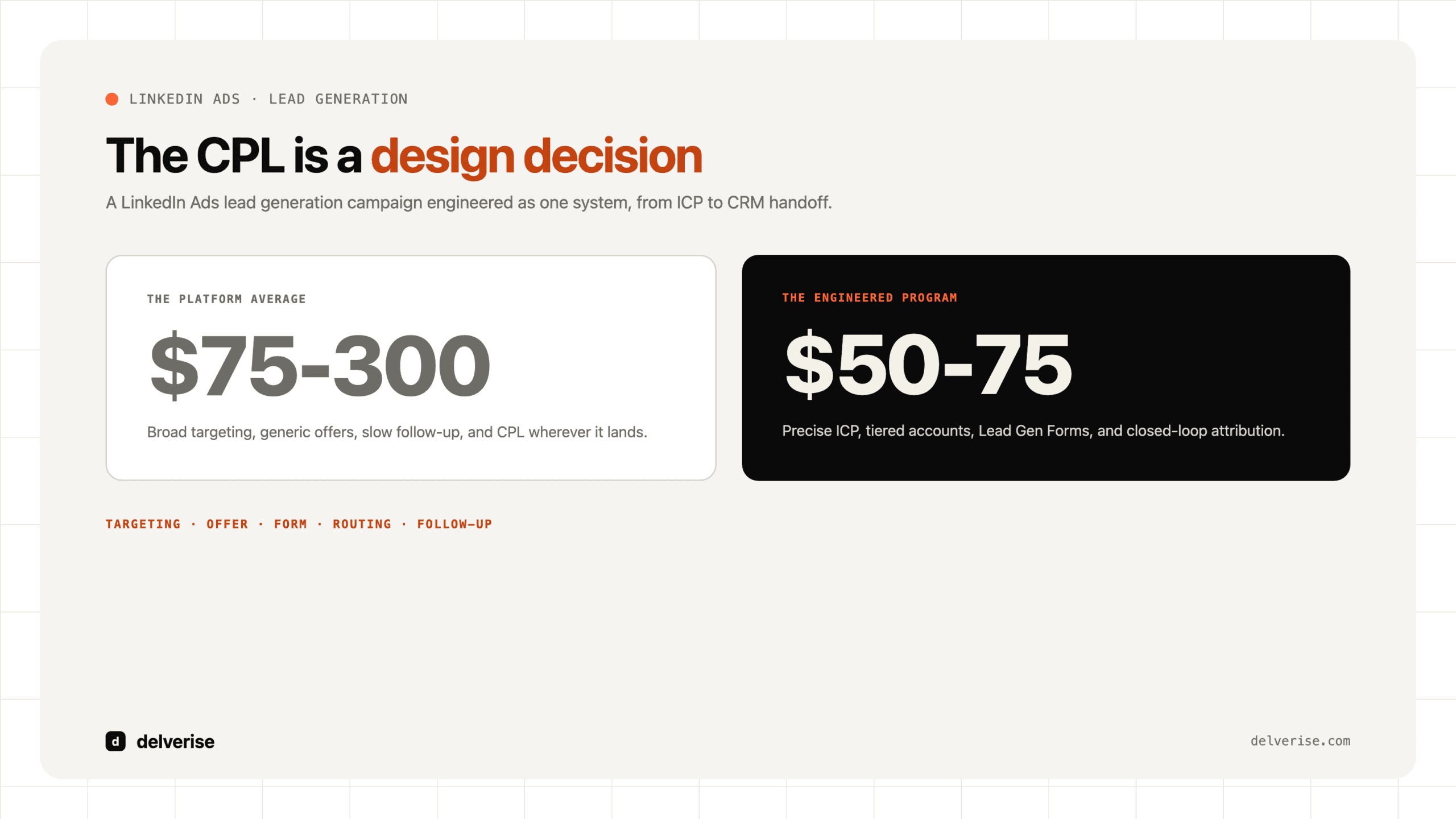
The results most companies see tell a different story. Many pour budget into the platform and meet disappointingly high Cost Per Leads (CPLs) ranging from $75 to over $300, a flood of low-quality leads, and mounting frustration. The gap between LinkedIn’s potential and actual performance is where most programs stall. The cause is rarely the platform. It is the absence of a systematic, data-driven approach to campaign creation and optimization, and that is the variable a revenue leader is in a position to assess.
An effective LinkedIn program is engineered, with each layer worth evaluating before you commit spend. It starts with a precise Ideal Customer Profile (ICP) that the targeting actually reflects, runs through advanced automation and attribution models that connect spend to closed revenue, and is held to a CPL benchmark in the $50-75 range rather than the platform average. The framework below breaks down what each component should look like and the questions to ask of any team or system running it, so you can judge whether a campaign is built to generate a consistent flow of high-quality B2B leads that convert into revenue.
| Feature | Benefit | Key Insight |
|---|---|---|
| 1B+ Professionals | Unparalleled access to a professional audience | The sheer size requires precise targeting to be effective. |
| 65M+ Decision-Makers | Direct line to individuals with purchasing power | Seniority-based targeting is crucial for reaching the right people. |
| Lead Gen Forms | Reduced friction and higher conversion rates (90% see lower CPL) | Pre-filled forms significantly outperform landing pages. |
| Matched Audiences | Advanced targeting capabilities for retargeting and ABM | Your most valuable audiences are those you already know. |
| Detailed Demographics | Granular targeting by industry, job title, seniority, and more | Precision targeting is the key to cost-effective campaigns. |
Answer: A LinkedIn Ads lead generation campaign works when targeting, offer, form friction, CRM routing, and follow-up are designed as one system. The campaign should start with a narrow ICP, a conversion offer matched to buying stage, clean account exclusions, native lead form or landing page testing, and a fast handoff into enrichment, scoring, and sales follow-up.
- Targeting defines the account, role, seniority, and exclusion logic before spend starts.
- Conversion design matches the offer and form to buyer intent instead of optimizing for cheap leads.
- Routing sends qualified leads into CRM, Slack, or sales workflows quickly enough to preserve intent.
- Measurement tracks opportunity creation and pipeline quality, not just CPL.
FOUNDATION & STRATEGY
1. Define Your Ideal Customer Profile with Precision
The single most critical determinant of your LinkedIn Ads success is the clarity of your Ideal Customer Profile (ICP). Without a well-defined ICP, you are essentially flying blind, casting a wide net that results in wasted ad spend on irrelevant audiences, low conversion rates, and a sales team frustrated with poor-quality leads. A precise ICP acts as your North Star, guiding every targeting decision you make and ensuring that your message resonates with the right people at the right time.

Research from Gartner confirms this discipline gap: ‘B2B organizations with formally documented ideal customer profiles achieve win rates up to 68% higher than those relying on broad targeting assumptions.’ For LinkedIn Ads specifically, that win-rate delta is what separates a $50 CPL program from a $300 one, because the platform amplifies whatever targeting logic you feed it.
The Comprehensive ICP Framework
A robust ICP goes beyond basic firmographics. It’s a multi-dimensional view of your perfect customer, encompassing:
- Firmographics: Industry, company size, revenue, location, and growth stage.
- Professional Demographics: Job titles, functions, and seniority levels.
- Technographics: The technology stack and tools your ideal customers use.
- Psychographics: Their pain points, goals, initiatives, and challenges.
- Behavioral Signals: Hiring trends, funding announcements, company expansion, and content engagement.
Account Tiering for LinkedIn Ads
Not all accounts are created equal. Tiering your accounts allows you to allocate your budget and resources more effectively:
- Tier 1: High-value accounts that receive premium budgets and personalized creative.
- Tier 2: Mid-value accounts targeted with standard campaigns and some personalization.
- Tier 3: Volume accounts where the focus is on broader targeting and efficiency.
ICP Validation Methods
- Analyze current customer data in your CRM: Identify common characteristics of your best customers.
- Gather feedback from your sales team: Conduct win/loss analysis to understand what resonates.
- Analyze LinkedIn profiles of your best customers: Look for patterns in their titles, skills, and experience.
- Conduct competitive intelligence and market research: Understand who your competitors are targeting.
Actionable Framework: ICP Definition Worksheet
| Category | Criteria | Description |
|---|---|---|
| Firmographics | Industry | e.g., SaaS, Financial Services, Healthcare |
| Company Size | e.g., 201-1000 employees | |
| Revenue | e.g., $10M – $50M ARR | |
| Demographics | Job Title | e.g., VP of Marketing, Revenue Operations Manager |
| Seniority | e.g., Director, VP, C-Level | |
| Technographics | Tools Used | e.g., Salesforce, HubSpot, Marketo |
| Psychographics | Pain Points | e.g., Inefficient lead nurturing, high CPL |
Tool Integration: Use tools like Clay to enrich your ICP data and validate your assumptions, providing a more granular and accurate picture of your target audience.
2. Set Clear Objectives and Define Success Metrics
Without clear objectives, your LinkedIn Ads campaigns will lack direction and purpose, making it impossible to measure success or optimize for performance. Aligning your campaign objectives with your broader business goals is the first step toward building a successful lead generation engine. The objective you select in Campaign Manager will determine the optimization and bidding options available to you, so it’s crucial to choose the one that best fits your goals.

Campaign Objective Selection
- Lead Generation: The primary focus of this guide, this objective is ideal for capturing leads directly on LinkedIn using Lead Gen Forms.
- Website Conversions: Use this objective when you want to drive traffic to a landing page for conversion.
- Website Visits: Best for top-of-funnel campaigns where the goal is to drive traffic and build awareness.
Primary Platform KPIs
- Leads: The total number of completed Lead Gen Forms.
- Cost Per Lead (CPL): Total spend divided by the number of leads. The ultimate measure of efficiency.
- Lead Form Completion Rate: A benchmark of 6-13% is a good target.
- Click-Through Rate (CTR): The average for Sponsored Content is between 0.44-0.61%.
Secondary Business Metrics
- Lead Quality Scores: The percentage of leads that fit your ICP.
- MQL/SQL Conversion Rates: The rate at which leads are qualified by marketing and sales.
- Pipeline Generated: The value of the sales pipeline influenced by your campaigns.
- Return on Ad Spend (ROAS): The revenue generated for every dollar spent on advertising.
Attribution Modeling
Understanding how LinkedIn contributes to your overall marketing efforts is crucial. Use a multi-touch attribution model to track the influence of your campaigns across the entire buyer journey. Integrating your LinkedIn Ads account with your CRM (e.g., HubSpot, Salesforce) is essential for closed-loop reporting and a clear view of your ROI.
Benchmark Targets by Funnel Stage
- Top-of-Funnel (TOFU): $100-200 CPL is acceptable for awareness campaigns.
- Middle-of-Funnel (MOFU): Target a CPL of $50-150 for consideration-stage offers.
- Bottom-of-Funnel (BOFU): Aim for a CPL of $25-100 for high-intent, decision-stage offers.
Tool Integration: Use GA4, HubSpot Analytics, and Salesforce reporting to track your KPIs and measure the true impact of your LinkedIn Ads.
3. Optimize Your LinkedIn Presence Before Launching Ads
Your LinkedIn Company Page is often the first interaction a prospect has with your brand after seeing an ad. A poorly optimized page can erode trust and negatively impact your ad performance. Think of it as the digital storefront for your business on LinkedIn. A complete and professional Company Page can increase your weekly views by 30% and provides a crucial touchpoint in the prospect’s journey from ad to conversion.

Company Page Optimization Checklist
- Complete Profile: Ensure your logo, banner, “About” section, website, and industry are all filled out.
- Brand Consistency: Maintain a consistent brand identity across all visual elements.
- Clear Value Proposition: Your mission statement and value proposition should be front and center.
- Strategic CTA: Configure your CTA button to drive the desired action (e.g., “Visit website,” “Contact us”).
- Showcase Products/Services: Use the “Products” and “Services” sections to highlight your offerings.
- Featured Section: Pin your most valuable content, such as lead magnets and case studies.
- Regular Content: Post at least once a week to show that your page is active and engaging.
Key Personal Profile Optimization (for Ad Senders)
If you are using Message Ads or other formats that are sent from a personal profile, optimizing that profile is just as important:
- Professional Headshot and Branded Banner: Create a professional and consistent look.
- Compelling Headline: Go beyond your job title and communicate your value proposition.
- Strong “About” Section: Highlight your expertise, achievements, and how you help your clients.
- Featured Section: Showcase your thought leadership content.
Content Strategy to Support Ads
Your organic content strategy should complement your paid advertising efforts. Regularly posting insightful content, case studies, and data-backed articles builds credibility and warms up your cold ad traffic. An active and engaging presence on LinkedIn signals to prospects that you are a trusted authority in your industry.
Tool Integration: Use LinkedIn Analytics to monitor your page performance and identify areas for improvement.
CAMPAIGN SETUP & EXECUTION
4. Campaign Manager Structure and Setup Strategy
Understanding the architecture of LinkedIn’s Campaign Manager is fundamental to building and managing effective campaigns. A well-organized campaign structure will make it easier to test, optimize, and scale your efforts. The hierarchy consists of three levels:

- Campaign Groups: The top-level organizational container, which can be used to group campaigns by product, region, or funnel stage.
- Campaigns: Where you define your objective, audience, budget, and schedule.
- Ads: The individual creative units, including the image or video, copy, and CTA.
Campaign Manager Workflow
- Objective Selection: Choose “Lead Generation” as your objective.
- Audience Definition: Define your target audience using LinkedIn’s powerful targeting options.
- Ad Format Selection: Choose the ad format that best suits your offer and audience.
- Placement: Decide where your ads will appear.
- Budget and Schedule: Configure your budget and the duration of your campaign.
- Bidding Strategy: Select the bidding strategy that aligns with your goals.
- Ad Creation: Create your ad and attach your Lead Gen Form.
- Review and Launch: Review your campaign settings and launch.
Organizational Best Practices
- Naming Conventions: Use a consistent naming convention for your campaigns to make them easy to identify and manage.
- Campaign Separation: Separate your campaigns by audience, offer, and funnel stage to allow for more granular control and optimization.
- Budget Allocation: Allocate your budget strategically across your campaign structure, with a portion reserved for testing.
LinkedIn Insight Tag Implementation
The LinkedIn Insight Tag is a piece of JavaScript code that you install on your website. It’s essential for tracking conversions, creating website retargeting audiences, and gaining valuable insights into your website visitors. Ensure that the Insight Tag is installed correctly and that you have configured conversion tracking for your key pages.
Tool Integration: Use Google Tag Manager to deploy and manage your LinkedIn Insight Tag.
5. Choose the Right Ad Formats and Placements
LinkedIn offers a variety of ad formats, each with its own strengths and use cases. Selecting the right format is crucial for achieving your campaign goals. For lead generation, the most effective formats are those that can be paired with Lead Gen Forms.

Sponsored Content (Primary Format)
- Single Image Ads: The most common ad format, ideal for lead magnets, webinar registrations, and content downloads. Use a 1200x627px image for desktop and a 4:5 aspect ratio for mobile.
- Video Ads: Highly engaging and effective for product demos, customer stories, and thought leadership. Aim for a video length of 30-60 seconds.
- Carousel Ads: Perfect for showcasing multiple features, benefits, or case studies. You can use 2-10 cards, each with its own image and copy.
- Document Ads: A great way to share thought leadership content, such as research reports and slideshows, directly in the feed.
Lead Gen Forms (Critical Feature)
Lead Gen Forms are the cornerstone of successful LinkedIn lead generation. They are pre-filled with a user’s LinkedIn profile data, which dramatically reduces friction and increases conversion rates. In fact, 90% of B2B marketers report a lower CPL with Lead Gen Forms, and they can achieve completion rates of 6-13% compared to just 2-4% for traditional landing pages.
Message Ads (Sponsored InMail)
Message Ads are delivered directly to a member’s inbox when they are active on LinkedIn. They are highly personal and effective for warmer audiences, high-value offers, and event invitations. While they have a higher cost, they can also deliver higher engagement from interested prospects.
Placement Strategy
You can choose to have your ads appear on the LinkedIn feed only or expand your reach to the LinkedIn Audience Network. For the highest quality leads, it’s recommended to start with the LinkedIn feed only. You can test the Audience Network later to see if it provides a positive return on your investment.
Tool Integration: Use Canva or Figma to design your ad creative.
6. Master Advanced Audience Targeting
LinkedIn’s targeting capabilities are its greatest strength. The ability to layer targeting criteria allows you to reach your ICP with unparalleled precision. A well-defined audience is the foundation of a cost-effective campaign. The key is to strike the right balance between precision and reach, ensuring that your audience is large enough to deliver meaningful results while remaining tightly aligned with your ICP.


Demographic and Firmographic Targeting
- Location & Language: The essential baseline filters for any campaign. Start with your primary markets and expand as you scale.
- Company Name: Target specific companies for your ABM campaigns by uploading a list of company names. This is ideal for Tier 1 accounts.
- Company Industry: Target relevant sectors, but be mindful of being too broad or too narrow. Combine industry targeting with other criteria for better precision.
- Company Size: Use employee count ranges to target companies of a certain size. For example, 201-1000 employees for mid-market or 1000+ for enterprise.
- Job Title and Function: Target specific job titles (e.g., “VP of Marketing”) or broader job functions (e.g., “Marketing”). Use titles when you need precision and functions when you need reach.
- Job Seniority: Reach decision-makers by targeting specific seniority levels (e.g., Director, VP, C-Level). This is crucial for high-value B2B offers.
Skills, Interests, and Group Targeting
- Member Skills: Target based on technical expertise (e.g., “Salesforce,” “SQL,” “AWS”). This is particularly effective when skills define your ICP better than job titles.
- Member Interests: Leverage content engagement patterns (e.g., “Marketing Automation,” “AI”) for broader reach or TOFU campaigns.
- Member Groups: Target professional LinkedIn Groups for highly niche audiences, though scale may be limited.
Matched Audiences (Most Powerful)
Matched Audiences are your most powerful targeting tool. They allow you to retarget website visitors, nurture existing leads, and build lookalike audiences. A minimum of 300 matched members is required to use a Matched Audience in a campaign.
- Website Retargeting: Create audiences based on the pages people have visited on your website (e.g., pricing page, blog posts, product pages). Use retargeting windows of 30, 60, 90, or 180 days to tailor your messaging. This is perfect for re-engaging warm traffic with mid- or bottom-funnel offers.
- Contact Targeting: Upload a list of email addresses (CSV format) to match them with LinkedIn profiles. Typical match rates are 40-60%. This is ideal for nurturing existing leads, upselling customers, or targeting event attendees.
- Account Targeting (ABM): Upload a list of company names to target all employees at those companies. This is the foundation of any enterprise ABM strategy and is perfect for targeting strategic accounts.
- Lookalike Audiences: Build audiences that are similar to your existing converters (minimum 300 members required). You can choose expansion percentages of 1%, 5%, or 10% of LinkedIn’s population. This is ideal for scaling successful campaigns and discovering new prospects.
- Video Engagement Audiences: Retarget viewers of your video ads based on completion percentage (25%, 50%, 75%, 95%). This allows for sequential messaging based on engagement depth.
- Lead Gen Form Audiences: Retarget users who opened your form but didn’t submit, or nurture those who did submit with next-step offers. This can reduce abandonment and enable progressive profiling.
Exclusion Audiences (Critical)
Excluding certain audiences is just as important as including the right ones. Be sure to exclude:
- Current customers (unless it’s an upsell or cross-sell campaign)
- Competitors (to save budget and prevent intelligence gathering)
- Past converters (to avoid wasting budget on those who have already taken the desired action)
- Low-performing demographics (based on your campaign data)
Audience Size Guidelines
- Minimum Audience Size: LinkedIn recommends a minimum audience size of 50,000 for Sponsored Content and 15,000 for Message Ads.
- Optimal Audience Size: For most campaigns, an audience size of 100,000-500,000 provides a good balance of precision and reach.
- Too Narrow: If your audience is below 50,000, you may experience limited delivery and higher CPLs.
- Too Broad: If your audience is above 1 million, you may be targeting too broadly and wasting budget on irrelevant impressions.
Tool Integration: Use LinkedIn Sales Navigator to research and build your target account lists, and Clay to enrich and validate your contact lists before uploading them as Matched Audiences.
7. Set Your Budget and Bidding Strategy for Cost Optimization
Your budget and bidding strategy are the financial levers that determine how your ads are delivered and how much you pay for each result. A well-configured bidding strategy can be the difference between a profitable campaign and one that drains your budget without delivering results. LinkedIn offers several bidding options, each with its own strengths and use cases.


Budget Allocation Framework
Before diving into bidding strategies, you need to determine your overall budget. A minimum daily budget of $100-200 ($3,000-6,000 per month) is recommended for meaningful testing and optimization. The learning phase requires at least 50 conversions, so your budget should be sufficient to reach that threshold within a reasonable timeframe (typically 2-4 weeks).
Budget Allocation by Campaign Type:
- 70-80% to proven, high-performing campaigns
- 15-20% to testing new audiences, offers, and creative
- 5-10% to retargeting and nurture campaigns
LinkedIn Bidding Strategies
LinkedIn offers three primary bidding strategies:
1. Maximum Delivery (Automated Bidding)
- How it works: LinkedIn’s algorithm automatically sets bids to deliver your entire budget and maximize results.
- Best for: The learning phase (first 7-14 days) when you don’t have baseline CPL data.
- Pros: Simplest to set up, requires minimal management, delivers your full budget.
- Cons: Less cost control, can result in higher CPL if not monitored.
- When to use: New campaigns, when you want to maximize delivery and gather data quickly.
2. Cost Cap (Target Cost)
- How it works: You set a maximum cost per result (e.g., cost per lead), and LinkedIn’s algorithm bids to keep your average cost at or below that cap.
- Best for: Campaigns with established performance data where you want cost control.
- Pros: Predictable costs, automated optimization, good balance of control and delivery.
- Cons: May limit delivery if cap is set too low.
- When to use: After the learning phase, when you have a target CPL and want to scale efficiently.
- Recommended setting: Set your cost cap 20-30% above your target CPL to allow for optimization while maintaining cost control.
3. Manual Bidding (CPC)
- How it works: You manually set the maximum amount you’re willing to pay per click.
- Best for: Experienced advertisers who want full control and are willing to actively manage bids.
- Pros: Maximum control over costs, can optimize for specific audience segments.
- Cons: Requires constant monitoring and adjustment, can limit delivery if bids are too low.
- When to use: Only if you have significant LinkedIn Ads experience and time for active management.
Bidding Strategy Decision Tree
| Campaign Stage | Recommended Strategy | Rationale |
|---|---|---|
| New Campaign (Days 1-14) | Maximum Delivery | Gather data quickly, allow algorithm to learn |
| Established Campaign (Day 15+) | Cost Cap | Control costs while maintaining delivery |
| Scaling Campaign | Cost Cap or Maximum Delivery | Depends on whether CPL is stable at target |
| Retargeting Campaign | Cost Cap | Typically lower CPL, set cap accordingly |
| Expert Management | Manual Bidding | Full control for experienced advertisers |
Budget Pacing and Delivery
LinkedIn offers two budget pacing options:
- Daily Budget: Spend up to a set amount per day. Best for most campaigns to ensure consistent delivery.
- Lifetime Budget: Spend a total amount over the campaign duration. Best for time-bound campaigns like event promotions.
Bid Optimization Tips
- Start with LinkedIn’s suggested bid range and adjust based on performance.
- Monitor your delivery status in Campaign Manager. If your campaign is “Not Delivering” or “Delivering Slowly,” you may need to increase your bid or broaden your targeting.
- Increase bids gradually (10-15% at a time) if you’re not reaching your daily budget and want more volume.
- Decrease bids or switch to Cost Cap if your CPL is above target and you’re spending your full budget.
- Use automated bidding (Maximum Delivery or Cost Cap) for most campaigns. Manual bidding is only recommended for experts.
Tool Integration: Use LinkedIn’s Campaign Manager forecasting tool to estimate your potential reach and costs before launching your campaign.
OFFER, CREATIVE & CONVERSION
8. Develop Compelling Offers and Lead Magnets
Your offer is the heart of your lead generation campaign. It’s the value you provide in exchange for a prospect’s contact information. A compelling offer that is highly relevant to your target audience is the single biggest lever you can pull to improve your campaign performance. The right offer can dramatically lower your CPL and increase the quality of your leads.
Offer Types by Funnel Stage
- Top-of-Funnel (TOFU): Educational content such as ebooks, guides, and whitepapers.
- Middle-of-Funnel (MOFU): Solution-oriented content such as webinars, case studies, and templates.
- Bottom-of-Funnel (BOFU): High-intent offers such as free trials, demos, and consultations.
Characteristics of a High-Converting Offer
- High Value: It should provide a tangible benefit to your target audience.
- Specificity: It should address a specific pain point or challenge.
- Instant Gratification: It should be easily accessible and consumable.
- Uniqueness: It should be something that your competitors are not offering.
Offer Testing and Optimization
Don’t assume you know what offer will resonate best with your audience. Continuously test different offers to see what performs best. You can test different content types, value propositions, and positioning angles to find the winning combination.
9. Craft High-Performing Ad Copy and Creative
Your ad copy and creative are what will stop the scroll and capture the attention of your target audience. In a crowded feed, you have only a few seconds to make an impact. Your copy should be clear, concise, and compelling, and your creative should be eye-catching and relevant.


Ad Copy Formula
- Hook: Start with a question or a bold statement that grabs attention.
- Value Proposition: Clearly communicate the benefit of your offer.
- Social Proof: Include a statistic or a testimonial to build credibility.
- Call to Action (CTA): Tell the user exactly what you want them to do next.
Creative Best Practices
- Use High-Quality Images: Avoid generic stock photos. Use images that are relevant to your brand and your offer.
- Incorporate Your Brand: Include your logo and brand colors to increase brand recognition.
- Keep It Simple: Don’t overcrowd your creative with too much text or too many visual elements.
- Test Different Formats: Test static images against videos and carousels to see what performs best.
Tool Integration: Use Figma or Canva to create your ad creative.
10. Optimize Lead Gen Forms for Conversion and Quality
Your Lead Gen Form is the final step in the conversion process. Optimizing your form for both conversion and quality is essential for maximizing the ROI of your campaigns. The goal is to make it as easy as possible for qualified leads to convert while filtering out unqualified leads.

Form Field Optimization
- Keep It Short: The fewer fields you have, the higher your conversion rate will be. Start with 3-5 fields for TOFU and MOFU offers.
- Use Pre-filled Fields: Take advantage of LinkedIn’s pre-filled fields to reduce friction.
- Ask Qualifying Questions: Use custom questions to qualify your leads and filter out those who are not a good fit.
Thank You Page Optimization
Your thank you page is an opportunity to provide immediate value and guide your new lead to the next step. Your thank you message should:
- Confirm the Conversion: Let the user know that their submission was successful.
- Provide Immediate Access: Give them a link to download the content or access the webinar.
- Set Expectations: Let them know what to expect next (e.g., “We’ll be in touch within 24 hours”).
- Include a Secondary CTA: For qualified leads, you can include a secondary CTA to schedule a demo or a consultation.
Tool Integration: Integrate your Lead Gen Forms with HubSpot or Salesforce to automatically sync your leads to your CRM.
LAUNCH, MEASUREMENT & OPTIMIZATION
11. Campaign Launch Checklist and Initial Monitoring
A thorough pre-launch check is your best defense against costly mistakes. The first 48-72 hours after launching a campaign are critical for gathering performance signals and making initial optimizations.

Pre-Launch Checklist
- Campaign Objective: Lead Generation is selected.
- Targeting: Your ICP is accurately targeted, and your audience size is sufficient (ideally >50k).
- Exclusions: Competitors, customers, and past converters are excluded.
- Budget: Your budget is sufficient for the learning phase ($100-200/day minimum).
- Bidding: Your bidding strategy is selected and configured correctly.
- Ad Creative: Your creative is proofread, and your CTA is clear.
- Lead Gen Form: Your form is attached correctly, and the fields are optimized.
- Lead Delivery: Your CRM integration is tested and working.
Initial Monitoring (First 48-72 Hours)
- Impression Volume: Are you getting impressions? If not, you may need to increase your bid or broaden your targeting.
- Click-Through Rate (CTR): Is your CTR above 0.3%? If not, you may need to test new creative.
- Form Completions: Are you getting leads? If you are getting clicks but no completions, you may need to simplify your form.
12. Advanced A/B Testing and Continuous Optimization
Systematic A/B testing is what separates mediocre campaigns from exceptional ones. By continuously testing and optimizing, you can compound your results over time and achieve a significant competitive advantage.

Testing Priority (Highest to Lowest Impact)
- Offer/Lead Magnet: The biggest lever you can pull.
- Audience Targeting: The second biggest lever.
- Ad Creative: High impact.
- Ad Copy and Messaging: Medium-high impact.
- Lead Gen Form Fields: Medium impact.
A/B Testing Setup in Campaign Manager
- Create a single campaign with your target audience.
- Create multiple ad groups within the campaign, with each ad group representing a different variation.
- Keep all settings identical except for the variable you are testing.
- Run the test until you have reached statistical significance (95% confidence).
Tool Integration: Use A/B test calculators to determine the statistical significance of your tests.
13. Lead Quality Assessment and Optimization
Lead volume is a vanity metric if the leads are not high-quality. The ultimate goal of your lead generation campaigns is to generate revenue, and that starts with generating high-quality leads that your sales team can convert into customers.

Lead Quality Metrics
- ICP Fit Score: The percentage of leads that match your ICP criteria.
- MQL Rate: The percentage of leads that meet your marketing qualification criteria.
- SQL Rate: The percentage of leads that are accepted by your sales team.
Sales and Marketing Alignment
- Define MQL/SQL Criteria Jointly: Work with your sales team to create a clear definition of a qualified lead.
- Establish Feedback Loops: Create a process for your sales team to provide feedback on lead quality.
- Lead Routing and SLA: Ensure that leads are routed to the appropriate sales rep in a timely manner.
Tool Integration: Use Clay for lead enrichment and validation, and HubSpot or Salesforce for CRM integration and workflow automation.
14. Scaling Successful Campaigns for Maximum ROI
Once you have a campaign that is consistently delivering high-quality leads at or below your target CPL, it’s time to scale. Scaling should be done systematically and gradually to avoid diminishing returns.

Scaling Methods
- Budget Increase: Gradually increase your budget by 15-20% per week.
- Audience Expansion: Broaden your targeting or create lookalike audiences.
- Campaign Duplication: Clone your successful campaigns and adapt them for new segments.
Scaling Monitoring
- CPL Trend: Is your CPL increasing? If so, you may need to pause scaling and optimize.
- Lead Quality: Is your lead quality remaining consistent? If not, you may need to tighten your targeting.
ADVANCED STRATEGIES & INTEGRATION
15. Advanced Retargeting and Sequential Messaging
Retargeting is one of the most powerful strategies in your LinkedIn Ads toolkit. It allows you to re-engage warm traffic at a fraction of the cost of cold outreach. By creating sequential messaging campaigns, you can nurture prospects through the buyer journey and convert them into customers.

Website Retargeting Strategies
- Audience Segmentation by Behavior: Create different retargeting audiences based on the pages people have visited on your website.
- Retargeting Windows: Use different retargeting windows (e.g., 30, 60, 90 days) to tailor your messaging to the prospect’s level of intent.
Form Abandonment Retargeting
Target users who opened your Lead Gen Form but didn’t submit it. You can often recover 15-25% of these leads with a targeted follow-up campaign.
16. Lead Enrichment and Automation with Clay and Zapier
Automating your lead enrichment and routing processes is key to scaling your lead generation efforts. By integrating LinkedIn Ads with tools like Clay and Zapier, you can create a seamless workflow that saves you time and improves the quality of your leads.

Lead Enrichment with Clay
Use Clay to automatically enrich your leads with additional data points, such as company size, revenue, and technology stack. This will help you to better qualify your leads and personalize your follow-up.
Lead Routing with Zapier
Use Zapier to create automated workflows that route your leads to the appropriate sales rep, add them to your CRM, and trigger your email nurture sequences.
17. Integrating LinkedIn Ads with Your Go-to-Market (GTM) Strategy
Your LinkedIn Ads campaigns should not exist in a silo. They should be an integrated part of your broader go-to-market (GTM) strategy. By coordinating your LinkedIn Ads with your other marketing and sales channels, you can create a more cohesive and effective customer experience.

Multi-Channel Coordination
- Align Your Messaging: Ensure that your messaging is consistent across all of your channels.
- Coordinate Your Timing: Time your campaigns to coincide with your other marketing and sales activities.
- Share Your Data: Share your data across your different channels to create a more complete picture of your customer.
Tool Integration: Use tools like Instantly and Smartlead to coordinate your LinkedIn Ads with your outbound email campaigns.
Need the operating system behind paid lead generation? delverise builds the enrichment, scoring, routing, outbound follow-up, and CRM reporting layers that turn LinkedIn demand into qualified pipeline. Explore AI Lead Generation, AI Outbound, GTM Engineering, or apply to work with us.
FAQ Section
How much should I budget for LinkedIn Ads lead generation?
A minimum budget of $100-200 per day ($3,000-6,000 per month) is recommended for meaningful results and testing. The learning phase requires at least 50 conversions to optimize effectively.
What’s a good cost per lead (CPL) for LinkedIn Ads?
LinkedIn CPLs typically range from $75 to $300+, depending on the industry, targeting, and offer. For technology and SaaS, a CPL of $75-150 is common. Remember that lead quality is more important than the absolute CPL. A $150 qualified lead that converts is far more valuable than a $50 unqualified lead.
How long does it take to see results from LinkedIn Ads?
Expect a learning phase of 7-14 days for the algorithm to optimize. You’ll need 50+ conversions to get meaningful data. The first month is typically for testing and optimization, with performance improvements and scaling in months 2-3. Sustainable ROI usually takes 60-90 days.
Should I use LinkedIn Lead Gen Forms or send traffic to a landing page?
For 90% of campaigns, use Lead Gen Forms. They deliver 6-13% completion rates versus 2-4% for landing pages. The pre-filled forms dramatically reduce friction, and 90% of marketers report a lower CPL with them. Only use landing pages when you need complex qualification or payment processing.
How many form fields should I include in my Lead Gen Forms?
Start with 3-5 fields for optimal conversion rates. Each additional field can reduce completion by 10-15%. For bottom-funnel offers, you can use up to 8 fields. Avoid exceeding 12 fields, which is the LinkedIn maximum.
How do I improve lead quality from LinkedIn Ads?
Add qualifying custom questions (e.g., budget, timeline), tighten your targeting (e.g., seniority levels, specific job titles), and use exclusion audiences. Offer bottom-funnel content to attract higher-intent leads, and retarget warm audiences. Most importantly, align with your sales team on MQL/SQL criteria.
What’s the best bidding strategy for LinkedIn lead generation?
Start with Maximum Delivery for the learning phase. Once you have baseline CPL data, switch to Cost Cap bidding for better cost control. Set your cap 20-30% above your target CPL. This strategy offers the best balance of control and delivery for most campaigns.
How do I know if my LinkedIn Ads are actually driving revenue?
Set up closed-loop reporting between LinkedIn and your CRM. Track metrics like MQL rate, SQL rate, opportunity rate, and win rate. Use CRM campaign attribution to measure LinkedIn’s influence on your pipeline and revenue. Aim for a minimum 3:1 ROI.
Should I use LinkedIn Audience Network or LinkedIn feed only?
Start with the LinkedIn feed only for the highest quality leads. You can test the Audience Network later for additional scale, but monitor your CPL and lead quality closely. If the Audience Network CPL is more than 30% higher or the quality drops, turn it off.
How often should I refresh my ad creative?
Refresh your creative every 4-6 weeks to combat ad fatigue. Keep an eye on your CTR; a decline is a sign of fatigue. Run multiple creative variations simultaneously and introduce new visuals and copy angles regularly.
18. 20 Common Mistakes to Avoid
Even with the best intentions, it’s easy to make mistakes when setting up and managing LinkedIn Ads campaigns. Here are 20 common pitfalls to avoid:

Targeting Mistakes:
- Targeting is too broad: Wastes budget on irrelevant audiences.
- Targeting is too narrow: Limits reach and increases CPL.
- Not using exclusion audiences: Wastes money on competitors and existing customers.
- Ignoring Matched Audiences: Fails to leverage your most valuable audiences.
Creative and Copy Mistakes:
- Generic or low-quality visuals: Fails to stop the scroll and capture attention.
- Weak or unclear value proposition: Doesn’t communicate a clear benefit.
- CTA misalignment: The CTA doesn’t match the offer.
- Not mobile-optimized: Provides a poor user experience for the 60%+ of users on mobile.
- Ad fatigue: Running the same creative for too long, leading to declining CTR.
Lead Gen Form Mistakes:
- Too many form fields: Creates friction and reduces completion rates.
- Poor custom questions: Uses free-text fields or unclear options.
- Weak thank you message: Misses the opportunity for immediate engagement.
Management and Optimization Mistakes:
- Slow lead follow-up: Leads go cold, drastically reducing conversion rates.
- No CRM integration: Leads to manual data entry, errors, and delays.
- Not testing: Running the same campaign indefinitely without optimization.
- Premature changes: Making changes during the learning phase, which resets the algorithm.
- No sales-marketing alignment: Leads to conflicting priorities and poor lead quality.
- Ignoring the data: Making decisions based on gut feelings instead of data.
- Setting unrealistic expectations: Expecting immediate profitability without a testing and optimization phase.
- Not having a clear ICP: The root of all other targeting mistakes.
Frequently Asked Questions
What is a realistic CPL for LinkedIn Ads in 2026?
A well-engineered LinkedIn Ads campaign can drive Cost Per Lead into the $50-75 range, compared to the typical $75-300 most marketers experience. Hitting this target requires a systematic approach: a precisely defined ICP, account tiering, Lead Gen Forms (which 90% of advertisers report lower CPL on), and rigorous optimization. Campaigns that skip the foundational ICP and objective-setting work tend to stay stuck at the higher end of the CPL range.
Why are my LinkedIn Ads producing low-quality leads?
Low-quality leads almost always trace back to a vague Ideal Customer Profile and poor targeting precision. Without a multi-dimensional ICP covering firmographics, professional demographics, technographics, psychographics, and behavioral signals, you cast too wide a net and waste budget on irrelevant audiences. Tightening targeting through seniority filters, account tiering, and Matched Audiences (your most valuable known accounts) consistently improves lead quality and reduces wasted spend.
How should I tier accounts for LinkedIn Ads campaigns?
Use a three-tier model to allocate budget by account value. Tier 1 accounts are high-value targets that receive premium budgets and personalized creative. Tier 2 covers mid-value accounts with standard campaigns and lighter personalization. Tier 3 is volume-focused, using broader targeting for efficiency. This structure prevents overspending on low-fit accounts while ensuring your best-fit prospects get the creative investment they warrant.
Which LinkedIn campaign objective is best for lead generation?
Choose the Lead Generation objective when you want to capture leads directly on LinkedIn using Lead Gen Forms, which 90% of advertisers see lower CPL on due to pre-filled fields. Use Website Conversions when driving traffic to a dedicated landing page for conversion tracking. Reserve Website Visits for top-of-funnel awareness plays. Your objective selection determines available optimization and bidding options, so it must match your actual goal.
How do I validate my Ideal Customer Profile for LinkedIn Ads?
Validate your ICP through four methods. First, analyze CRM data to identify common characteristics among your best customers. Second, gather sales team feedback through win/loss analysis. Third, study the LinkedIn profiles of your top customers for patterns in titles, skills, and experience. Fourth, run competitive intelligence to see who competitors target. Tools like Clay can enrich your ICP data and give you a more granular, accurate picture before you commit budget.
Read next