←Back to blog
Revenue OperationsGuideNovember 21, 20269 min read
LinkedIn Revenue Attribution Report: What It Measures and How to Trust It
A LinkedIn revenue attribution report is a report inside Campaign Manager that ties your LinkedIn ad engagement to opportunities and closed-won revenue in your CRM. It matches CRM contacts to LinkedIn members, gives credit to ad touches that came before deals were created or won, and shows attributed pipeline, revenue, and return on ad spend for your LinkedIn campaigns. For a revenue leader, that sounds like the answer to a question every board asks: is LinkedIn actually producing revenue?
A LinkedIn revenue attribution report is a report inside Campaign Manager that ties your LinkedIn ad engagement to opportunities and closed-won revenue in your CRM. It matches CRM contacts to LinkedIn members, gives credit to ad touches that came before deals were created or won, and shows attributed pipeline, revenue, and return on ad spend for your LinkedIn campaigns.
For a revenue leader, that sounds like the answer to a question every board asks: is LinkedIn actually producing revenue? The report helps answer it. It also has blind spots that can inflate or erase LinkedIn’s credit depending on how your CRM is set up. This guide covers what the report measures, what it needs to work, where it misleads, and how to use it for budget decisions.
Key takeaways
- The Revenue Attribution Report (RAR) connects LinkedIn Campaign Manager to Salesforce or HubSpot and credits LinkedIn ad engagement against CRM opportunities and revenue.
- It only sees LinkedIn touchpoints, so it can tell you LinkedIn was present in a deal. It cannot tell you LinkedIn was the reason the deal happened.
- Its accuracy depends on your CRM hygiene: contacts attached to opportunities, clean email data, and consistent opportunity stages.
- Read it as an influence signal next to your own multi-touch model and self-reported attribution. Never treat it as the only source of truth.
- The biggest wins usually come from fixing contact-to-opportunity association before the report is switched on.
What does the LinkedIn Revenue Attribution Report actually measure?
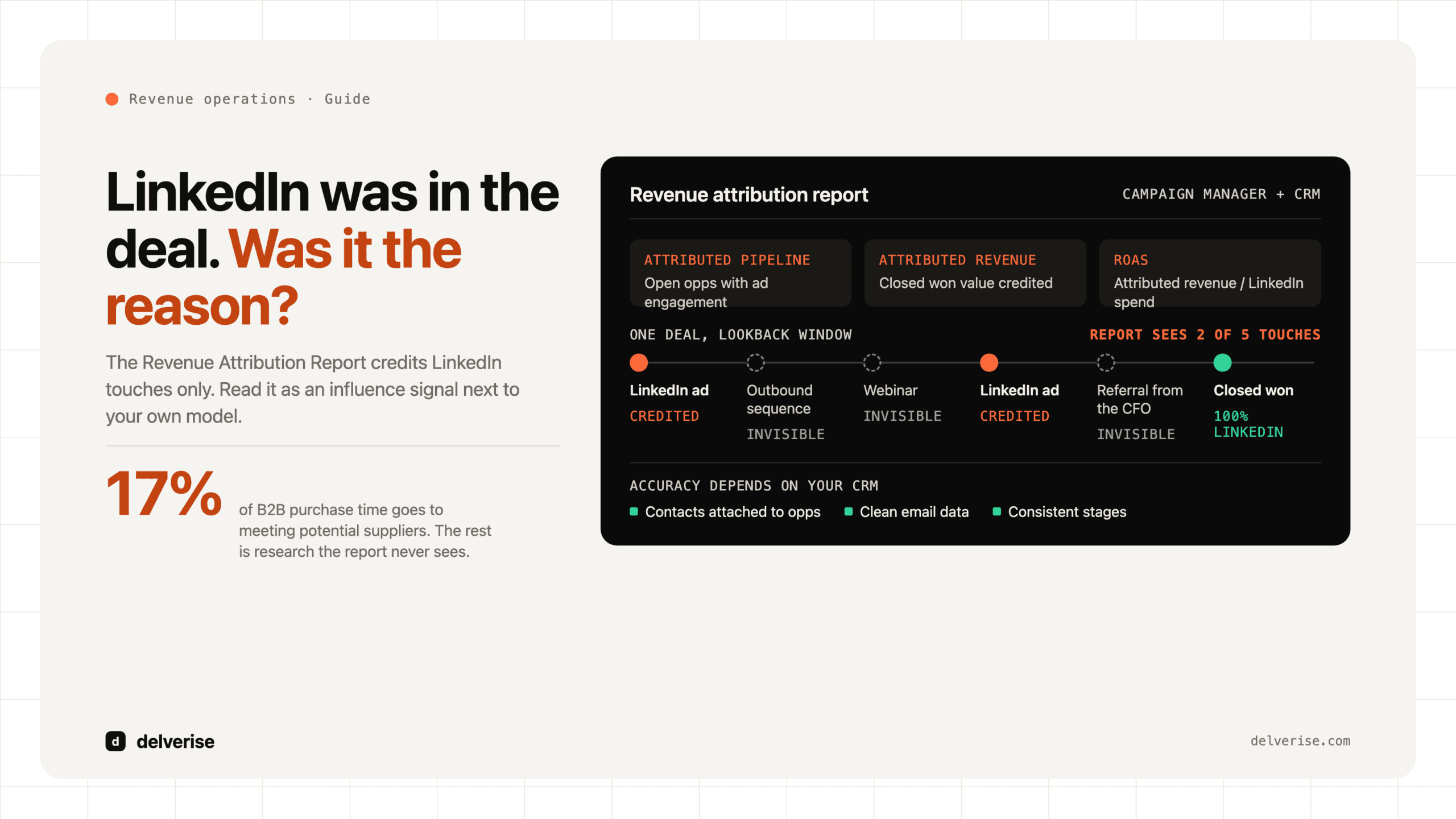
The report sits in Campaign Manager and pulls opportunity data from a connected CRM. For each opportunity, LinkedIn looks at the contacts associated with it, matches those contacts to LinkedIn members (mostly by email), and checks whether any of them engaged with your ads during the lookback window before the opportunity was created or closed.

From that match it reports a set of revenue-level metrics:
- Attributed pipeline: the value of open opportunities where matched contacts engaged with your LinkedIn ads.
- Attributed revenue: closed-won value credited to LinkedIn campaigns.
- Return on ad spend (ROAS): attributed revenue divided by LinkedIn spend for the period.
- Deal-level context: figures like average deal size, win rate, and time to close for influenced deals compared with the rest.
Credit is split across the LinkedIn campaigns that touched a deal using a multi-touch approach. That split only happens among LinkedIn touches. Your outbound sequence, webinar, G2 profile visit, and the referral from a customer’s CFO are invisible to it. LinkedIn changes lookback windows and model options over time, so check current Campaign Manager documentation before you set expectations with your team.
Why do revenue leaders care about this report?
LinkedIn is usually one of the largest paid lines in a B2B SaaS budget, and it has always been hard to defend with platform metrics. Cost per lead and click-through rate say little about whether the pipeline was real. Revenue attribution moves the conversation from engagement to dollars.
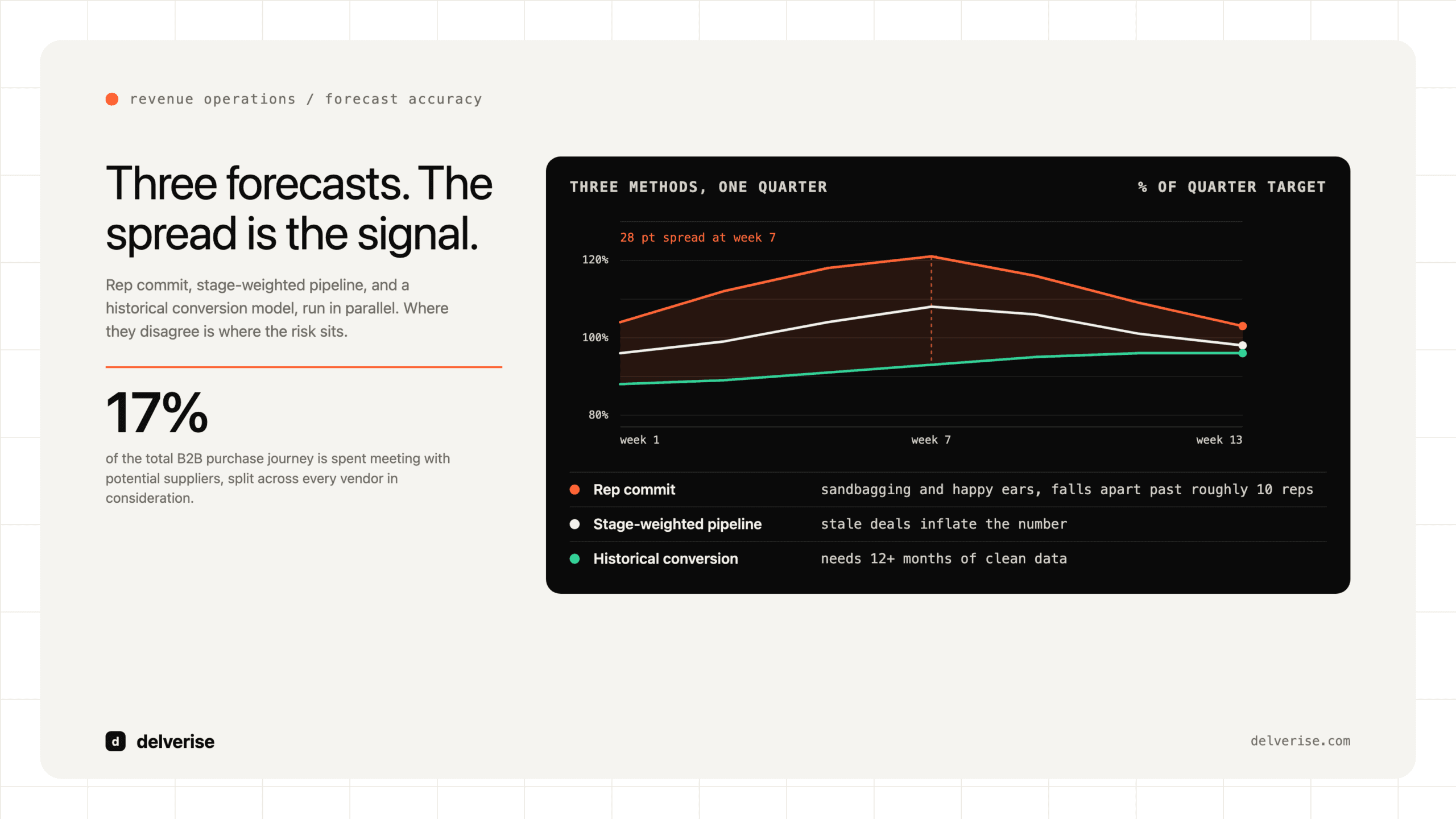
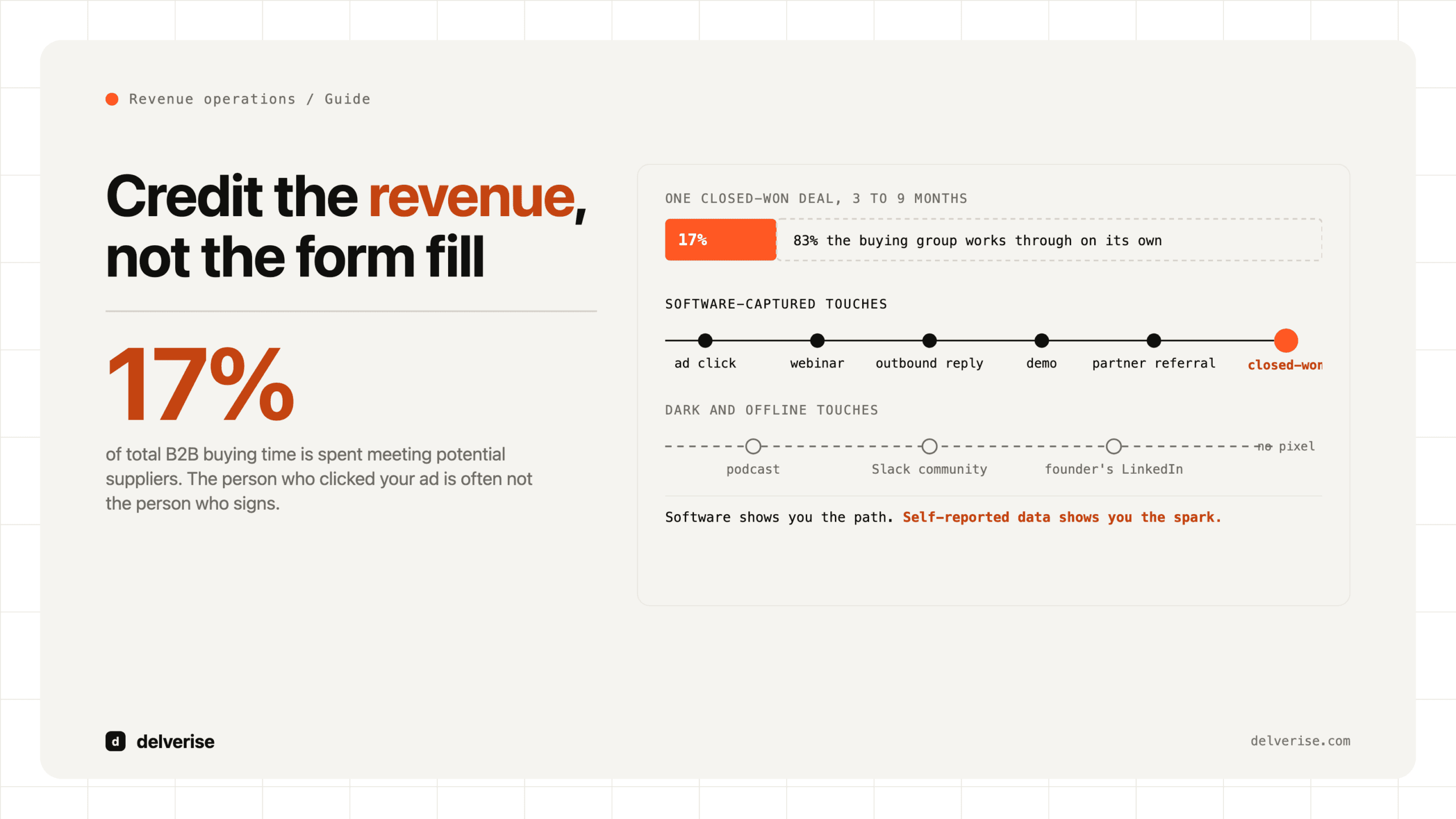
It also fits how B2B buying works now. Gartner’s research on the B2B buying journey found that buyers spend only about 17% of their purchase time meeting with potential suppliers, and much of the rest goes to independent research. McKinsey’s B2B Pulse research has repeatedly found buyers using ten or more channels during a purchase. Much of that activity happens before anyone fills out a form, which is why last-touch reporting tends to shortchange channels like LinkedIn that shape consideration early.
There is a timing argument too. The LinkedIn B2B Institute, working with the Ehrenberg-Bass Institute, popularized the “95-5 rule”: at any given moment, roughly 95% of your potential buyers are out of market. Ads shown to those people today may not become opportunities for two or three quarters. A report that looks at revenue instead of this month’s leads gives brand and demand spend a fairer hearing.
What do you need in place before the report is trustworthy?
The report only knows what your CRM tells it. Most bad RAR numbers come from bad CRM structure, and LinkedIn is just reporting it back. Before you trust the output, confirm the basics. (If you are unsure whether your stack is ready, our breakdown of the six foundation pieces under every revenue stack is a useful self-check.)

- A Campaign Manager admin and a CRM admin are both available to authorize the connection.
- Contacts are consistently associated with opportunities (Opportunity Contact Roles in Salesforce, deal-to-contact associations in HubSpot).
- The buying committee is attached to each deal, not just the single champion who booked the demo.
- Contact records carry work emails that LinkedIn can match, and duplicates are merged.
- Opportunity stages, created dates, and close dates are used the same way by every rep.
- The LinkedIn Insight Tag and, ideally, the Conversions API are sending conversion events.
- Your lookback window matches your real sales cycle, based on your own median days to close.
The contact association item matters most. If reps only attach one contact per opportunity, LinkedIn can only match against one person, and a campaign that reached five members of a buying committee gets credit for one or none. Forrester’s research on buying groups has consistently shown that B2B purchases involve many stakeholders, so a single-contact opportunity model will undercount LinkedIn’s reach almost every time. Filling out buying committees through CRM enrichment is often what turns this report from noise into signal.
Where does the LinkedIn revenue attribution report mislead?
Knowing the failure modes lets you read the report with the right amount of skepticism.
It overstates credit when LinkedIn is one of many touches
Because the report only sees LinkedIn, a deal sourced by an outbound SDR that happened to include someone who scrolled past your ad can show up as LinkedIn-attributed revenue. Engagement can include impressions, not just clicks, depending on your settings. For accounts you are already working through an outbound funnel, overlap is guaranteed, and the report will count it all as LinkedIn influence.

It understates credit when CRM data is thin
Missing contacts, personal emails, and opportunities created without contacts all cut the match rate. LinkedIn’s real contribution then looks smaller than it is.
Every platform claims the same deal
Google Ads, your intent data tool, and your webinar platform may each claim the same closed-won deal in their own reports. Add up platform-reported revenue across vendors and you will often get a figure well above your actual bookings. Each report is internally consistent. None of them is designed to split credit with the others.
Small samples swing wildly
A Seed or Series A company might close 15 deals a quarter. One large deal landing in a LinkedIn-touched account can double ROAS overnight. Look at trailing two-quarter or three-quarter windows before you move budget.
How does RAR compare with other ways of measuring LinkedIn?
| Method | What it sees | Strength | Weakness |
|---|---|---|---|
| LinkedIn Revenue Attribution Report | LinkedIn ad engagement matched to CRM deals | Revenue-level view with no custom build | LinkedIn-only view, so it can overclaim shared deals |
| CRM last-touch or first-touch | One tracked touchpoint per deal | Simple and consistent | Misses the untracked research that dominates B2B buying |
| Custom multi-touch model | All tracked channels in your warehouse or CRM | Splits credit across channels | Takes engineering and ongoing maintenance |
| Self-reported attribution | What the buyer says influenced them | Captures dark social, podcasts, and word of mouth | Imprecise, depends on form and discovery call discipline |
| Holdout or geo tests | Lift between exposed and unexposed groups | Closest thing to causal evidence | Needs enough volume and patience to read |
The most reliable setup for a Seed to Series B team combines three of these: RAR for LinkedIn-specific depth, a CRM multi-touch view for cross-channel credit, and a “How did you hear about us?” field that reps confirm on the first call.
What does a worked example look like?
Here is a hypothetical, simplified scenario to show how the numbers can diverge. A Series A company spends $60,000 on LinkedIn over two quarters and closes $900,000 in new ARR in the same period.
- RAR shows $360,000 in attributed revenue, a 6x ROAS.
- The CRM first-touch report credits LinkedIn with $75,000, because only two deals started with a LinkedIn lead form.
- Self-reported attribution shows five buyers naming LinkedIn content or ads, on deals worth $210,000.
- A deal-level review finds that $120,000 of the RAR figure came from accounts already in active outbound sequences before any LinkedIn engagement.
A reasonable read: LinkedIn is clearly influencing deals, first-touch undercounts it badly, and RAR overcounts where outbound got there first. A defensible planning number sits somewhere between $210,000 and $240,000, which still makes the spend comfortably worth keeping. That range, along with its assumptions, is what should go into the board deck and into your revenue forecast. Neither 6x nor 1.25x should.
How should you use the report to make budget decisions?
Use RAR to compare LinkedIn campaigns and audiences with each other, where its biases are roughly constant. It is good at showing that a thought-leadership campaign aimed at VP Finance is touching larger deals than a retargeting campaign. It is weaker at deciding whether LinkedIn deserves more budget than outbound or paid search, because it cannot see those channels.
A practical operating rhythm:
- Monthly: review attributed pipeline by campaign and audience, and shift spend inside LinkedIn.
- Quarterly: reconcile RAR against your multi-touch and self-reported views, then set a planning multiplier for LinkedIn.
- Twice a year: run a holdout test on a meaningful audience segment if your volume supports it.
Feed what you learn back into targeting too. If influenced deals cluster in certain titles or company sizes, that should shape your lead qualification scoring and the accounts your SDRs work, so paid and outbound reinforce each other instead of claiming each other’s deals.
Who should own LinkedIn revenue attribution?
Ownership usually falls between marketing, which runs Campaign Manager, and RevOps, which owns the CRM. When nobody owns the connection between the two, the report gets switched on, produces a flattering number, and quietly loses credibility the first time sales challenges it. The durable fix is to treat attribution as part of the revenue system: defined data contracts for contact association, a documented model, and one reconciled view the whole leadership team agrees to use. That is squarely GTM engineering work, and it pays off well beyond LinkedIn.
Frequently Asked Questions
Which CRMs work with the LinkedIn Revenue Attribution Report?
LinkedIn supports direct connections to Salesforce and HubSpot, and it has supported Microsoft Dynamics as well. Check Campaign Manager for the current list, because integrations and requirements change. You need admin access on both sides to authorize the connection.
How long does it take to get useful data from the report?
Once connected, the report can backfill some history within your lookback window. Useful signal still depends on your sales cycle. If your median deal takes 90 days to close, plan on at least two quarters of data before you draw budget conclusions.
Why is my LinkedIn attributed revenue so low?
The most common cause is weak contact-to-opportunity association. If opportunities have one contact or none, or contacts use personal emails, LinkedIn cannot match them to members. Enriching buying committees and enforcing contact roles usually raises match rates noticeably.
Can I use RAR as my company’s main attribution model?
It works poorly as a company-wide model, because it only sees LinkedIn touchpoints and will claim credit for deals other channels also influenced. Use it for LinkedIn-specific decisions, and reconcile it with a cross-channel multi-touch model and self-reported attribution for company-level budgeting.
Does the report count ad impressions or only clicks?
LinkedIn can include view-based engagement as well as clicks, depending on how your conversion and attribution settings are configured. View-based credit raises the numbers, so know which setting you are using before you compare LinkedIn with channels that only count clicks.