←Back to blog
Revenue Intelligence & Data ToolingGuideAugust 29, 20267 min read
AI Email Finder: How It Works, Where It Fails, and How to Evaluate One
An AI email finder is software that predicts and verifies a prospect’s work email address from a name and company domain, using pattern inference, public web data, and third-party databases. Good ones return a confidence score and a verification result, so revenue teams send only to addresses likely to land in an inbox.
An AI email finder is software that predicts and verifies a prospect’s work email address from a name and company domain, using pattern inference, public web data, and third-party databases. Good ones return a confidence score and a verification result, so revenue teams send only to addresses likely to land in an inbox.
Key takeaways
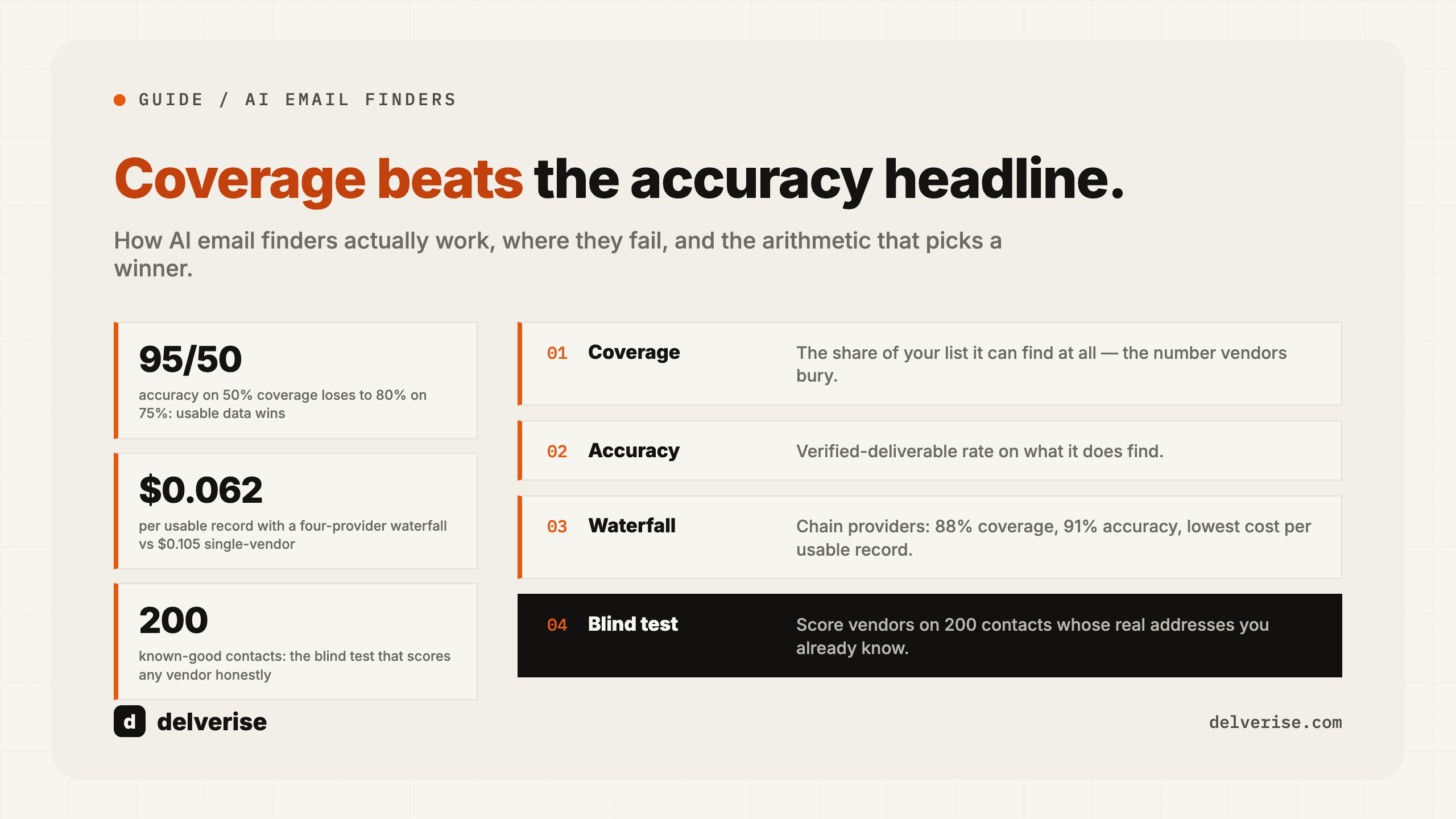
- Usable yield equals coverage multiplied by accuracy. A vendor advertising 95% accuracy on 50% coverage delivers less usable data than one at 80% accuracy on 75% coverage.
- Accuracy claims are almost never measured on your ICP. Test on a sample of your own target accounts before signing anything.
- Catch-all domains, non-US SMBs, and recent job changers are the three places every finder degrades.
- Email finding is a data layer, not a growth strategy. It only pays off when targeting, sequencing, and CRM writeback are already working.
- Waterfall enrichment (querying several providers in priority order, stopping at the first verified hit) beats any single vendor on both coverage and cost per usable record.
What is an AI email finder, and how does it differ from a contact database?
A contact database sells you records it already holds. You query a company, it returns whatever it has stored, and coverage is fixed by what the vendor collected. An AI email finder generates a candidate address on demand for a specific person, then tests whether that address exists.
The “AI” part is mostly pattern inference plus source reconciliation. Given a first name, last name, and domain, the system scores likely formats (first.last@, flast@, first@) against every observed address it has seen at that domain, weights them by recency and source reliability, and picks the highest-probability candidate. Machine learning helps rank patterns across millions of domains. It does not conjure addresses out of nothing.
Most serious tools do both. They check their own store first, then fall back to inference and live verification. That hybrid is why the buying question has shifted from “who has the biggest database” to “who returns the most verified records for the accounts I actually care about.” If you are still evaluating raw databases, our breakdown of how revenue leaders should buy contact data covers that side of the market.
How does an AI email finder actually find an address?
Five steps, in order:

- Identity resolution. Match the person to a real profile: name, current employer, seniority, location. Ambiguity here poisons everything downstream.
- Domain resolution. Map the company to its sending domain, which often differs from its marketing website (subsidiaries, rebrands, and acquisitions all break this).
- Pattern inference. Rank candidate formats using known addresses at that domain.
- Verification. Perform an SMTP handshake with the receiving mail server to ask whether the mailbox exists, without sending a message.
- Confidence scoring. Return valid, invalid, catch-all, or unknown, usually with a numeric score.
A catch-all domain is one configured to accept mail to any address, valid or not. Verification cannot confirm or deny those mailboxes, and roughly a fifth to a third of B2B domains behave this way depending on your segment. That single fact explains most of the gap between vendor marketing and observed bounce rates.
How accurate are AI email finders in practice?
Treat accuracy and coverage as two separate numbers, then multiply them.

Coverage rate is the share of your input list for which the tool returns any address. Accuracy is the share of returned addresses that are genuinely deliverable. Vendors quote accuracy loudly and coverage quietly, because coverage is where they lose.
Here is the arithmetic on a 4,000-contact target list:
| Scenario | Coverage | Accuracy | Usable emails | Cost per usable record at $0.05/credit |
|---|---|---|---|---|
| Vendor A (marketed on accuracy) | 50% | 95% | 1,900 | $0.105 |
| Vendor B (broader index) | 75% | 82% | 2,460 | $0.081 |
| Waterfall across four providers | 88% | 91% | 3,203 | $0.062 |
Vendor A wins the accuracy headline and loses on every metric a revenue leader is measured against. The waterfall wins because each provider is only charged when the prior one returns nothing, so you pay for incremental coverage rather than duplicate hits.
Run this test yourself before buying. Take 200 contacts from accounts you already closed, where you know the real addresses, and score each vendor blind. Two hundred records costs almost nothing and will contradict at least one vendor’s pitch deck.
What should a revenue leader compare before buying?
- Coverage measured on a 200-record sample of your own ICP, not on the vendor’s benchmark set
- Catch-all handling: does the tool flag them separately, or quietly count them as valid?
- Non-US and sub-200-employee coverage, if either is in your ICP
- Data recency and how job changes are detected
- Credit model: charged on attempt or on verified match only
- API rate limits and latency, if this runs inside a real-time workflow
- GDPR posture: lawful basis, data subject request handling, EU data sourcing
- CRM writeback path, including field mapping and deduplication rules
The credit model deserves particular attention. Charging on attempt shifts all coverage risk onto you, and on a low-coverage segment that difference can double your effective cost per record.
Where do AI email finders break?
Job changes. B2B contact data decays at roughly 2 to 3% per month through role changes alone. An address found in January may be dead by summer, and the finder will happily return the cached version.

Small and non-US companies. Coverage is built from observed data. Companies with thin web presence, few employees on public platforms, or non-Latin naming conventions produce far weaker inference.
Deliverability, which is downstream and unforgiving. Since February 2024, Google and Yahoo require bulk senders to authenticate with SPF, DKIM, and DMARC, offer one-click unsubscribe, and hold spam complaint rates below 0.3%. A finder with mediocre accuracy pushes bounce and complaint rates up, and the damage lands on your entire sending domain rather than on one campaign. Our guide to turning email prospecting into a system covers the sending infrastructure side.
Targeting quality, which no tool can rescue. Gartner’s research on B2B buying found that customers spend only about 17% of their total purchase journey meeting with potential suppliers across all vendors combined, and McKinsey’s B2B Pulse work shows buyers now moving across roughly ten channels in a single decision journey. Your window is small and shared. Sending more verified emails to weakly qualified accounts spends that window faster. Getting the account and persona selection right upstream matters more than the last five points of match rate, which is why what data your team actually needs is worth settling before the tooling question.
How should an email finder sit inside the GTM stack?
Think of it as one node in an enrichment chain, triggered by an event rather than run as a monthly batch.
A working pattern: a trigger fires (new hire in a target role, funding round, product signup, ICP account entering a buying window), the account and person are resolved, a waterfall of two to four providers runs until one returns a verified address, the record writes to your CRM with source and confidence fields intact, and only then does it enter a sequence. Records that come back catch-all or unknown route to a different path, typically LinkedIn or phone, rather than into email.
Orchestration tools make this practical without engineering headcount. Clay is the most common choice for waterfall enrichment because it fans a single row across dozens of providers and stops at the first verified hit, which is exactly the cost structure the table above rewards. Building the tables, credit guardrails, and CRM sync correctly is where most teams stall, and it is the work delverise does on its Clay implementation engagements. For the wider architecture, including how enrichment connects to routing and reporting, see our notes on CRM enrichment and on evaluating AI lead finders for the targeting layer that feeds it.
One discipline separates teams that get value from this from teams that burn credits: store the provider, timestamp, and confidence score on every enriched field. Without that, you cannot tell which vendor is underperforming, and renewal season becomes guesswork.
Frequently Asked Questions
Is using an AI email finder legal for B2B outreach?
In the US, CAN-SPAM permits cold commercial email with accurate headers, a physical address, and a working opt-out. In the EU and UK, GDPR requires a lawful basis, usually legitimate interest, plus documented balancing and honored deletion requests. Ask any vendor how they source EU records and how they handle data subject requests, and get the answer in writing.
What is a realistic match rate for a good tool?
On mid-market and enterprise US targets, 70 to 85% verified coverage is a reasonable expectation from a well-built waterfall. Single vendors typically land in the 45 to 65% range. On SMB or non-US segments, expect meaningfully lower, and validate with a sample before committing budget.
Do free email finders work?
They work for low-volume, spot-check research. Free tiers usually cap at a few dozen lookups per month, skip verification, and exclude API access, which rules out any automated workflow. They are a fine way to sanity-check a paid vendor’s output on a handful of records.
Should we buy an email finder or a full data platform?
If email addresses are the only gap, buy a finder or a waterfall orchestration layer and keep your existing data sources. If you also lack firmographic, technographic, and intent coverage, a platform may consolidate spend. Decide based on the specific fields your sequences and scoring models require today.
How often should enriched contact data be refreshed?
Re-verify any address older than 90 days before it enters a sequence, and monitor job-change signals continuously on accounts in active pipeline. A contact who moved companies is a lost record in one system and a warm new opportunity in another, provided you catch the change.
Read next