←Back to blog
Revenue Intelligence & Data ToolingGuideAugust 22, 20268 min read
AI Lead Finder: What It Actually Does and How to Evaluate One
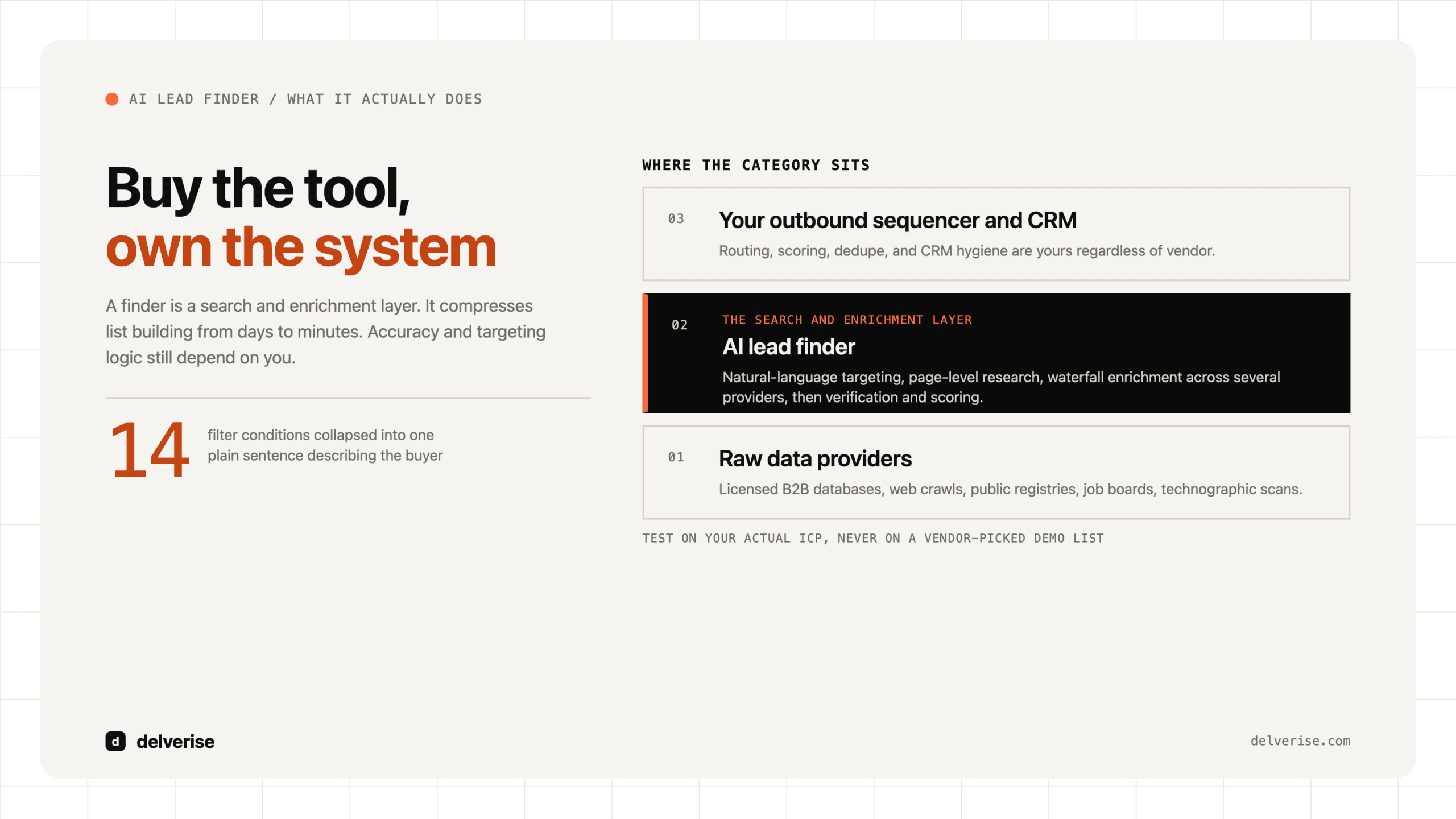
An AI lead finder is software that uses machine learning and large language models to search public and licensed data sources, identify companies and people matching your ideal customer profile, and enrich them with contact details and context. It compresses list building from days to minutes. Accuracy and targeting logic still depend on you.
An AI lead finder is software that uses machine learning and large language models to search public and licensed data sources, identify companies and people matching your ideal customer profile, and enrich them with contact details and context. It compresses list building from days to minutes. Accuracy and targeting logic still depend on you.
Key takeaways
- The category is a search and enrichment layer, sitting between raw data providers and your outbound sequencer or CRM.
- Natural-language targeting is the real unlock in usability: you describe the buyer in a sentence instead of building 14 filter conditions.
- Coverage and freshness vary wildly by segment. Test on your actual ICP before you sign, never on a vendor-picked demo list.
- Volume is the easy part. The constraint on most B2B SaaS teams is qualification, timing, and follow-through, none of which a finder solves.
- Buy the tool, own the system. Routing, scoring, dedupe, and CRM hygiene are yours regardless of vendor.
What is an AI lead finder, and how does it differ from a contact database?
A traditional contact database is a static index you query with filters: industry, headcount, title, geography. An AI lead finder adds three things on top. It accepts natural-language descriptions of a target account and translates them into structured criteria. It reads unstructured sources, including websites, job postings, filings, and news, to answer questions a filter cannot ask. And it enriches each record with work emails, phone numbers, and context at the moment you need it rather than serving a stale snapshot.
The practical difference shows up in the queries you can run. A database answers “SaaS companies, 50 to 200 employees, US.” A finder answers “B2B SaaS companies whose careers page lists an open RevOps role and whose pricing page mentions usage-based billing.” That second query is a buying signal wrapped in a targeting rule, and it is what separates a usable prospecting list from a headcount filter.
How does an AI lead finder actually work?
Under the hood, most products run the same four steps.

- Source aggregation. Licensed B2B databases, web crawls, public registries, job boards, and technographic scans get pulled into a company graph.
- Interpretation. An LLM converts your description into filters plus a set of research questions it answers per account by reading pages.
- Enrichment and waterfall. Contact details get resolved through multiple providers in sequence, so a miss at provider one falls through to provider two.
- Verification and scoring. Emails get validated, records get deduped against your CRM, and accounts get ranked by fit or signal strength.
Step three is where quality is won or lost. Single-source enrichment typically resolves a fraction of a list. A waterfall across several providers materially lifts match rates on the same input, which is why serious teams care more about the enrichment architecture than the interface.
Where do AI lead finders break?
Three failure modes come up repeatedly.

Confident wrong answers. When an LLM researches an account and cannot find the answer, it will sometimes infer one. A company gets tagged as using a competitor product because a blog post mentioned it once. At list scale, a small hallucination rate produces hundreds of miscategorized accounts, and nobody notices until reply rates sag.
Fit without timing. A finder tells you who matches. It rarely tells you who is in market this quarter. Gartner’s research on B2B buying found that customers spend only about 17% of the total purchase journey meeting with potential suppliers, and Gartner also puts a typical buying group at six to ten decision makers. Perfect fit data still leaves you guessing about the other 83% of the journey, which is the same structural problem we covered in why batch outreach cannot see buying timing. Pairing a finder with buying intent data is the usual fix, with the caveat that intent signals carry their own noise.
Coverage cliffs. Every provider has strong and weak segments. US mid-market tech is well covered. European SMBs, regulated industries, non-English markets, and roles outside the standard title taxonomy are much thinner. Vendors demo on their strong segments. Test on yours.
Which tool category actually fits your team?
| Category | Best at | Weakest at | Fits when |
|---|---|---|---|
| AI lead finder | Fast list building from a plain-language ICP description | Timing signals, niche coverage, auditability | You are still testing segments and need volume quickly |
| Contact database | Predictable filters, stable pricing, large seat counts | Anything requiring unstructured research | Your ICP is simple and firmographic |
| Intent platform | Surfacing accounts researching your category now | Contact-level precision, false-positive rate | You have a defined market and a follow-up motion that works |
| Orchestration and enrichment layer (for example Clay) | Combining many providers, custom research, waterfalls you control | Requires an owner with real ops skill | You want one system instead of five disconnected tools |
What does the ROI math actually look like?
Take a hypothetical Series A team with two AEs, a $28,000 average contract value, and a target of 20 new opportunities per quarter. Their ICP contains roughly 4,000 accounts.

Before automation, an SDR spends around 12 hours a week building and enriching lists, so about 150 hours a quarter of research time. An AI lead finder at $500 to $1,500 per month collapses most of that to a few hours of review. The saved time is real, and it is also the least interesting part of the calculation.
The interesting part is match rate. If a finder resolves verified contacts for 55% of your list versus 75% from a multi-provider waterfall, that gap is 800 reachable accounts across a 4,000-account ICP. At a 3% meeting rate and a 25% close rate, those 800 accounts are worth roughly six additional closed deals a year, or about $168,000. The difference between a good enrichment stack and a mediocre one is usually larger than the entire software line item.
Speed compounds the same way on the response side. The classic Harvard Business Review study on the short life of online sales leads found that firms contacting a lead within an hour were roughly seven times more likely to have a qualifying conversation than those waiting even one hour longer. Finding leads faster only pays if your follow-up is equally fast.
What should you check before you buy?
Run this on a trial, using 200 accounts you already know well so you can grade the output yourself.
- Coverage on your exact ICP, including your weakest geography and smallest company size band
- Verified email match rate, measured after a bounce test, not the vendor’s claimed rate
- Mobile number coverage if your motion includes calling
- Accuracy of AI-researched fields, hand-checked against 25 accounts you can verify
- Native CRM sync with dedupe against existing accounts and open opportunities
- Credit model transparency: what consumes credits, what refunds on a miss
- Export rights and what happens to your enriched data if you churn
- GDPR and CCPA posture, including source of contact data and opt-out handling
If a vendor resists letting you test on your own list, that is the answer. Buyer-side scrutiny is normal now: McKinsey’s B2B Pulse research has tracked buyers using around ten channels across a purchase, roughly double a decade earlier, and category review sites like G2 exist precisely because self-directed verification became the default. Apply the same standard to your own purchase.
Should you buy a lead finder or build the workflow?
Buy when you are early, your ICP is still moving, and you need answers this month. A packaged AI prospecting tool gets a team from zero to a working list fast, and speed of learning matters more than elegance at that stage.
Build when your targeting logic has become a competitive advantage. Once you know that the accounts worth pursuing are identified by a specific combination of hiring signals, tech stack, funding stage, and product usage patterns, no packaged finder will encode that for you. At that point an orchestration layer plus your own waterfall gives you control over cost per record, provider mix, and research logic. That is also the point where the finder stops being a standalone purchase and becomes one component in a wider revenue system covering routing, scoring, and reporting. If you want that built rather than assembled over 18 months of trial and error, delverise does enrichment and data infrastructure work and runs Clay implementations as part of it.
Either way, keep the sequence straight. Data quality feeds targeting, targeting feeds messaging, messaging feeds pipeline. Teams that buy a finder while their CRM is a swamp get faster at creating bad records. Fix the underlying account map first.
Frequently Asked Questions
Is an AI lead finder the same as an AI SDR?
No. A lead finder identifies and enriches accounts and contacts. An AI SDR or AI BDR attempts the outreach itself: writing messages, sequencing, and handling replies. Many teams pair them, and many discover the finder delivers most of the value while the messaging layer still needs human judgment.
How accurate is AI-generated lead data?
Firmographic fields such as headcount, industry, and location are usually reliable within a reasonable margin. Verified work emails from a good multi-provider waterfall commonly land in the 60% to 80% range on mid-market US targets, lower elsewhere. AI-researched fields, meaning anything an LLM inferred from reading a website, need spot-checking on every new use case.
What does an AI lead finder cost?
Entry tools run $50 to $200 per seat per month with capped exports. Credit-based platforms typically start around $150 to $800 per month and scale with enrichment volume. Enterprise data contracts run into five figures annually. Budget separately for verification, since bounce rates above 3% put your sending domains at risk.
Will using one hurt our email deliverability?
Only through misuse. Unverified lists, aggressive volume ramps, and no domain warm-up cause deliverability damage regardless of how the list was sourced. Verify every address before sending, keep per-mailbox volume conservative, and monitor bounce and spam complaint rates weekly.
Do we still need a CRM if the finder stores our leads?
Yes. A finder holds a working list. Your CRM holds ownership, stage, history, and revenue attribution. Treat the finder as a source that writes into the system of record, never as a replacement for it, and enforce dedupe rules on the way in so reps stop working accounts that already belong to someone else.
Read next