←Back to blog
Revenue Intelligence & Data ToolingGuideAugust 18, 20268 min read
How to Use AI for Sales Prospecting: A Revenue Leader’s Guide
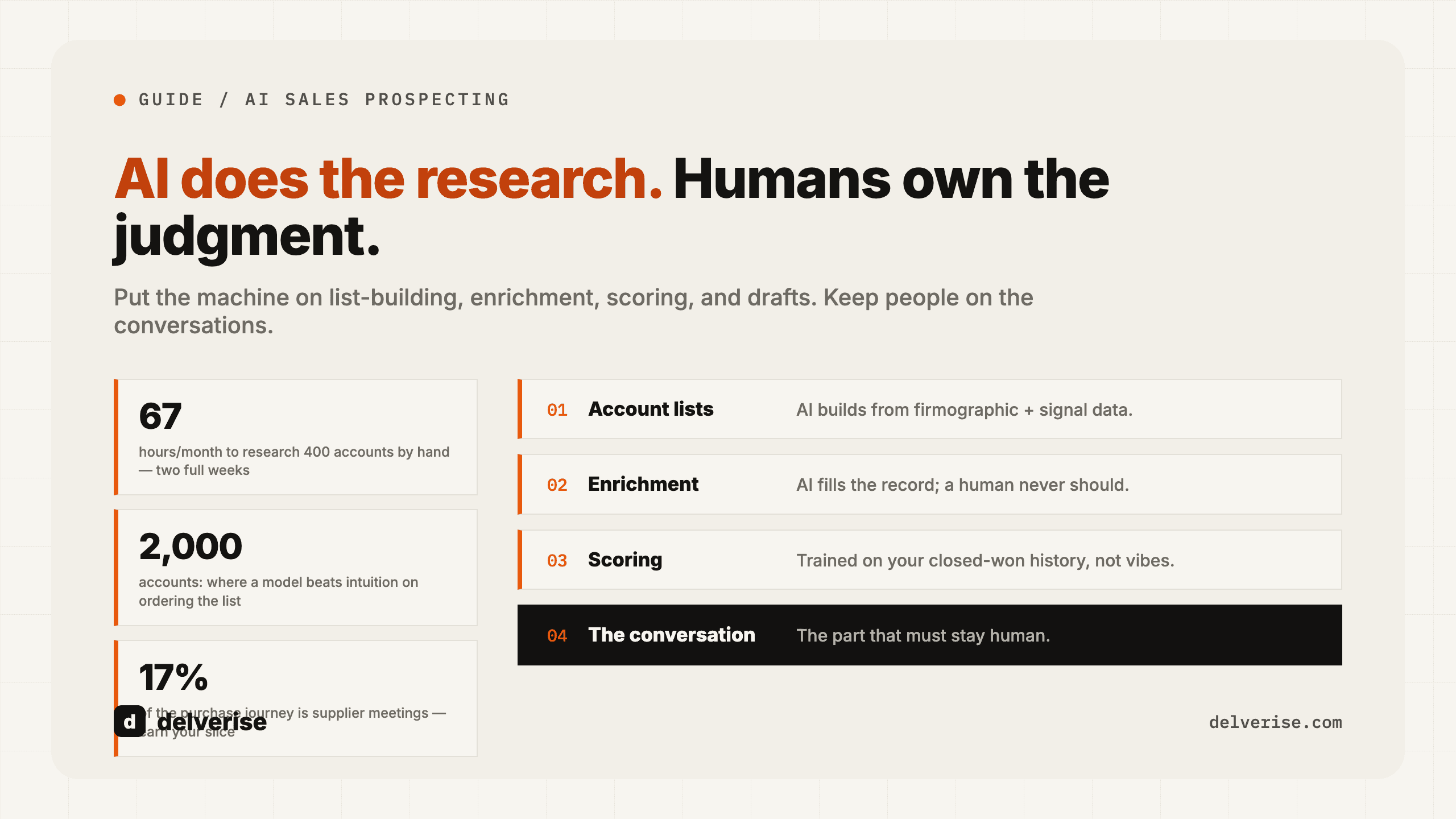
Use AI for sales prospecting by putting it on the research-heavy steps: building an account list from firmographic and signal data, enriching contacts, scoring fit and timing, drafting a first-pass message, and routing the result to a rep. Keep humans on qualification calls, pricing, and anything that carries your brand’s credibility.
Use AI for sales prospecting by putting it on the research-heavy steps: building an account list from firmographic and signal data, enriching contacts, scoring fit and timing, drafting a first-pass message, and routing the result to a rep. Keep humans on qualification calls, pricing, and anything that carries your brand’s credibility.
Key takeaways
- AI compresses research time, which is where most prospecting hours actually go. It does not fix a weak ideal customer profile or a broken follow-up process.
- Output quality tracks input quality. Prospecting AI running on stale CRM data produces confident, wrong messages at scale.
- The highest-return use is scoring and prioritization, because it changes what reps work on rather than only how fast they write.
- Personalization at volume has a ceiling. Buyers recognize templated “research” quickly, and the reply-rate lift decays.
- Measure this on pipeline created per rep per month and meeting-to-opportunity conversion, not on activity counts, which AI inflates by design.
What does AI actually do in sales prospecting?
Sales prospecting is the work of identifying accounts and people who could plausibly buy, then earning a first conversation. AI touches four distinct jobs inside that, and they have very different return profiles.

Research and enrichment. Pulling headcount, tech stack, funding, job changes, hiring patterns, and recent announcements into a structured record. This is the most reliable use because the task is retrieval and formatting, and errors are visible.
Scoring and prioritization. Ranking accounts by fit (do they look like your best customers) and timing (is something happening now). A model trained on your closed-won and closed-lost history will beat a rep’s intuition on ordering a 2,000-account list, though it stays only as good as the CRM history behind it.
Drafting. Turning a research record into a first-touch email, call opener, or LinkedIn note. Useful as a starting point, weak as a finished product.
Routing and follow-up. Deciding who gets the lead, in what sequence, and when to re-engage. Underrated, and usually the cheapest fix available. Harvard Business Review’s well-known research on lead response time found that companies contacting inbound leads within an hour were roughly seven times more likely to have a meaningful qualifying conversation than those waiting even two hours. AI-assisted routing removes the queue entirely.
The pattern across all four: AI is strong on the parts that involve reading a lot and deciding what matters, and it is weak on the parts that involve judgment about a specific human’s situation. We go deeper on category-by-category tradeoffs in our AI prospecting tools buying guide.
Why does AI prospecting fail for most teams?
Three failure modes account for nearly everything we see.

The data underneath is wrong. B2B contact data decays continuously as people change roles, and any provider’s coverage varies sharply by region and company size. Feeding one vendor’s export into an AI writer means every hallucinated title and dead email gets amplified across thousands of sends. The fix is a data enrichment waterfall: chain providers in a fallback order, verify, and only then let the AI layer touch the record.
The ICP was never written down precisely enough to encode. “Mid-market SaaS companies with a sales team” is not a definition a model can act on. A usable ICP names the employee band, the funding stage, the trigger events that matter, and the disqualifiers. Teams that skip this step ask AI to guess, and it will.
Volume replaces relevance. Gartner’s research on B2B buying found that buyers spend only about 17% of the total purchase journey meeting with potential suppliers, and that time gets split across every vendor in consideration. McKinsey’s work on B2B decision journeys found buyers now move across roughly ten channels before committing. Both point the same direction: attention is the constraint. Sending five times more mediocre email into that constraint reduces your odds rather than improving them.
Where should AI sit, and where should humans stay?
| Prospecting task | What AI should do | What a human must own | Common failure |
|---|---|---|---|
| Account list building | Query firmographic and signal sources, dedupe against CRM, apply exclusion rules | Define fit criteria and disqualifiers | Lists that ignore existing pipeline and partner accounts |
| Contact enrichment | Chain providers, verify emails, flag low confidence | Set the accuracy bar and the cost ceiling per record | Single-source data treated as truth |
| Fit and intent scoring | Rank accounts against closed-won patterns and live signals | Review the top and bottom deciles monthly | Scores nobody trusts because the logic is opaque |
| First-touch copy | Draft variants grounded in verified research fields | Approve the angle, the offer, and the voice | Fake personalization buyers spot instantly |
| Qualification call | Prep brief, transcript, CRM write-back | The conversation itself | Automating the one step that builds trust |
| Follow-up and routing | Instant assignment, sequencing, re-engagement triggers | Escalation rules and SLA | Leads sitting in a queue overnight |
What is a realistic worked example?
Take a Series A company with three SDRs and two AEs, working 400 target accounts a month.

Manual baseline: a rep spends roughly eight to twelve minutes properly researching an account (site, funding, hiring, current stack, a reason to reach out now). At ten minutes, 400 accounts costs about 67 hours a month, close to two full weeks of one person’s capacity, and it happens before a single conversation.
With an AI research layer: enrichment and a drafted research summary run at roughly $0.10 to $0.40 per account depending on how many data providers you chain, so $40 to $160 a month in credits. Reps review flagged records instead of building them, which realistically takes 60 to 90 seconds per account, or about eight hours total.
The recovered time is the real return, and it only converts into pipeline if you spend it on live conversations. Teams that pocket the savings and simply send more email typically see reply rates fall, because send volume rose while relevance stayed flat. Teams that redirect the hours into calls, multithreading, and second-touch follow-up see the gain show up in meetings held.
One honest caveat on cost: token and credit spend scales linearly with list size, and a poorly scoped list burns budget on accounts that were never going to buy. Tighten the list before you turn on enrichment, never after.
What should you build first?
Sequence matters more than tool choice. A practical order:
- Write the ICP as machine-readable rules: employee band, stage, region, tech signals, and explicit disqualifiers.
- Audit CRM data quality on a 200-record sample before automating anything on top of it.
- Stand up enrichment with at least two providers in a fallback chain plus email verification.
- Build a fit score from closed-won and closed-lost history, then have a rep sanity-check the top and bottom 20 accounts.
- Add one timing signal you genuinely act on, such as hiring for a role your product supports, a funding event, or documented buying intent.
- Automate routing and follow-up SLAs before you automate outbound copy.
- Only then add AI drafting, with a human approving every angle for the first month.
Most teams run this on a spreadsheet-style data workspace connected to their CRM and sequencer. Clay is the common choice for the enrichment and scoring layer because it chains providers, runs AI research columns per row, and pushes results into HubSpot or Salesforce without custom engineering. It is genuinely good at that, and it also has a real learning curve, meaningful credit costs at volume, and a tendency to become an unmaintained shadow system when nobody owns it. If you want that layer built and documented properly, delverise works with teams on exactly this through our Clay partner practice.
Signal quality deserves its own scrutiny. Intent data is useful when it changes account order and useless when it just adds a column, which we cover honestly in our breakdown of what buying intent data actually changes. And if the plan involves handing entire sequences to autonomous agents, read where that approach holds and where it fractures in AI BDR: what it actually automates and where it breaks.
Who owns this inside the company?
AI prospecting sits across sales, marketing, and operations, which is exactly how it ends up owned by nobody. The workable answer is a named owner in RevOps or GTM engineering who is accountable for the data layer, the scoring logic, and the handoff into sequences, with sales leadership owning the message and the quota. Where that role fits in a broader team design is laid out in our guide to GTM operations, and the systems view of connecting these pieces lives on our GTM engineering page.
The practical test of ownership: when a data provider changes its API or a score starts drifting, someone notices within a week. If nobody would notice, the system will quietly degrade and your reps will go back to manual research within a quarter.
Frequently Asked Questions
Will AI replace SDRs?
It replaces the research and admin portion of the role, which is often 50 to 60 percent of an SDR’s week. The conversation, the objection handling, and the judgment about whether an account is worth pursuing still need a person. Most teams we see keep headcount flat and raise the accounts covered per rep instead.
How much personalization is enough?
Enough that the message could only have been sent to that company. One verified, specific observation beats three generic merge fields. Once a buyer can pattern-match your “personalization” to a template, the effect reverses and the send costs you credibility.
What should we measure to know it is working?
Pipeline created per rep per month, meeting-to-opportunity conversion, and reply-to-meeting rate. Track activity volume only as a diagnostic. AI raises activity counts by construction, so improvement there proves nothing on its own.
Do we need a dedicated AI prospecting tool, or can the CRM handle it?
CRM-native AI features are improving and handle scoring reasonably well when your data is clean. The gap shows up in enrichment breadth and in per-record research, where a purpose-built data workspace still wins. Start with what you own, and add a layer only when you can name the specific thing it does that your CRM cannot.
How long before this produces pipeline?
Data and scoring work typically takes two to four weeks to stand up, and you need a full sales cycle to judge the pipeline effect. Expect early signal on reply and meeting rates within 30 days, and treat anything claiming faster proof with skepticism.
Read next