←Back to blog
Revenue Intelligence & Data ToolingGuideJuly 12, 20268 min read
AI Sales Assistant: What Revenue Leaders Should Know Before You Buy One
An AI sales assistant is software that uses large language models and automation to handle the repetitive work around selling: researching accounts, drafting personalized outreach, updating the CRM, summarizing calls, and surfacing which deals need attention. It gives reps back selling time and gives revenue leaders a more consistent, measurable pipeline motion.
An AI sales assistant is software that uses large language models and automation to handle the repetitive work around selling: researching accounts, drafting personalized outreach, updating the CRM, summarizing calls, and surfacing which deals need attention. It gives reps back selling time and gives revenue leaders a more consistent, measurable pipeline motion.
Key takeaways
- An AI sales assistant is best understood as a layer of automation across research, outreach, CRM hygiene, and forecasting, not a single product category.
- The value comes from time returned to reps and higher data quality, both of which are measurable if you instrument them before you buy.
- Most tools fail on data quality, not on the model. Weak account data in means generic outreach out.
- Buying a point tool is fast; building a durable system across your stack takes RevOps design and clean data plumbing.
- Start with one workflow that has a clear before-and-after metric, then expand once it holds up under real volume.
What does an AI sales assistant actually do?
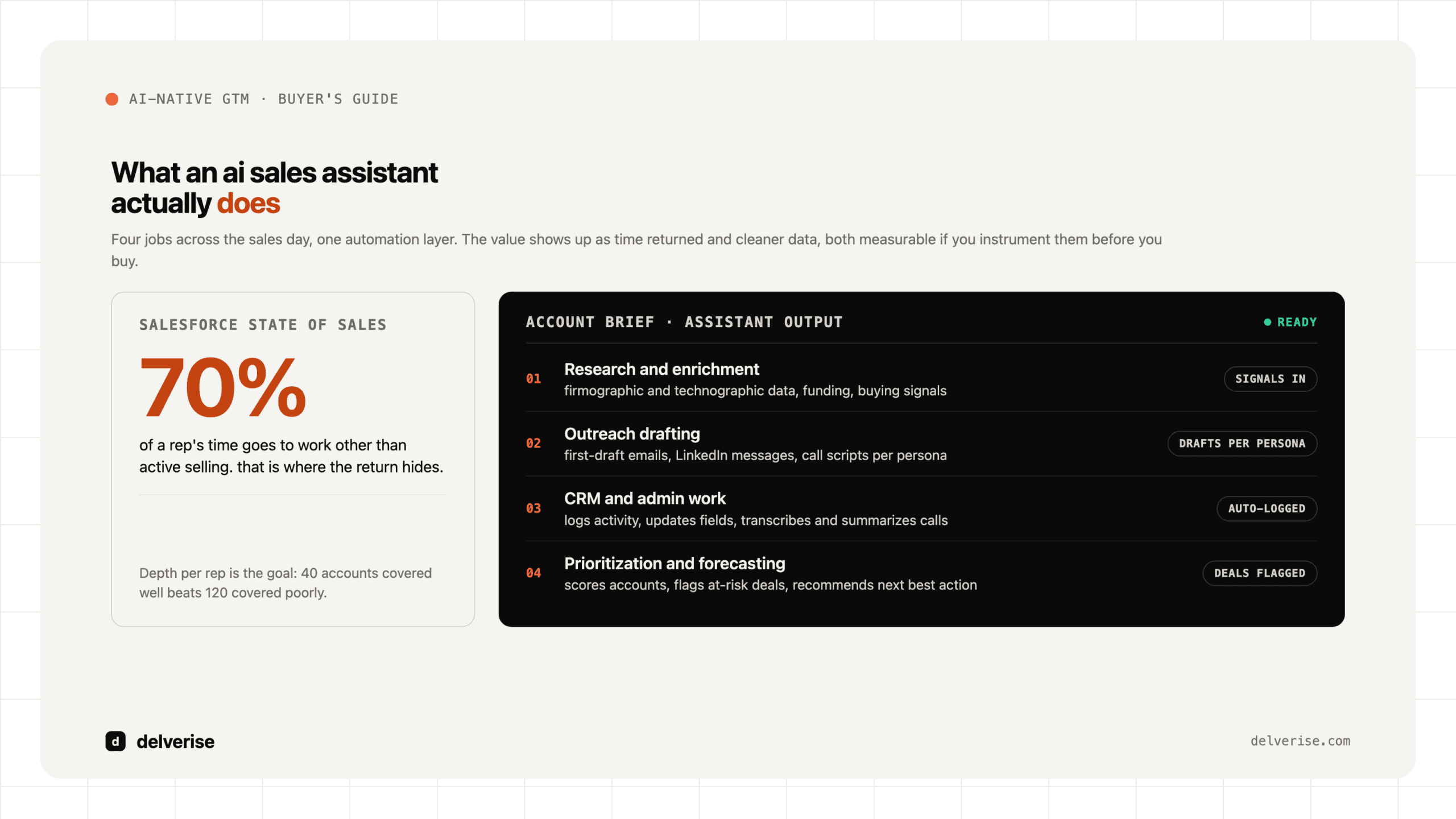
The phrase covers a wide range of tools, so it helps to break the work into four jobs a rep does every day.

Research and enrichment. The assistant pulls firmographic and technographic data, recent news, funding events, and buying signals, then packages that into a brief a rep can act on. This is where a well-built CRM enrichment layer matters, because the assistant is only as sharp as the data feeding it.
Outreach drafting. Based on that research, the assistant writes first-draft emails, LinkedIn messages, and call scripts tailored to the account and persona. Good ones adapt tone and angle to the segment. Weak ones produce the same three sentences with the company name swapped in.
CRM and admin work. The assistant logs activity, updates fields, transcribes and summarizes calls, and drafts follow-ups. Salesforce found in its State of Sales research that reps spend roughly 70 percent of their time on tasks other than active selling, so this is where a lot of the return hides.
Prioritization and forecasting. The assistant scores accounts, flags at-risk deals, and recommends the next best action. This is closely tied to how you handle lead scoring, since the assistant is applying your scoring logic at scale rather than inventing its own judgment.
Why do revenue leaders care about this now?
Two forces are pushing this up the priority list. First, buyer behavior has shifted. Gartner’s research on B2B buying found that customers spend only a small fraction of the purchase journey with any sales rep, which means the time reps do get has to be sharp and well-informed. An assistant that hands a rep a complete account picture before the call raises the quality of that scarce interaction.
Second, the economics of a Seed to Series B team are tight. You cannot hire your way to coverage the way a large enterprise can. McKinsey’s work on AI in sales has pointed to meaningful productivity gains from automating research and administrative tasks, and for a lean team that productivity is the difference between a rep managing 40 accounts well and 120 accounts poorly. The goal is depth of coverage per rep, applied to the accounts most likely to convert.
If you want the broader context on how this fits a modern demand engine, our take on AI lead generation automation covers where these assistants sit inside the wider pipeline.
What are the real limitations you should plan for?
The honest tradeoffs matter more than the demo. Three failure modes show up repeatedly.

Data quality caps everything. An assistant writing outreach from stale or thin data produces confident, personalized-sounding messages that are subtly wrong. Wrong title, wrong pain, wrong trigger. That erodes trust faster than no outreach at all. This is why enrichment and deduplication work has to come first.
Personalization at scale can still read as spam. When every competitor uses similar tools, “personalized” opening lines converge on the same patterns and prospects learn to ignore them. The differentiator is the quality of the signal you act on, not the fluency of the sentence.
Generic tools do not know your motion. An off-the-shelf assistant does not understand your ICP nuances, your qualification bar, or how your deals actually progress. It applies a generic playbook. Getting real value means encoding your own logic into it, which is a systems and RevOps job, not a plug-and-play install.
Buy a tool or build a system: which is right?
This is the decision most leaders get wrong by treating it as binary. Here is a practical comparison.

| Dimension | Off-the-shelf assistant | Built revenue system |
|---|---|---|
| Time to first value | Days to weeks | Weeks to a couple of months |
| Fit to your ICP and motion | Generic defaults | Encoded to your segments and stages |
| Data quality control | Limited to vendor sources | Waterfall enrichment across providers |
| Cost model | Per-seat subscription | Build investment plus running costs |
| Portability if you switch tools | Low, logic lives in the vendor | High, logic lives in your stack |
| Best for | Validating the workflow | Scaling a proven motion |
A sensible path for most teams is to start with a focused tool to prove the workflow returns real selling time, then invest in a built system once the motion is validated and volume justifies it. Tools like sales engagement platforms and enrichment layers are the building blocks either way.
How do you build the data layer that makes it work?
The assistant is the visible part. The data plumbing underneath is what determines whether it produces sharp or generic output. This is where Clay has become a common choice for revenue teams. Clay is a data orchestration tool that runs waterfall enrichment, meaning it queries multiple data providers in sequence and takes the first good answer, then feeds AI research and message drafting on top of that enriched record.
The reason this matters: a single data provider might have coverage on 40 to 60 percent of your target accounts. Running providers in a waterfall pushes coverage and accuracy well past what any one source gives you, and clean input is what separates useful AI outreach from noise. Our guide to Clay email enrichment walks through the mechanics, and if you are evaluating the platform against others, the alternatives comparison lays out the tradeoffs honestly.
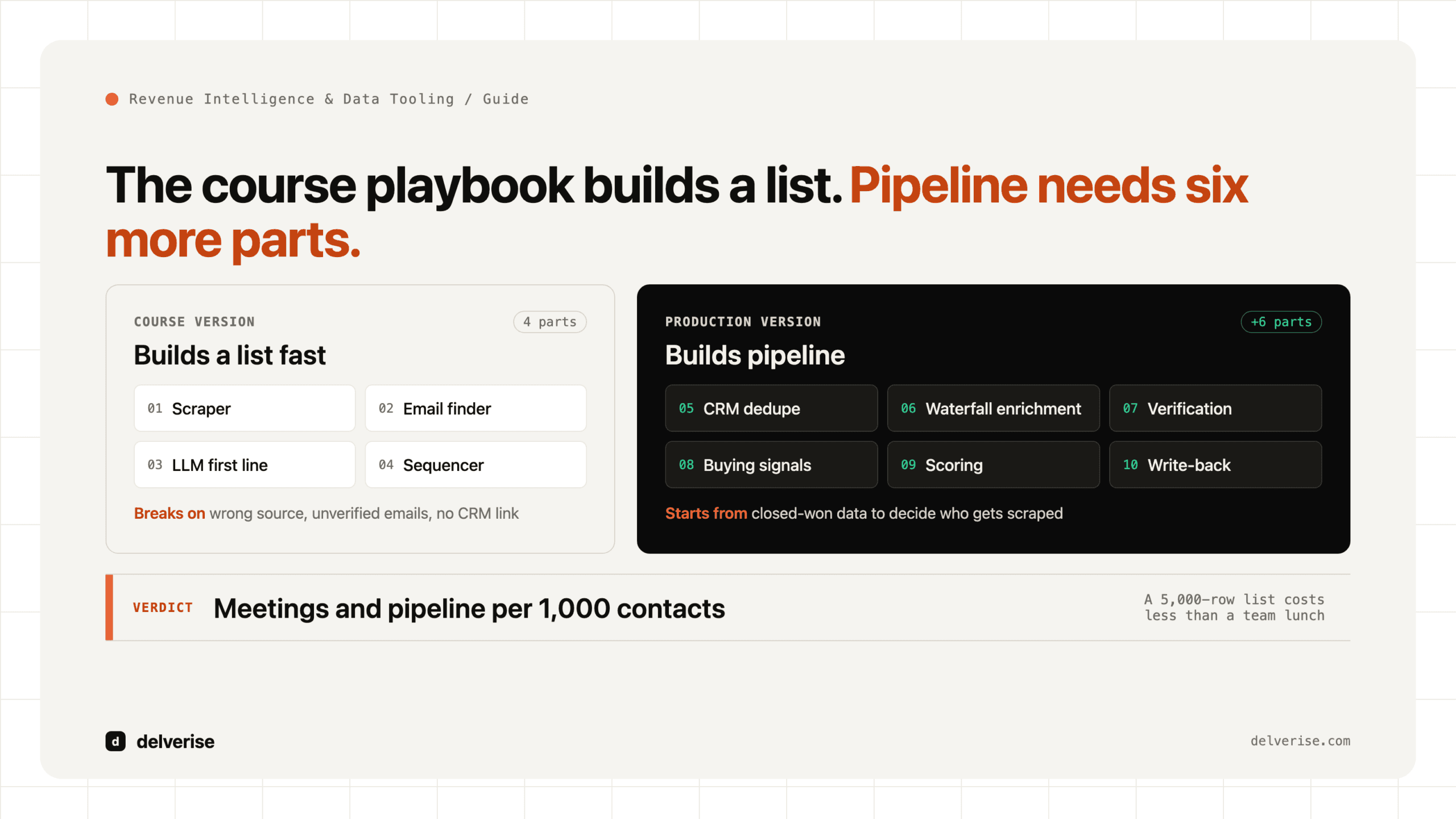
Whatever tool you choose, the sequence is the same: clean and enrich the data first, encode your qualification and scoring logic second, then point the AI assistant at that foundation. Teams that skip the first two steps and buy the shiny assistant end up automating the production of bad outreach. If you want a partner to design and stand up that layer, our Clay implementation work exists for exactly this.
A worked example: what good looks like
Consider a Series A company with four SDRs targeting mid-market ops leaders. Before any AI assistance, each SDR researches roughly 15 accounts a day and sends 30 to 40 emails, most of them lightly templated. Reply rates sit around 2 percent.
They rebuild the front of the motion. Enrichment runs a waterfall across three providers, so every account record carries verified contact data, tech stack, headcount trend, and a recent trigger event. An AI research step drafts a two-line brief per account. A drafting step writes outreach anchored to the specific trigger, which a human then approves or edits. The SDRs stop researching and start reviewing and sending.
The realistic outcome is not a 10x reply rate. It is each SDR covering 40 to 50 well-researched accounts a day instead of 15, with reply rates moving into the mid-single digits because the messages reference something real. The gain compounds from two things at once: more coverage and better relevance. That combination is what a properly built assistant delivers, and it depends entirely on the data layer being solid.
How should you measure whether it is working?
Instrument the before-state first, or you will never prove the return. Track selling time per rep, research time per account, reply and meeting-booked rates, CRM data completeness, and pipeline created per rep. Tie these back to the funnel metrics you already report so the assistant’s impact shows up in numbers your board recognizes. If you cannot draw a line from the tool to pipeline or productivity, you bought a feature, not a system. For the operational scaffolding that makes this measurable, our view on marketing operations is a useful companion.
Frequently Asked Questions
What is the difference between an AI sales assistant and a sales engagement platform?
A sales engagement platform sequences and delivers outreach across channels and tracks the activity. An AI sales assistant adds a reasoning layer on top: it researches accounts, drafts personalized content, summarizes calls, and recommends next actions. Many teams run both, with the assistant feeding higher-quality inputs into the engagement platform.
Will an AI sales assistant replace my SDRs?
No. It removes the research and admin load so a smaller team covers more ground with higher relevance. Judgment, relationship building, and handling nuanced objections stay human. The realistic outcome is fewer reps needed per unit of pipeline, and each rep spending more time on live selling.
How much does an AI sales assistant cost?
Point tools typically run per seat, often 50 to 150 dollars per user per month, plus data and enrichment credits that vary with volume. A built system carries a larger upfront investment but keeps the logic in your own stack. Budget for data quality separately, since that is the input that determines whether any of it works.
What do I need in place before adopting one?
A clearly defined ICP, a CRM that is reasonably clean, and an enrichment layer that keeps account data current. Without those, the assistant produces confident but wrong outreach. Get the data foundation and your qualification logic settled first, then add the AI layer on top.
Can it work with our existing CRM and stack?
Most modern assistants integrate with HubSpot, Salesforce, and common enrichment and orchestration tools. The harder question is whether your data flows cleanly between them. Integration is where these projects usually stall, which is why the plumbing and RevOps design deserve as much attention as the assistant itself. See our HubSpot vs Salesforce comparison if you are still choosing the system of record.
Read next