←Back to blog
Revenue Intelligence & Data ToolingGuideAugust 30, 20268 min read
Best AI Tools for Lead Generation: A Revenue Leader’s Buying Guide
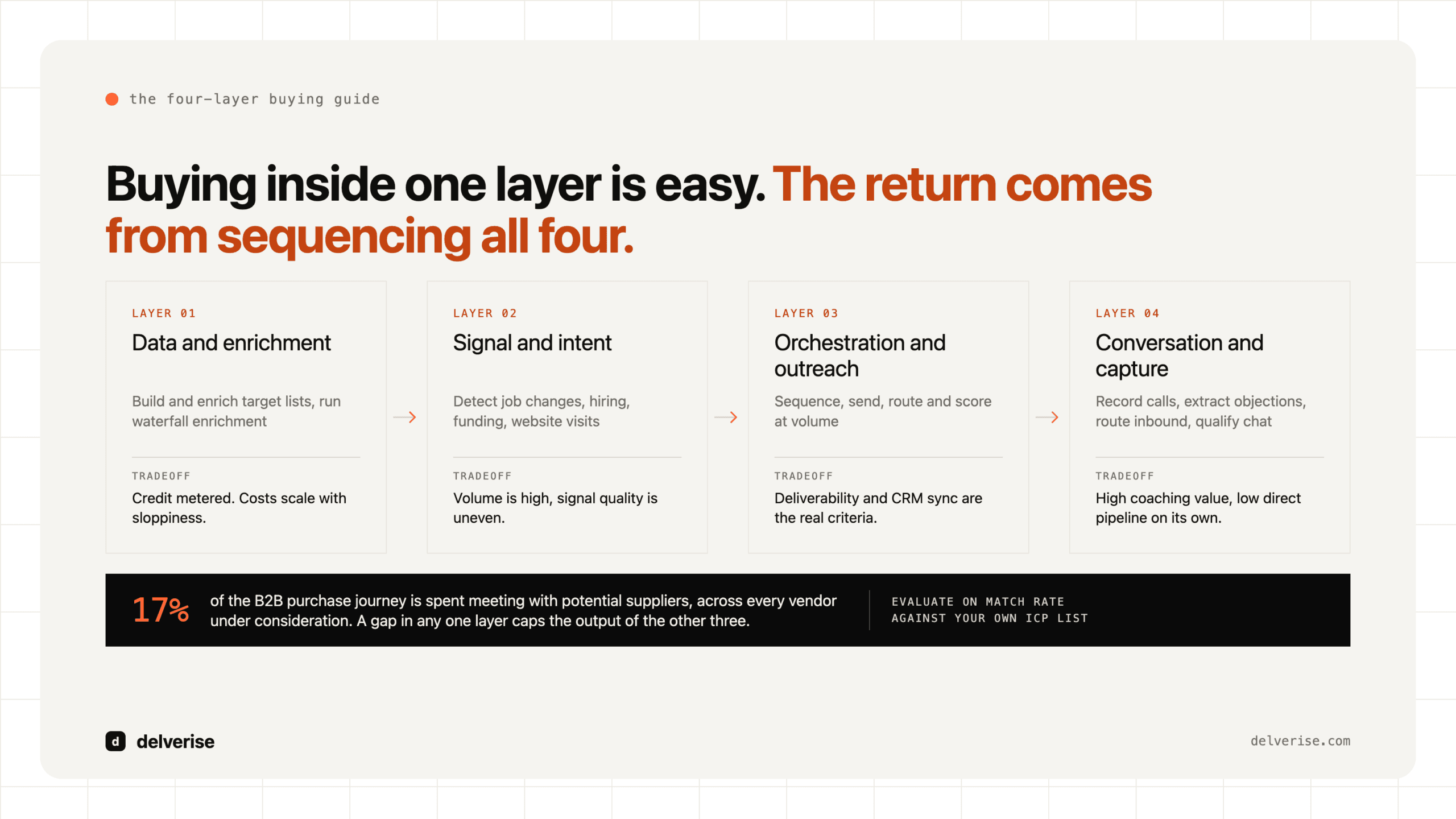
The best AI tools for lead generation fall into four layers: data and enrichment (Clay, Apollo, ZoomInfo), signal detection (Common Room, Warmly), orchestration and outreach (Outreach, Salesloft, Smartlead), and conversation capture (Gong, Chili Piper). Buying tools inside a layer is easy. The returns come from sequencing the layers so one system feeds the next.
The best AI tools for lead generation fall into four layers: data and enrichment (Clay, Apollo, ZoomInfo), signal detection (Common Room, Warmly), orchestration and outreach (Outreach, Salesloft, Smartlead), and conversation capture (Gong, Chili Piper). Buying tools inside a layer is easy. The returns come from sequencing the layers so one system feeds the next.
Key takeaways
- AI improves lead generation at the data and routing layers first. Copy generation is the smallest lever, and it is the one most teams buy first.
- Four layers matter: enrichment, signal, orchestration, and capture. A gap in any one of them caps the output of the other three.
- Tool cost is a rounding error next to the cost of a broken handoff between tools. Budget for integration work, not just licenses.
- Gartner’s research on B2B buying found that buyers spend only about 17% of their purchase journey meeting with potential suppliers, across all vendors under consideration. Timing beats volume.
- Evaluate on match rate against your own ICP list, not on the vendor’s published database size.
What counts as an AI lead generation tool?
The category has become loose enough to be unhelpful, so here is a working definition. An AI lead generation tool uses a model, a large language model or a trained classifier, to do one of four jobs: find accounts and contacts that match your ideal customer profile, enrich them with attributes you would otherwise research by hand, detect a behavioral signal that suggests timing, or generate and route outbound touches based on that context.
Two terms worth defining up front. Enrichment means adding attributes to a record you already have: firmographics, tech stack, headcount growth, a verified email. Waterfall enrichment means querying several data providers in sequence and stopping at the first one that returns a valid result, which raises coverage and lowers cost versus buying one expensive provider for everything.
Most tools marketed as “AI lead generation” are doing enrichment and copy generation. The interesting work sits in the layers around them. We covered how to think about the underlying inputs in more depth in lead gen data.
Which AI tools for lead generation actually matter?
Vendor-neutral view, organized by the job each one does rather than by brand.

| Layer | Job it does | Representative tools | Honest tradeoff |
|---|---|---|---|
| Data and enrichment | Build and enrich target lists, run waterfall enrichment, research accounts with AI | Clay, Apollo, ZoomInfo, Ocean.io | Powerful and credit-metered. Costs scale with sloppiness. Needs an owner who understands the data model. |
| Signal and intent | Detect job changes, hiring, funding, website visits, community activity | Common Room, Warmly, RB2B, LinkedIn Sales Navigator alerts | Signal volume is high, signal quality is uneven. Most teams act on signals that do not predict buying. |
| Orchestration and outreach | Sequence, send, route, and score at volume across email, phone, and LinkedIn | Outreach, Salesloft, Smartlead, Instantly, HubSpot Sequences | Deliverability and CRM sync are the real evaluation criteria. Feature lists mostly converge. |
| Conversation and capture | Record calls, extract objections, route inbound, qualify chat | Gong, Chili Piper, Qualified, Fathom | High value for coaching and messaging. Low direct pipeline contribution on its own. |
| Automation glue | Move records between systems, trigger workflows, run agents on schedule | n8n, Zapier, Make, Workato | The layer nobody budgets for and every working stack depends on. |
If you are choosing between the two dominant sequencers in the orchestration row, we broke the decision down in Outreach vs Salesloft.
Where does Clay fit, and where does it break?
Clay sits in the data layer and is the tool most Seed to Series B teams should evaluate first, because it collapses list building, waterfall enrichment, and AI research into one table. You define an ICP, pull accounts, run enrichment across dozens of providers, and use an AI research column to answer a question you would otherwise pay an SDR to answer manually. Something like: does this company run a partner program, and who owns it?

The honest tradeoffs. Clay is credit-metered, so a poorly ordered table burns budget on records you were going to discard anyway. It rewards teams that think in systems and punishes teams that treat it as a list-buying interface. And it does not replace your CRM, your sequencer, or your judgment about who to write to. delverise is a Clay First 100 Solutions Partner, and the pattern we see most often is a team that bought Clay, built three tables, and stalled because nobody owned the data model. If that is where you are, our Clay implementation work exists for exactly that gap.
Alternatives worth pricing against it: Apollo if you want database plus sequencing in one seat-priced product, ZoomInfo if you need enterprise coverage and can absorb the contract, or a direct provider stack if your ICP is narrow enough that one source covers it. See B2B email list providers for how to buy contact data without overpaying.
What does a working AI lead gen stack look like end to end?
A concrete worked example. Say you sell workflow software to operations leaders at logistics companies with 200 to 2,000 employees. Roughly 4,000 accounts fit in North America.

- Week 1, define and build. Pull the 4,000 accounts into Clay. Enrich with headcount trajectory, tech stack, and recent funding. AI research column answers one qualifying question per account. Roughly 1,200 accounts survive.
- Week 2, add signal. Layer job-change and hiring signals on top. Accounts hiring an ops manager or a supply chain analyst move to a priority tier. Roughly 180 accounts land there in a given month.
- Week 3, route. Priority accounts sync to the CRM with a source stamp and route to a rep. The remaining 1,000 enter a lower-touch nurture sequence in your sequencer of choice.
- Week 4, measure. Reply rate and meeting rate reported by tier, not in aggregate. If the priority tier does not outperform the base tier by a wide margin, your signal is noise and you kill it.
The arithmetic that matters: 180 well-timed accounts with a specific, researched opening beat 4,000 generic ones on both meeting rate and domain reputation. McKinsey’s B2B Pulse research has consistently found that buyers now move across roughly ten channels in a single purchase journey, which means your job is being present with relevant context at the moment they are already looking. It is not a volume problem.
The failure point is almost always the handoff between step 2 and step 3. Enrichment tools produce records; CRMs expect objects with owners, stages, and dedupe rules. That translation layer is where GTM engineering earns its keep, and it is the thing you cannot buy off a pricing page. More on how the layers connect in what is a GTM tech stack.
How should you evaluate a tool before you buy it?
Run every vendor through the same test. Take 100 real accounts from your own ICP, not from the vendor’s sample, and measure what comes back.
- Match rate on your 100-account sample, checked manually against 20 records
- Email validity rate after running results through a verifier
- Native CRM sync, including custom objects and field-level write rules
- Credit or seat cost modeled at 12 months of realistic volume, not the pilot volume
- Named internal owner with time allocated, before the contract is signed
- Exit path: can you export your enriched data if you leave
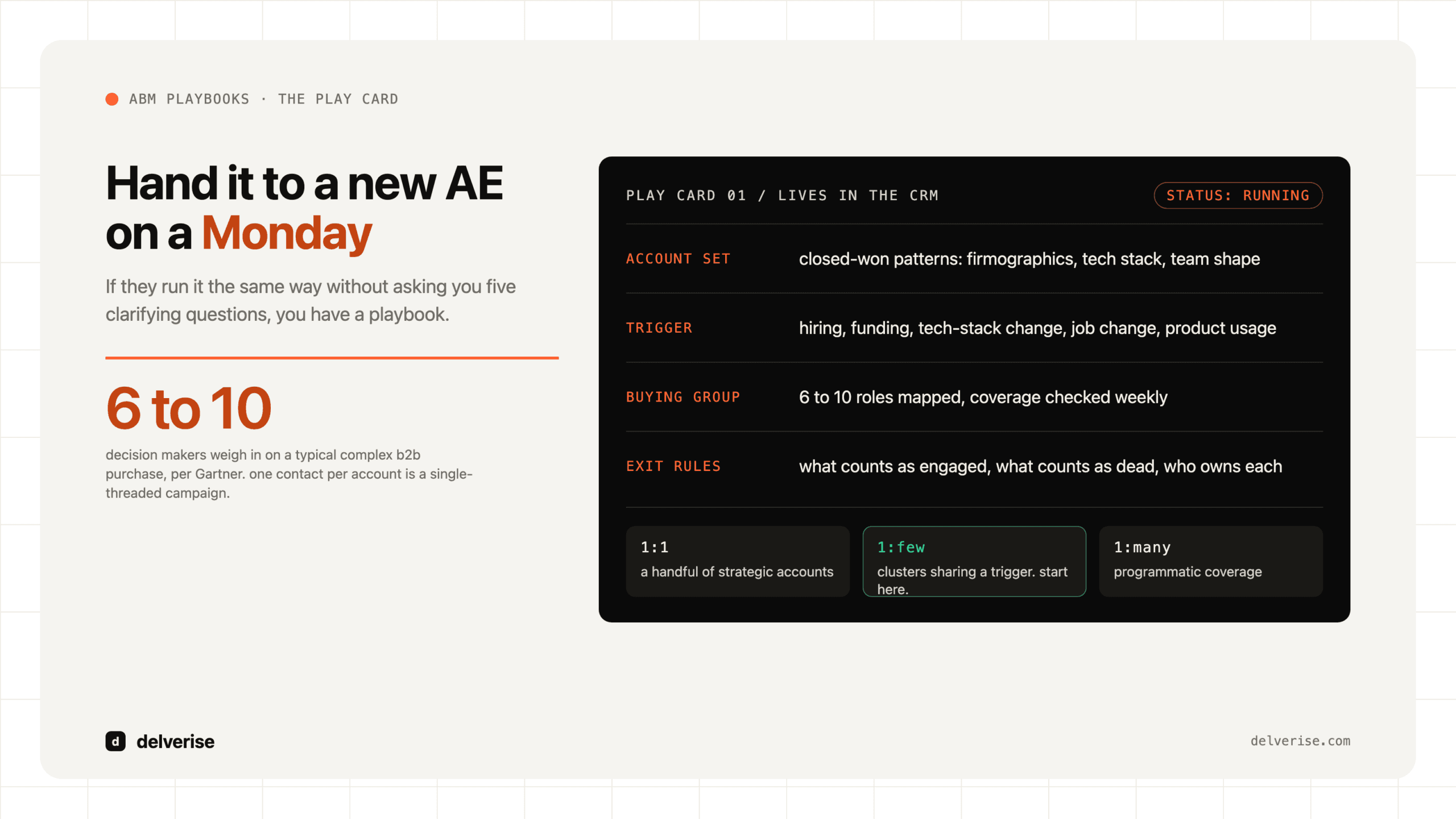
Gartner has also documented that the typical B2B buying group now includes six to ten decision makers, each arriving with independently gathered information. That shapes tool selection more than most teams realize, because a tool that reaches one contact per account is structurally undersized for the way your buyers actually decide.
What should you expect this to cost, and what breaks?
Rough budgeting for a Seed to Series B team. Data layer: low hundreds per month at entry, scaling with credit consumption. Sequencer: tens of dollars per seat per month. Signal tools: comparable to the data layer. Automation glue: near zero if self-hosted, modest if not. Total tooling for a working stack usually lands between $1,500 and $6,000 per month.
The larger line item is integration and ownership. A stack with five tools and no owner produces duplicate records, unattributed pipeline, and reps who stop trusting the data. Salesforce’s State of Sales research has repeatedly found that reps spend the majority of their week on tasks other than selling, and badly integrated tooling is a direct contributor.
Two things break most often. First, deliverability, when volume rises faster than domain reputation can support. Second, attribution, when AI-sourced leads enter the CRM without a durable source stamp, so nobody can prove the spend worked. Both are architecture decisions made at setup, and both are expensive to retrofit. If you are weighing whether to build this internally or bring in help, go-to-market consultant vs building in-house lays out the decision honestly. Our broader approach lives on the GTM engineering page.
Frequently Asked Questions
What is the single best AI tool for lead generation?
There is no single best tool, because the four layers do different jobs. If you are forced to pick one starting point for a B2B SaaS team under Series B, start with the data layer. Clay or Apollo will produce more incremental pipeline than an AI copywriting tool, because better targeting improves every downstream metric at once.
Can AI replace SDRs for lead generation?
AI reliably replaces the research and list-building portion of the SDR role, which is often 40% to 60% of the week. It does not replace judgment on which accounts deserve a human touch, or the actual conversation. Teams that cut headcount and keep the same process usually see output fall. See AI agents for lead generation for where the boundary sits today.
How long before an AI lead generation stack produces pipeline?
Expect four to six weeks to first meetings and one full sales cycle to judge quality. Anything faster is usually a pre-existing list being re-worked. Judge the system on meeting-to-opportunity conversion by tier, and give the signal layer at least 60 days before you decide it works.
Do free AI lead generation tools work?
Free tiers are genuinely useful for validating an ICP hypothesis before you commit budget, and several are strong enough for a first 200 accounts. They break down on match rate, export limits, and CRM sync. We covered which ones hold up in free AI tools for lead generation.
How do I stop AI-generated outreach from sounding generic?
Personalize on a researched fact that required work to find, then write the rest of the message like a human wrote it. AI research columns are good at surfacing the fact. AI copy generation is mediocre at the surrounding sentences. Keep the model on research duty and let a person own the voice.
Read next